EasyManua.ls Logo

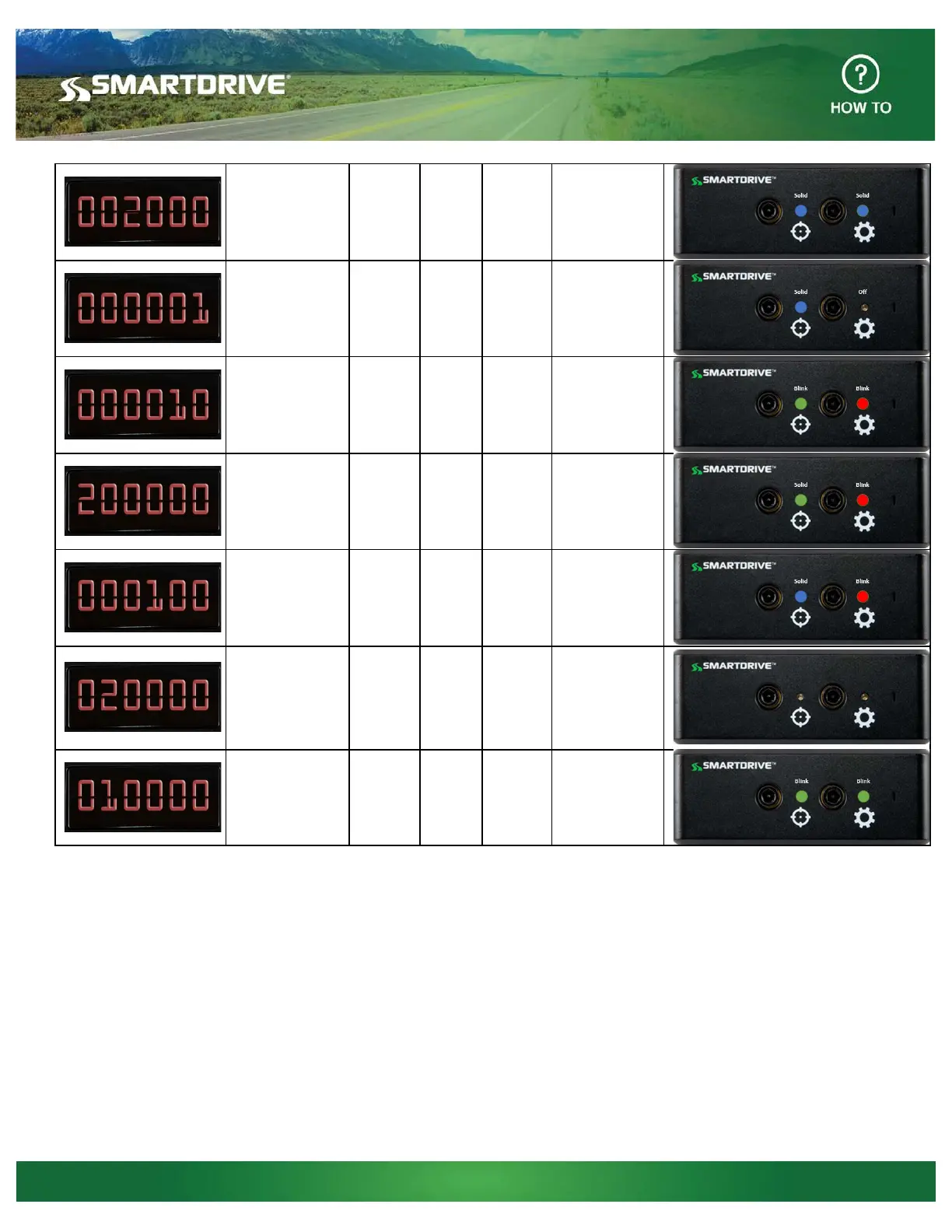
SmartDrive Systems SmartRecorder 4 - Interior-Facing Camera Not Working; Analog Camera Not Detected; Wi-Fi Signal Not Connecting; Cellular Signal Not Found

SmartDrive Systems SmartRecorder 4
3 pages
To Previous Page IconTo Previous Page
Loading...
© 2017 SmartDrive Systems, Inc. All rights reserved. SmartDrive, the SmartDrive logo, and Measured Safety Program are registered trademarks of SmartDrive Systems, Inc. SmartDrive SmartIQ is a trademark of SmartDrive Systems,
Inc. All other marks are the property of their respective owners.
Interior- Facing
Camera enabled
but not working
Blue
solid
Blue
Solid
002000
Troubleshoot
camera
connectivity
Analog camera
enabled and not
detected
Blue
Solid
N/A 000001
Check analog
camera
connections
Wi-Fi Wireless
signal found, but
unable to connect
to SmartDrive
Green
Blink
Red
Blink
000010
Verify in
coverage and
proper Wi-Fi
setup
Cellular
Wireless Signal
not found
Green
Solid
Red
Blink
200000
Verify in
coverage
No GPS Signal
Blue
Solid
Red
Blink
000100
Verify vehicle is
out doors with
good line of
sight to the sky
Sensor Bar not
found
N/A N/A 020000
Troubleshoot
Sensor Bar
connectivity, if
connected
replace Sensor
bar
Ignition currently
off
Green
Blink
Green
Blink
010000
Verify ignition is
turned on. If it is
verify proper
wiring
SmartDrive Systems, Inc.
4790 Eastgate Mall
San Diego, CA 92121
858.225.5550
www.smartdrive.net
SmartDrive US Technical Support
Toll Free: 866.933.9930
customer.service@smartdrive.net

Other manuals for SmartDrive Systems SmartRecorder 4

Related product manuals