25
EN
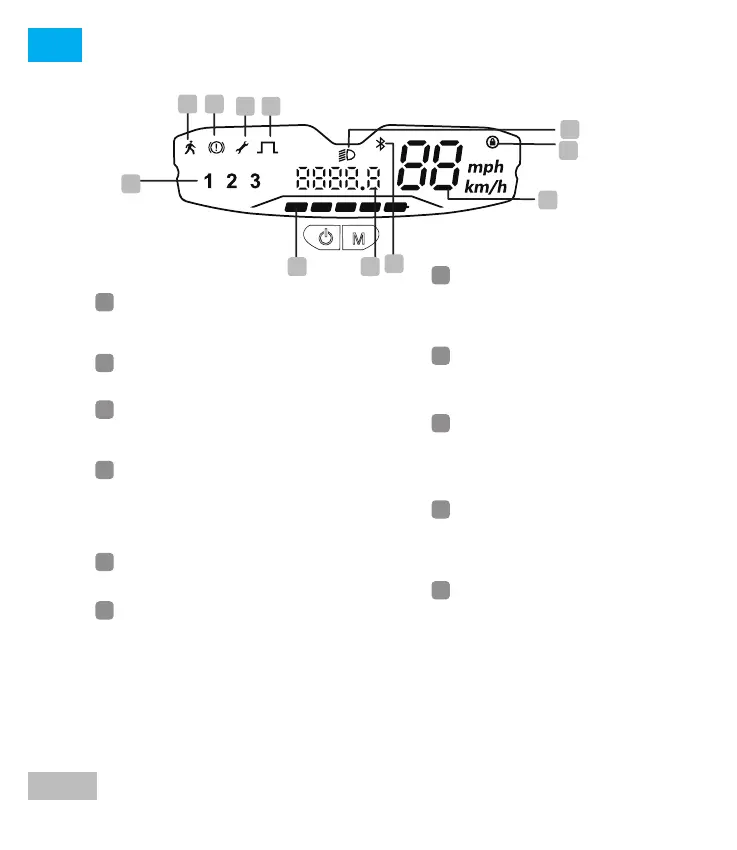
Display:
B
C D
G
H
I
J
K
A
J
K
A
Pedestrian mode: Pedestrian
gear at 6 km/h makes it easy to
push the scooter.
G
Speed unit switching: when the
meter is on, press the right button
three times to switch between
km/h and mph units
B
Brake: the icon indicates that the
brake has been activated
H
Bluetooth: the icon indicates that
the scooter has been successfully
connected to the device
I
Mileage switching: when the
meter is on, double click the left
button to switch between
individual or total mileage
C
Error: The wrench icon indicates
that the scooter has detected an
error
F
Lock function switch:
Blocking function from the app to
block the skate from your mobile
phone. The icon will be illuminated
once the action has been carried
out
E
Light Switch Control: Click the left
button to control the light on/off
D
Non-zero start: The icon indicates
that when the speed of the
scooter reaches 3 km/h, press the
throttle and the motor starts to
work.
Battery level: Battery strength is
indicated by 5 bars. Each
represents approximately 20% of
a full battery
Speed gear: right click of the right
button to switch the three gears 1,
2 and 3, double click the right
button to switch to the pedestrian
gear, and double click again to
the original gear. 1st gear 10kh/h ,
2nd gear 20km/h, 3rd gear
25km/h. (With memory function,
the default gear is the gear used
before the last power off)
E
F




 To Next Page