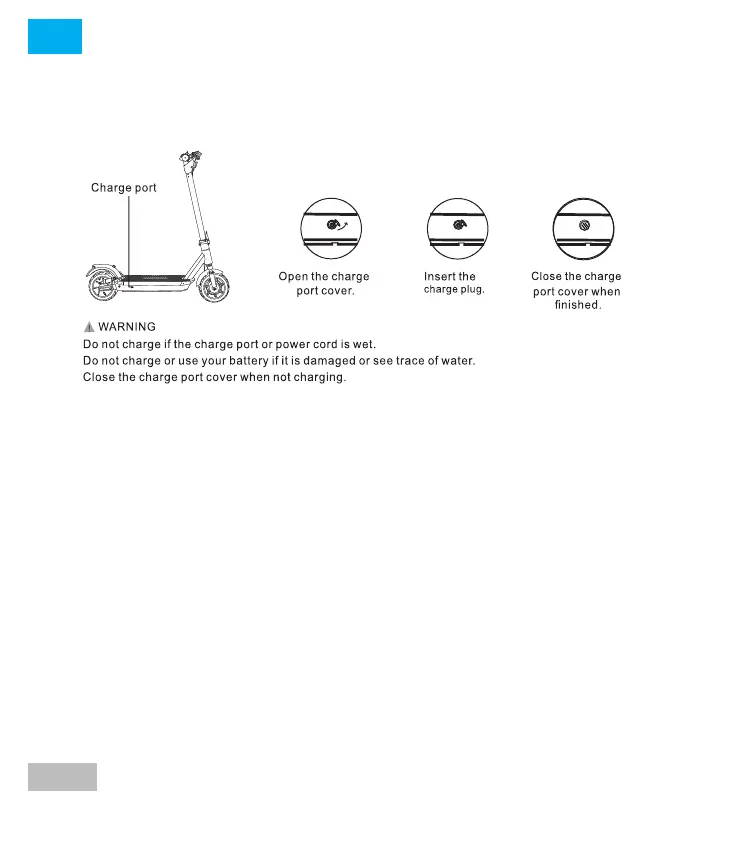
Charging connection:
Charging your smartGyro
Make sure your smartGyro charger is in good condition. Check that
there is no dust or dirt on the connector, and if so, clean it and make
sure it is dry.
Always use the original charger provided with the product and connect
it correctly to the device (via the charging port) and to a power outlet.
It is important that you always use the charger that comes with your
smartGyro, otherwise it could cause failure of the device and not be
covered by the guarantee. Once the product is put to charge, it will take
about two to three hours to fully charge.
When the LED light turns green, it means the product is fully charged. It
is important that at that time, immediately disconnect the adapter
from the network so that it stops charging.
The life of the battery will be affected by the charging time of the
battery, never exceed it and you will extend the life of your battery.
Please note that the approximate charging time is between 5-6 hours.
Do not leave the product charging after the light on the adapter has
turned green or overcharge the battery for more than 3 hours.
IMPORTANT:
a) Charging will be about 5-6 hours.
c) Do not overcharge the unit as this will shorten the life of its battery
and charger.
Tips to keep in mind for charging
- Load preferably in places far from flammable products.
- Monitor and control the charging period (which does not exceed the
recommended one).
- Use only the original charger.
- Do not leave the skate charging at night.
- If the skate has been exposed to high temperatures, wait and check
that it is not hot before charging it again.
- For the charging procedure it is important that the skate is turned off
and that it does not have any accessories connected, since if it is not
possible that one of the sensors remains activated and the battery
overheats.
- When the charger LED changes from red to green, the smartGyro is
charged.
- It cannot be charged with the power on or running.
29
EN
Remove the rubber cap, insert the charging cable. After
charging is complete, put the rubber cap back in place.




 To Next Page