
 Need help?
Do you have a question about the Smartisan DS200 and is the answer not in the manual?
Turn on the headset and enter pairing mode.
Connect the headset to a Bluetooth device via phone.
Procedure for turning off the headset.
Headset automatically reconnects to the last paired phone.
Functionality of the hall magnet switch for disconnection.
Details the status lights for various operations.
Specifies the Bluetooth version supported.
Identifies the product model number.
Details the electrical input requirements.
Lists supported Bluetooth communication protocols.
Indicates the type of charging port used.
States the net weight of the product.
Defines the maximum effective wireless range.
Specifies hours of use for music and calls.
Details the device's stand-by duration.
Information on charging duration and battery capacity.
Specifies the audio frequency response range.
Precautions for use in dusty, damp, or high/low temperatures.
Avoid placing near heat sources or open flames.
Recommendations for safe listening volumes to prevent damage.
Warning about distractions from high volume while driving.
Advisories on using wireless devices on aircraft.
Keep device and small parts away from children.
Guidelines for accessible power sockets and disconnecting chargers.
Visual indicators and symbols used in the manual.
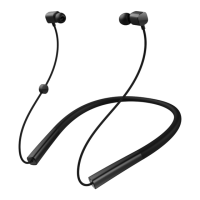
Manual disclaimer, product image reference, and included items.
Device compliance with FCC rules and operation conditions.
Compliance with FCC Part 15 and potential interference.
Equipment compliance with FCC RF exposure limits.
Compliance with IC license-exempt RSS standards.
Device compliance with IC SAR limits.

 To Next Page
 General