Change Setup code (Master)
•
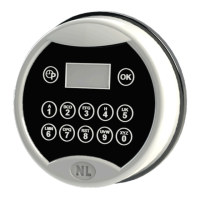
Press and hold 8 until double beep, enter Setup code and select function 0.
•
Enter and confirm new Setup code.
Install Service
•
Press and hold 8 until double beep, enter Setup code and select function 1.
•
Press OK to confirm the operation.
•
Enter and confirm new Service code.
Delete Service
•
Press and hold 8 until double beep, enter Setup code and select function 3.
•
Press OK to confirm the operation.
Reset lock
•
Press and hold 8 until double beep, enter Setup code and select function 5.
•
Display shows the message RESET.
•
Press OK to confirm the operation.
•
Enter a valid code.
•
Lock is in pre-setup mode.
Pre-setup mode
•
To open press 1.
•
Setup code (Master) 5-5-5-5-5-5-5-5.
Lock setup
•
Press and hold 8 until double beep. Enter the Setup code 5-5-5-5-5-5-5-5.
•
Display shows the following options (press P to scroll):
•
CHANGE: change Setup code to exit pre-setup mode.
•
SETUP: check (OK) or change (P) lock configuration (bold = default settings)
•
DELAY DOWN - DELAY UP: time delay counting up or down.
•
DUAL NO - DUAL YES: dual mode active - dual mode not active.
•
DIGITS 6 - DIGITS 7 - DIGITS 8: opening codes length.
Time delay
•
Press and hold 9 until double beep and enter Manager code (or Service code) or
access Setup menu and press 9.
•
Display shows current time delay values: press OK to confirm or enter new values
(00-99min) and press OK.
•
Display shows current open window values: press OK to confirm or enter new values
(01-19min) and press OK.
Time delay can be increased at any moment, decreased only during open window.
Change language and check firmware version
•
Press and hold OK until double beep: display shows serial number and firmware
version: press P.
•
Display shows current language: press OK until the desired language will be selected.


 To Previous Page
 Loading...