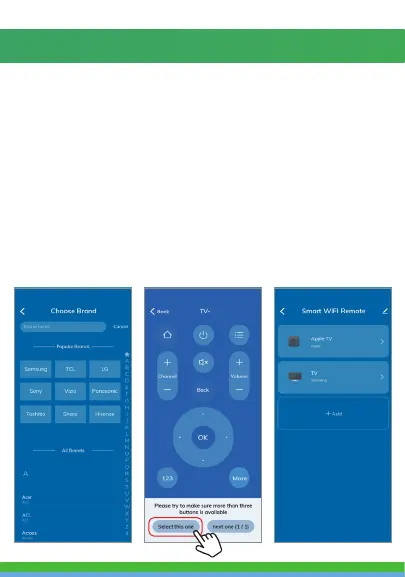
10. Then select the brand of the device you are adding.
The Smart Wi-Fi Remote will automatically connect
to your device or you will be asked to point the
Smart Wi-Fi Remote at the device and press the
button in the app to connect.
11. You’ll then see a remote. Scroll through button
layouts at the bottom of the page until you find
the one you like. Then press “select this one”.
12. Continue steps 8-11 to add more devices if you
like. You can view all of your remotes in the app
by clicking the Smart Wi-Fi Remote from your
home screen.
8. To connect an IR remote controlled device to the
Smart Wi-Fi Remote, click on your Smart Wi-Fi
Remote under “All devices” on your home page.
Then click on “Add”.
9. Then select what kind of device you would like to
add. If you would like to set up a TV, press the TV
button.



 To Next Page