PLEASE CALL CUSTOMER CARE BEFORE RETURNING ITEM TO LOWE’S: 1-888-755-4497
EN
5
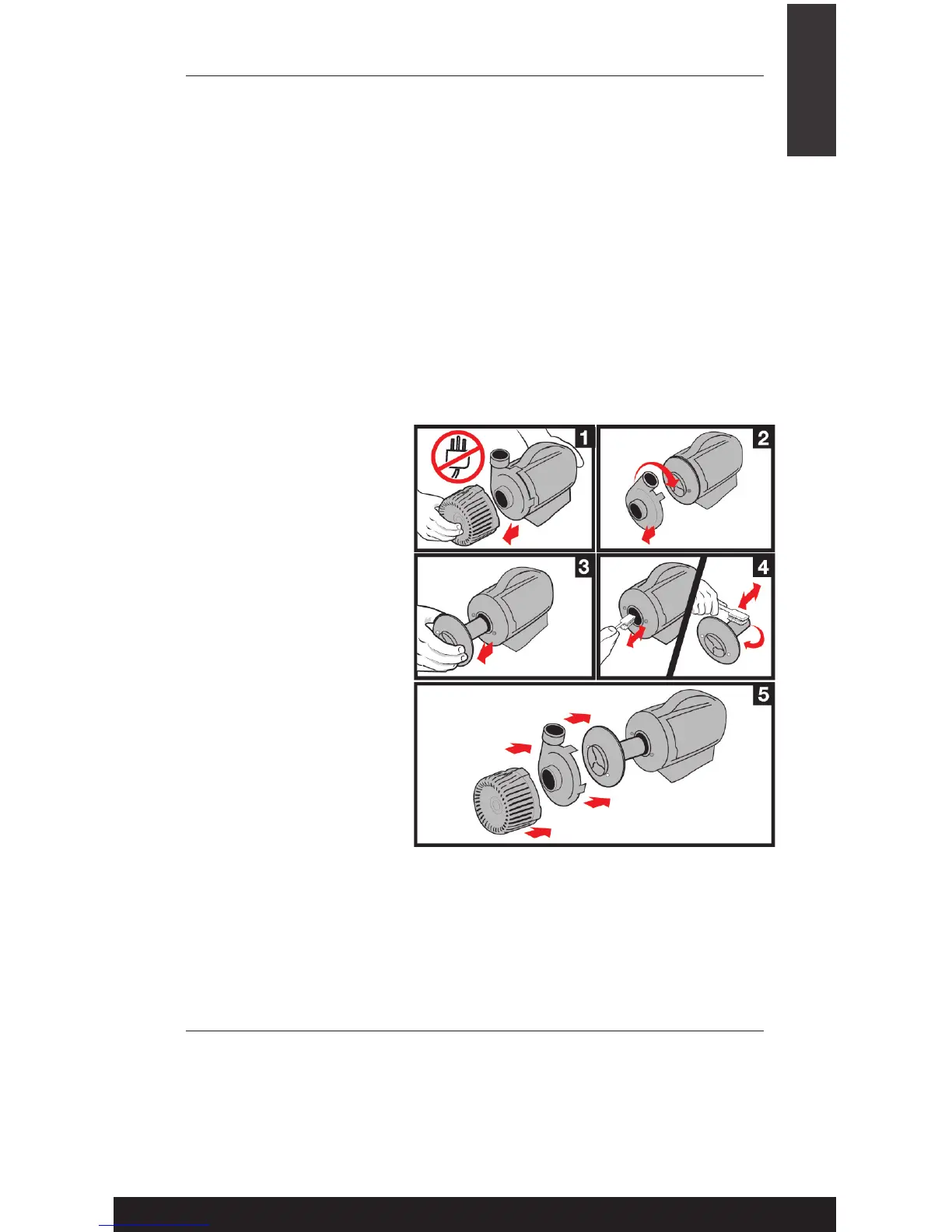
MAINTENANCE
Step 1: Before cleaning,
always disconnect the
pump from the power
source and remove the
inlet screen.
Step 2: Remove the
impeller housing to expose
the impeller assembly.
Step 3: Remove the
impeller assembly by gently
pulling on the impeller
blades. NOTE: This pump
uses a very strong magnet.
To protect your ngers from
potential injury, use caution
when removing or inserting
the impeller.
Step 5: Reassemble all pump parts, place the pump inside the
pumpshield® and place in water before reconnecting to the power source.
PUMPSHIELD:
• Clean the pumpshield® and (if necessary the pump) regularly
depending upon the environment in which it is operated. A drop
in water ow is an indication that your pumpshield® and/or pump
require cleaning. The pumpshield® not only protects your pump but
signicantly reduces the need for pump maintenance.
• Before cleaning, always disconnect the pump from the power source.
• Remove any large debris from pumpshield®. Use a garden hose to
rinse off any other dirt from the pumpshield®.
PUMP
Regular cleaning of the pump may be necessary depending upon the
environment in which it is operated. Clean the pump when it is visibly
soiled or when a drop in performance is detected. Clean your pump in
5 easy steps!
Step 4: Use a soft cloth or
brush and warm water to
clean the impeller and the
inside of the impeller and
rotor housing.
TROUBLESHOOTING
IF THE PUMP FAILS TO OPERATE:
• Check to make sure the power cord is plugged in, the pump is getting
power.
• Check the pump outlet and any tubing, nozzles, spitters etc. for kinks
or obstructions.


 To Next Page