EasyManua.ls Logo

Smartro SM3531B - Page 2

Smartro SM3531B
9 pages
Print Icon
To Next Page IconTo Next Page
To Previous Page IconTo Previous Page
Loading...
Page 1
Instruction
Manual
Thanks
for
choosing
this
device
from
Smartro.
1. Befor•
You
Start
UsinK
It
Make
sure
{O
read
the
instruction
manual
carefully.
This infonoatioo will help you
10
fiuni.liarizt
yourself
\\'itb
your
new
device,
to
learn
all
of
its
functions,
and
to
get ad,ice
in
lhe
e\'ent
offBulL5.
Following
the
instructions
will
prevent
damage
to
your
device
and
IO~'li
of
your
susrutory
righis
n11sing
froni
de["'"" lluc to inooncct use.
We
shall not
be
liable
for
any damag• occurring as a resull
of
non
-following
of
the$e
~truClions.
Likewise, we
take
no
re-,pon~bilily fot
any
incomx:.t
readings
l:llld
for
any
consequ~
which may result
from
them.
Plo:a,e
Lake
particuL'IT
note
of
the safety advice!
Plea~e
keep
thi~
instruct
i()n
manual
ror
future
reference
.
2. Scope
of
Delivery
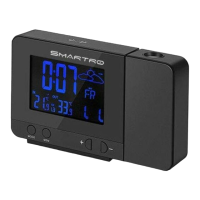
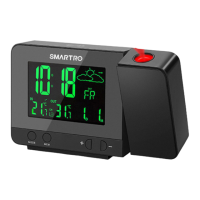
Radio-controlled
projection
weru.her
suuioo
Wm:1<»
Ri:mocc
Sensor
lnsmxtioa anmnl
p.,..
..
adaplor
J.
fldd
of
Optr•tlo11
•nd All lb• BentfitJ
of
Your
!\e"
De,i
..
at•
Gian«
Projection
of
the time and temperature onto a wall or coiling
(d1g11al)
Two
ahums
wilh
Snuozr:
function
Weather
forecasting
function
Radio--cootroUcd
nmc
function
CaJrndar
(Lp
ID
the
Year
or:im
I
lndoo<~-9.9"C-50"C(J>,-
J::<F
Ouldu<a
iUl.ij..<latwc:
~
- 71r-C(-40"f -IS8°Fl
'C
"f
seiect:!bl,
\\-rrclcss Remote Sensor
Wall
Mounting or
lable
Stand
433.92MHz
RF
transmitting frequency
60-meter
traMrni.ss-ion
ra.nge
in
an
upc:n
area
Battery: LR03 AAA
DC
Power:
DC
5V
12A
USB cin,ger func,.,,,
~-
For
YMC
Safety
Thn
pro=
~
"'c'cs;.dy
clmdcd
for the field
of
applicatima
~;,,,J
.._....,.,.. It sboukl
oa.fy
be
used
as
dcscri:..."00
~
~
~,K1ioos
Loaroboro.ed repaus.
"'-¥CS
u,
the
proc!u:t
""?
;;,<otal
=!dd.
~
Camion? Risk
or
electJ s '

Related product manuals