01 How to wear
Please wear the device on your wrist correctly, about one nger from the carpal and adjust it to
comfoable position.
Tip: Please wear the device a bit little tighter when hea rate monitors.
02 How to download & connect to APP
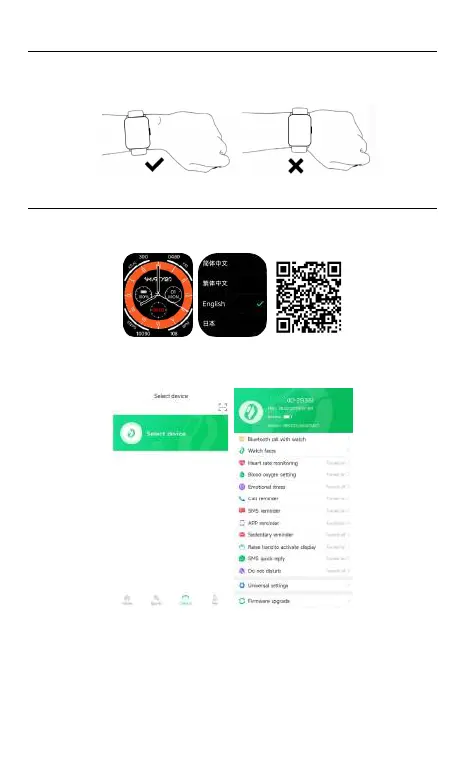
02.1 Press and hold the side button to turn it on, select the language on the guide page, use
your phone to scan the QR code to download the APP and pair it. You can also scan the QR
code below to download and install the “GloFit” APP in the app store.
02.2. Go to app “GlroFit” and select "Add Device" on the device page, then follow the
instructions on the screen.
02.3 How to connect to BT call feature:
1) Android phone: After the APP and the watch are successfully bound, it will automatically
prompt whether to pair with the audio Bluetooth SW070 (ID-xxxx), please click to pair it
directly.
2) IOS phone (IOS model system version 13 and above suppos one-key connection prompt)
and some Android mobile phones: After the APP is successfully bound to the watch, when
using the phone function, you need to manually go to phone settings--Bluetooth--Search
audio Bluetooth SW070(ID-xxxx). Click to pair the audio Bluetooth SW070(ID-xxxx)and
the phone function can be used normally only after the pairing is successful.
Tips:
(1). Please upgrade the app to latest version to get a better experience.
(2). Andorid 5.0 and IOS 9.0 or above system are compatible with the App.
(3). For the rst time connection with iphone, “Pair” reminder will pop-up, click to pair, then
incoming calls and instant messages will be pushed.
(4). For the rst time connection with android, “Permissions” reminder will pop-up, please
follow up the guidance and allow permissions to ensure all functions working properly.
(5). To connect successfully, please turn on mobile phone’s bluetooth, GPS and network.
(6). If the device cannot be searched or connected during use, please reset or turn o the
watch to t again.
03 Operating Instructions
a. Open the control panel: Slide the main page from top to bottom.
b. Open the information: Slide up from the bottom of the main page.
c. Open the main menu: Slide the main page from left to right to enter the list theme inteace.
Double-click the button to switch to menu style.
d. Add function components : Slide from right to left on the main page to click "Add
Components" to add and delete freely.
e. Quickly enter the watch face change: Rotate the button.
f. Power on/o: Long press the button for 5 seconds on main page.
g . Normal operation function: Press the button to return to the previous function inteace,
when in the main page , press the button again to turn on/o the screen.
h. Rotate button function: You can rotate the button to slide up and down in the list view and
grid view and also can slide left and right on the watch face option page. In the honeycomb
view, the rotation button can directly zoom in and out.
04 Function
05 Other functions
sedenta reminder, do not disturb mode, low batte reminder, incoming call reminder, high
hea rate reminder, low hea rate reminder, nd watch, online watch face, customized watch
face, 12/24 time system, unit setting, raise to wake, low batte mode, silent mode, menstrual
cycle reminder, goal achievement reminder.
06 Charging
1.Attach the charging cable to the watch charging po, ensuring the metal pins fully
connected.
2.Please use the correct charging adapters which are 5V 0.5A above.
3.If sma watch can not be powered on after being left unused for long time, please
clean up the charging metal pins to make sure connecting well, avoid sweat or
moisture residue.
07 Warranty
1. One year warranty for default hardware defectives, half of year for batte and
charging cable.
2. Below reasons cause to defectives are not included in free warranty seice:
1) Personal assemble or disassemble.
2) Falling damage during use.
3) All man-made damage or due to the third pay's fault, improper use(such as: water
in the sma watch, external force shattering, scratch during use etc.
3. Please provide a warranty card with the details lled when request for after selling
seice.
4. Please contact with direct dealers for warranty seice.
5. Please note all functions of the product are based on physical objects.
Notes:
1.To ensure waterproof, please DO NOT:
1)Wear the watch during hot shower or in hot tea and other corrosive liquids
2)Remove any screws or buttons.
2.Products with batteries cannot be disposed with household waste. Please
send this product to WEEE collecting points near you.
SW070


 To Next Page
 Loading...