Instructions for the user
32
3.2.1 Setting the time
When the oven is used for the first time, or after a power blackout, the
display flashes on and off at regular intervals. Press the
key for 1/2
seconds to stop the display flashing and start setting of the current time.
Press the value modification keys
or to increase or decrease by one
minute for each time a key is pressed.
Press one of the two value modification keys until the current time
appears. The clock will start from the time set 6/7 seconds after the last
keyispressed.
At the end of each programmed cooking operation, the clock gives 8
beeps, repeated 3/4 times at intervals of about 1 and a half minutes.
The beeps can be stopped at any moment by pressing any key.
3.2.2 Minute-minder
This function does not stop cooking but just triggers the beeps.
-
When the
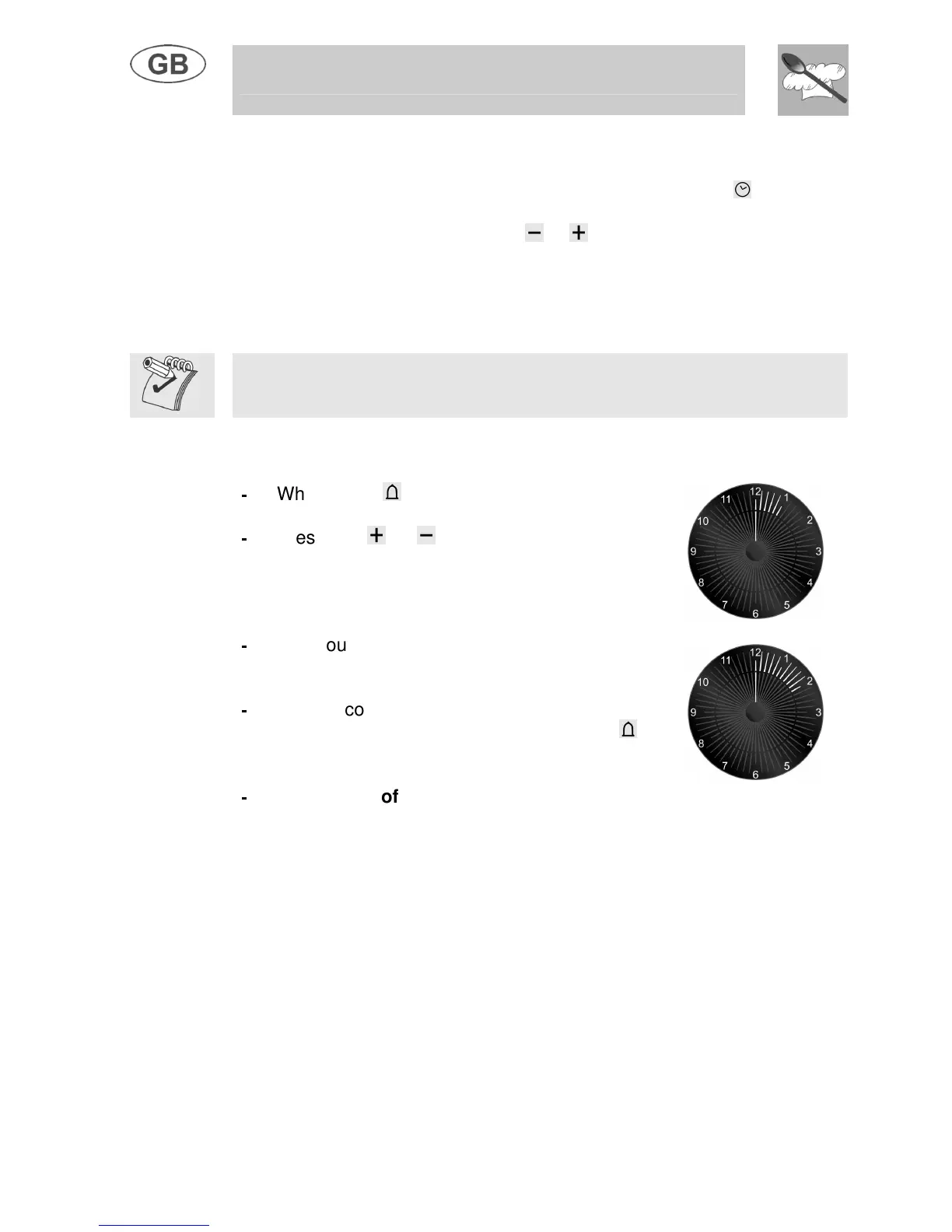
key is pressed the display
illuminates, appearing as shown in figure 1;
-
Press the
or keys within 6/7 seconds to
set the minute-minder. Whenever a key is
pressed, 1 outside segment, representing 1
cooking minute will light up (figure 2 shows 10
cooking minutes).
-
The countdown will start 6/7 seconds after the
last key is pressed; at the end of it, you will hear
the beeps.
-
During cooking with countdown, the current
time can be displayed by pressing the
key
once; press again to return to the minute-
minder display.
-
At the end of the countdown, the oven has
to be switched off by hand, by turning the
thermostat and the function selector to 0.
1
2



 To Next Page