EN
14
Holliday mode
How would it be used?
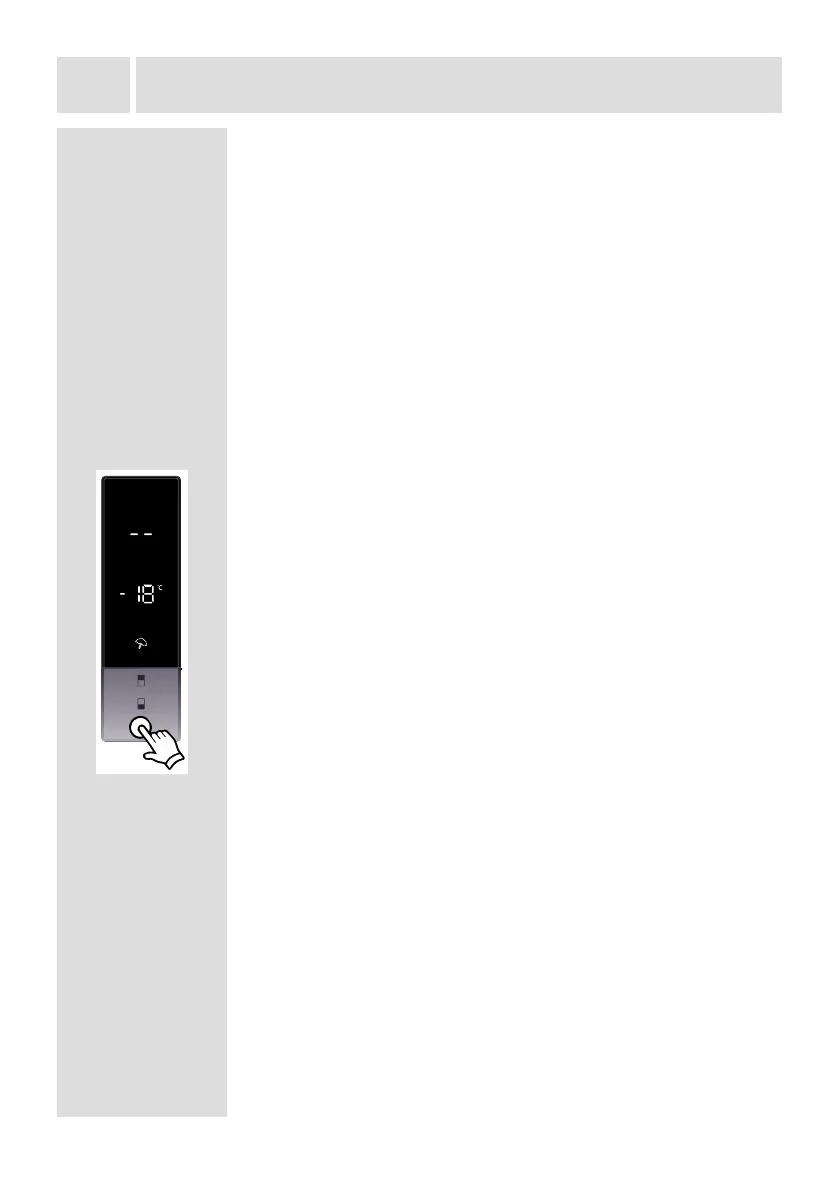
• Push "mode button" until holiday symbol appears
• If no button is pressed for 1 second. Mode will be set.
Holiday symbol will blink 3 times. When mode is set,
buzzer will sound beep beep.
• Cooler temperature segment will show "--".
• Holiday symbol and "--" will light till mode nishes.
During this mode:
• Freezer may be adjusted. When holiday mode will be
cancelled , the selected setting values will proceed.
• Cooler may be adjusted. When holiday mode will be
cancelled, the selected setting values will proceed.
• Super cool and super freeze modes can be selected.
Holiday mode is automatically cancelled and the selected
mode is activated.
• Economy mode can be selected after cancelling the
holiday mode. Then the selected mode is activated.
• To cancel, you will just need to press on mode button.
During this mode:
• Freezer may be adjusted. When economy mode will be
cancelled, the selected setting values will proceed.
• Cooler may be adjusted. When economy mode will be
cancelled, the selected setting values will proceed.
• Super cool and super freeze modes can be selected.
Economy mode is automatically cancelled and the selected
mode is activated.
• Holiday mode can be selected after cancelling the
economy mode. Then the selected mode is activated.
• To cancel, you will just need to press on mode button.
THE VARIOUS FUNCTION AND POSSIBILITIES


 To Next Page