User instructions
17
OPTIONS (available in all programs except the soak program)
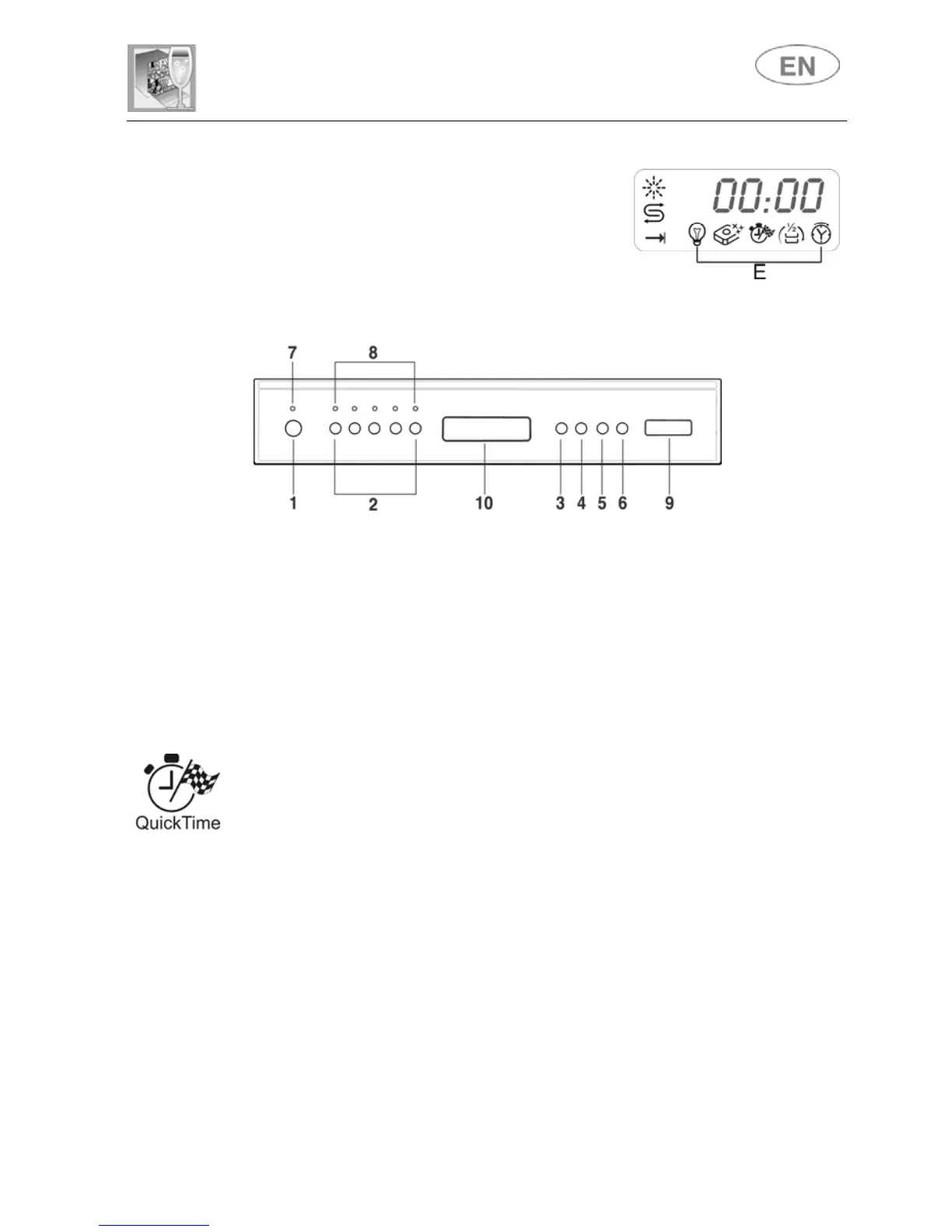
The options are controlled by the OPTION
SELECTION button (3).
Press the button to access the procedure,
confirmed by flashing of one of the OPTIONS
lights (E).
N.B.: The PROGRAM DELAY light only comes on when the specific
PROGRAM DELAY button (5) is pressed.
Press the SELECT OPTIONS button (5) again to display the next option. To
confirm an option, press the CONFIRM OPTION button (6) (the light stops
flashing and remains on). This operation can be carried out for one or all of
the options available. To deactivate an option which has already been
confirmed, press the OPTION SELECTION button (3) until the OPTION
LIGHT required flashes, and press the CONFIRM OPTION button (6). The
light stops flashing and goes out.
All options except "3in1" are disabled at the end of the wash cycle.
QUICK TIME PROGRAMS
Select this option together with any washing program (except the soak
program) to SHORTEN the cycle. To activate this option, press button
(light comes on) after selecting the program required.
The option is automatically deactivated at the end of the program.



 To Next Page