English / 02
Operations:
1. To turn power on/ off: fast press power button 5 times in succession to power on or off, and the white LED light will
flash 3 times.
2. Long press the power button to vape.
3. Press power button twice, and then LED shows different lights according to the power status. Red for battery power
lower than 30%, orange for battery power between 30%-70%, and Green for battery power higher than 70%.
4. Charge the device via the USB cable included.
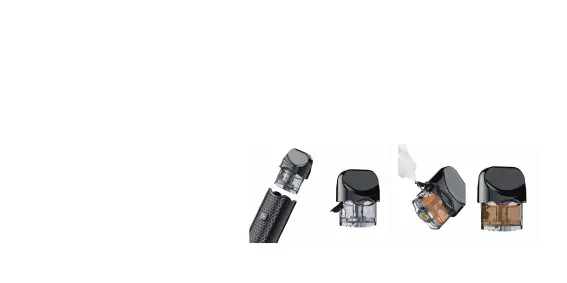
How to fill with e-liquid:
1. Pull out the rubber plug on the slot and add
e-liquid through the slot;
2. Press the rubber plug back carefully and
firmly.


 To Next Page