LEADING
THE
SMART
ENERGY
REVOLUTION
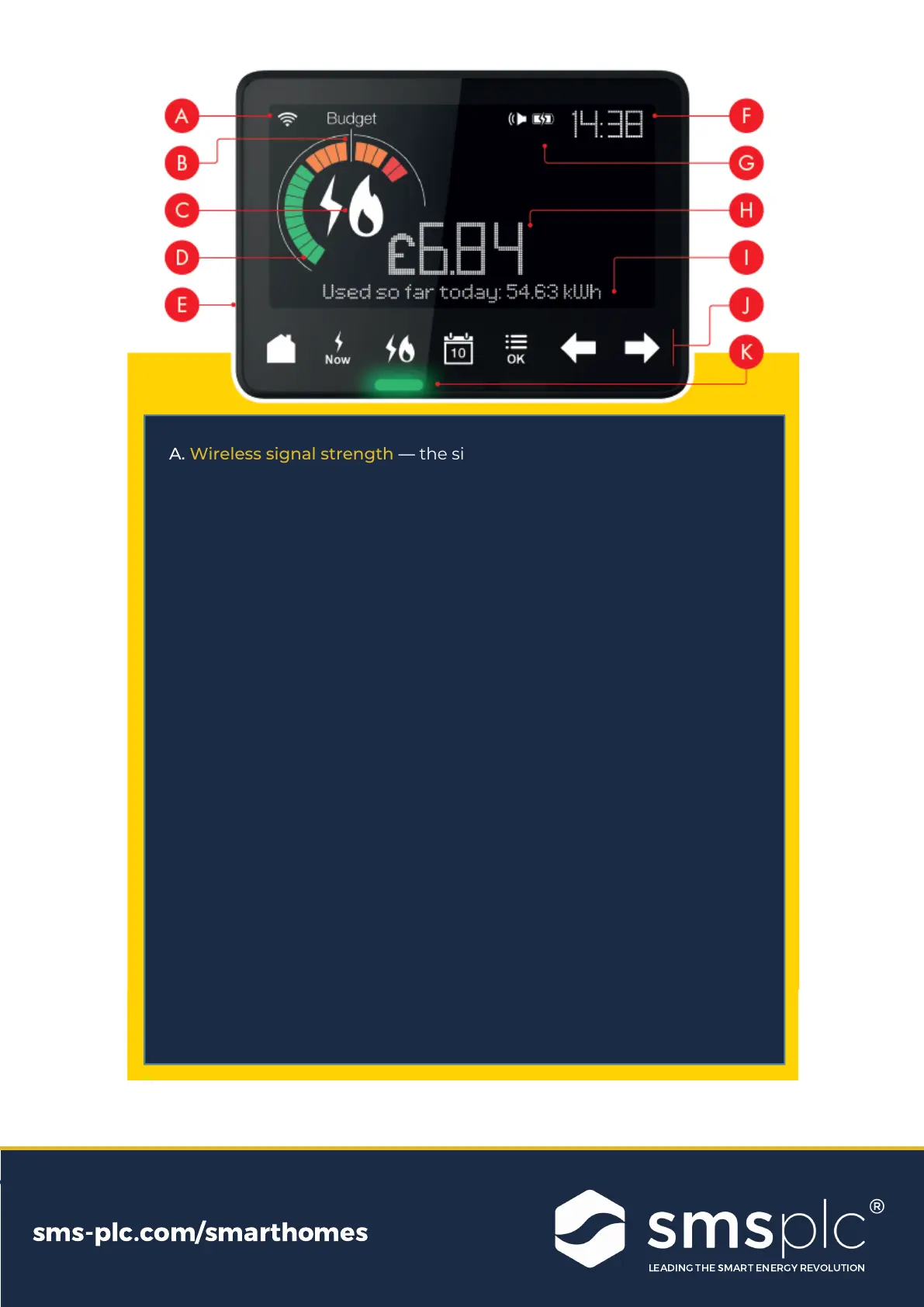
A. Wireless signal strength — the signal strength between your IHD
and your smart meter
B. Budget indicator — the Budget Line indicates your personally set
budget (see more in “Setting a Budget”)
C. Fuel type — shows your fuel type – electricity, gas or both
D. Energy usage dial — see your energy use at a glance: low (green),
medium (orange) or high (red)
E. On/off button — on the back of the display
F. Time — current time in 24hr format
G. Battery indicator — battery level and charging status
H. Numeric display — see your energy usage and costs in numbers
I. Text display — displays text feedback, messages and prompts
J. Control buttons — control your IHD; view different information and
functions
K. Electricity now lights — see your electricity use right now as low
(green),medium (orange) or high (red)
LEADING
THE
SMART
ENERGY
REVOLUTION
sms
-
plc
.
com
/
smarthomes
LEADING
THE
SMART
ENERGY
REVOLUTION
sms
-
plc
.
com
/
smarthomes


 To Next Page