Need help?
Do you have a question about the Snakebyte KEY:BOARD ULTRA and is the answer not in the manual?
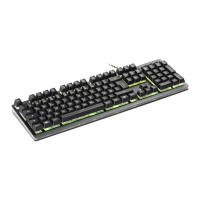
Connect the keyboard to a free USB port on your PC or Mac. Wait until it is automatically connected and drivers are installed.
Lists various FN key combinations for media control, volume, and other system functions.
The keyboard supports conflict-free gaming keys (including WASD, arrow keys) during gameplay.
Configure LED lighting effects directly using keyboard shortcuts and FN key combinations.
Change individual key backlight colors without needing PC software. Press FN + M1 to enter/exit.
Program profiles, configure polling rate, and use macros for customized keyboard functionality.
Slow breathing with color change, breathing without color change, spreading from center.
Press key lighting, pressed key lighting off, row lighting on push.
Center flashing, side to center lighting, random flashing.
Lighting passing through from one side (slow/quick), lighting through entire keyboard (fast).
Rainbow colors (auto/flashing), keyboard rows light up (auto).
Color pass side to side, monochromatic center to entire, rainbow pulsating center.
Important warnings about product use, handling, and avoiding hazards like heat, liquids, or disassembly.
Advice on avoiding strain, discomfort, or pain during use and taking breaks.
Guidance on cleaning the keyboard using a soft, dry cloth and avoiding chemicals.
Contact information for snakebyte distribution GmbH, including email and website.
Statement confirming compliance with legal requirements and Directive 2014/53/EU.
Notes on FCC compliance, warnings about modifications, and guidance to correct interference.


 To Next Page
 General