56
5-15
4-10
6
Operation
5.6 Easy Alu function
The Easy Alu function automatically recognises the
Alu required by the operator and the rim dimension
parameters, once the gauge has been positioned on
the rim.
The machine presents only the possible Alus in relation
to the contact points selected by the operator.
Note:
Alu 4 and Alu 5 are not included in the Easy Alu
function. They require manual setting by the
operator (F 5.4.2).
5.6.1 Automatic rim dimension reading
and setting and
Alu Mode
Preparations:
— Co
mpensation run carried out, if necessary (F 6.1).
— Wheel correctly clamped (F 5.1).
— Select the Vehicle type (F 5.5.1).
— Enter rim width (F 5.5.2).
Important:
The OK indication and recommendation for optimisation,
as well as the optimisation procedure itself, will only be
accurate if the rim width is correctly entered (Sonar).
Automatic rim distance and diameter reading with
an internal gauge arm
— Move the internal gauge arm gauge into position
on the rim to select the initial weight application
position (internal rim side). Keep it in this position
until an audible signal is heard.
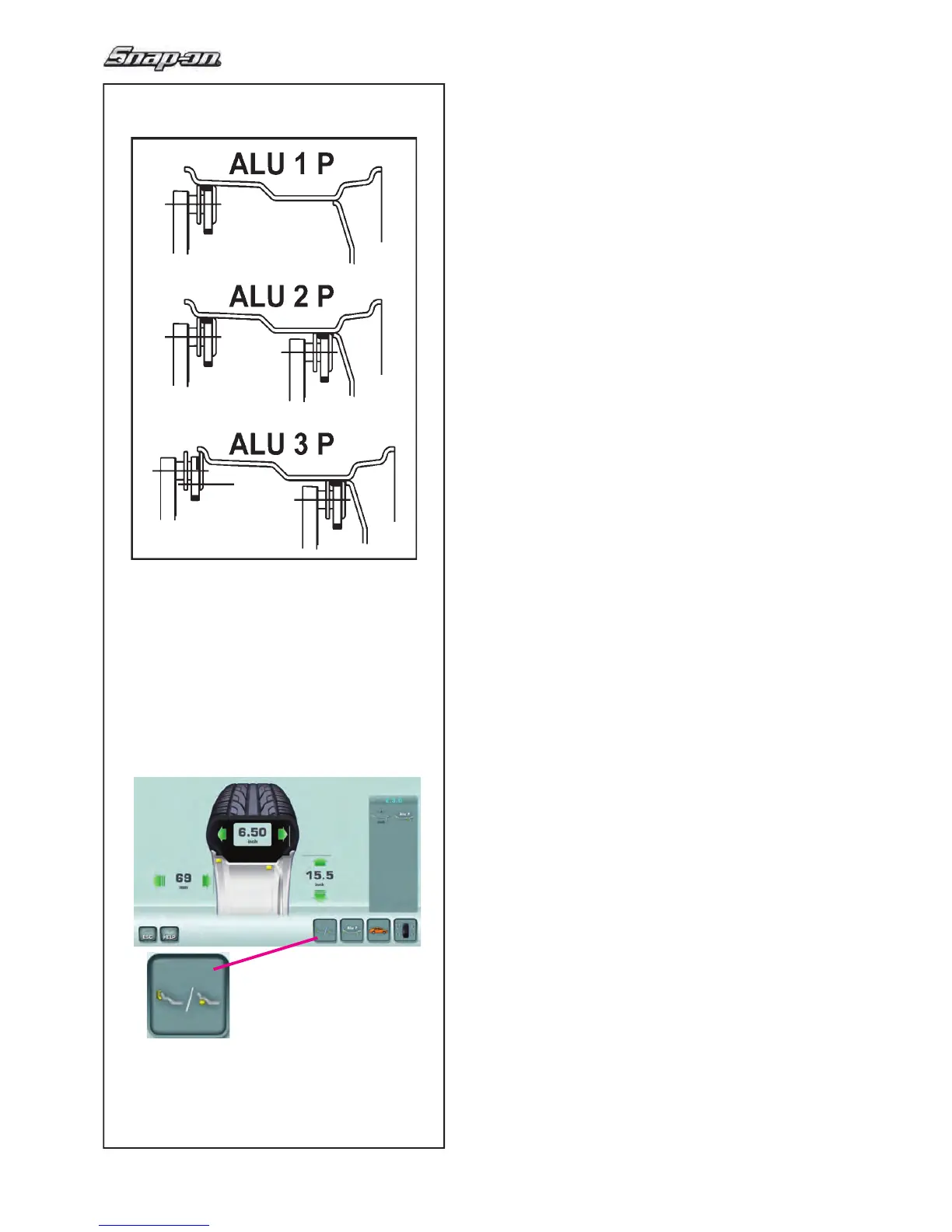
Only for Alu1P, Alu2P and Alu3P (Fig. 5-15):
— Position and hold the internal gauge in the
second position on the rim to select the
application position on the right side of the rim.
Shortly afterwards the machine emits an audible
signal to indicate that the machine automatically
saves the weight application coordinates.
— Move the gauge to the idle position.
— For Alu1P, Alu2P and Alu3P you can proceed with
a measuring run (F 5.7.1).
At this point you can change the Alu mode suggested
by
the machine,
using the “Easy Alu Toggle” key (6,
Fig. 4-10).


 To Next Page
 Loading...