84
5-49
5-50
5-51
5-52
26
Operation
Reading of error code E9
If E9 is read out, at least one error was made with
respect to the sequence of operations when performing
optimisation (System messages F 7.1).
— Abort the optimisation program by pressing the
STOP key and, if desired, start optimisation once
again.
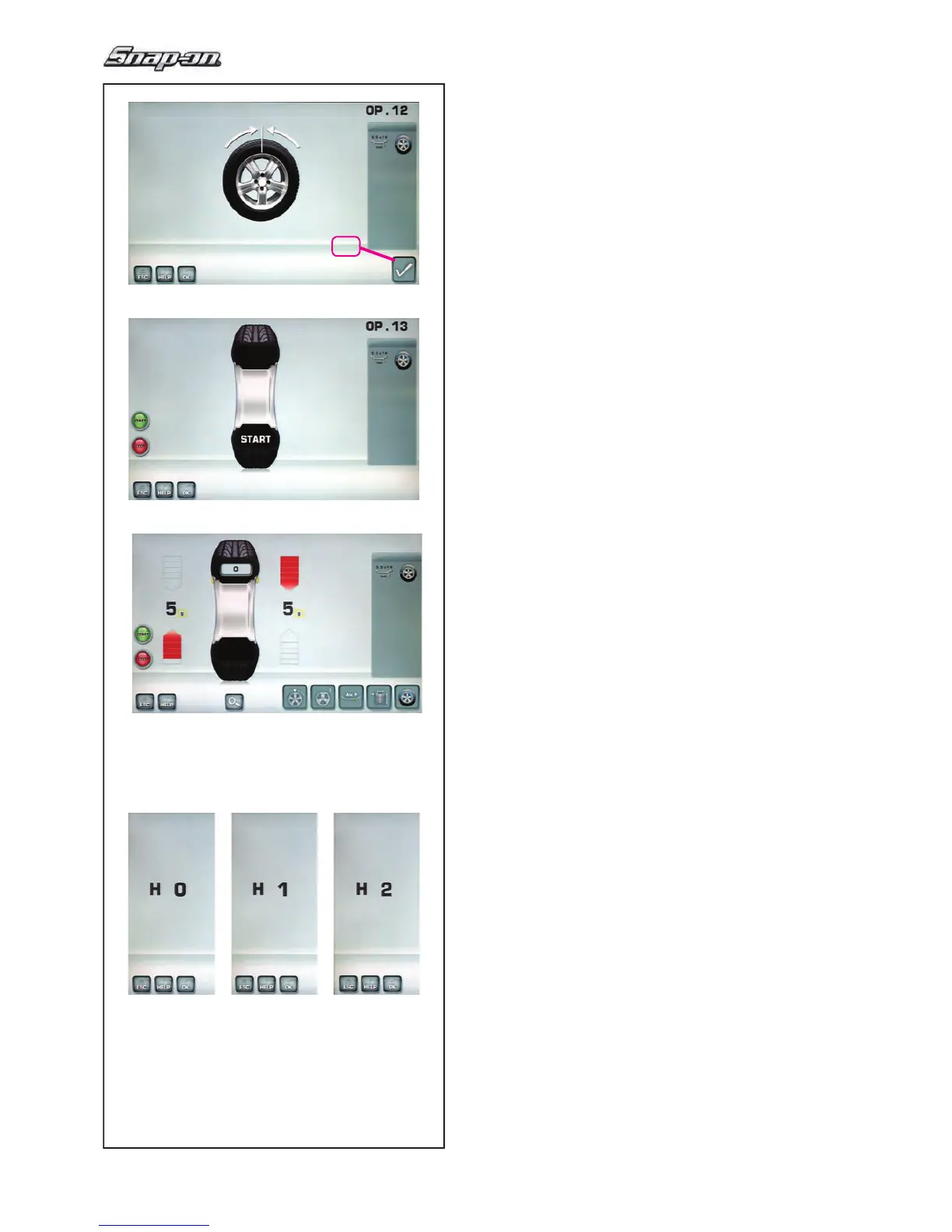
Fig. 5-49 OPTIMISATION “OP.12”
(4th measuring run of tyre/rim assembly)
— Clamp the wheel on the balancer.
— Rotate the wheel such that the valve is exactly
perpendicular to and above the main shaft.
— Con! rm the valve position by pressing menu key
26.
The OPTIMISATION “OP.13” screen (Fig. 5-50) is
displayed.
Fig. 5-50 OPTIMISATION “OP.13”
START is displayed on the screen.
— Spinn the wheel.
A measuring run is performed.
The
BALANCING screen (Fig. 5-51) is displayed.
Finish weight Optimisation
Fig. 5-51 BALANCING
— Balance the wheel according to the readings.
I
f
the wheel running conditions are optimal, the
following codes can be displayed (Fig. 5-52):
H0 Wheel running conditions cannot be improved by
optimisation.
H1 Further optimisation not recommended but
feasible.
H2 Weight minimisation is recommended, optimisation
can achieve no further improvement.


 To Next Page