86
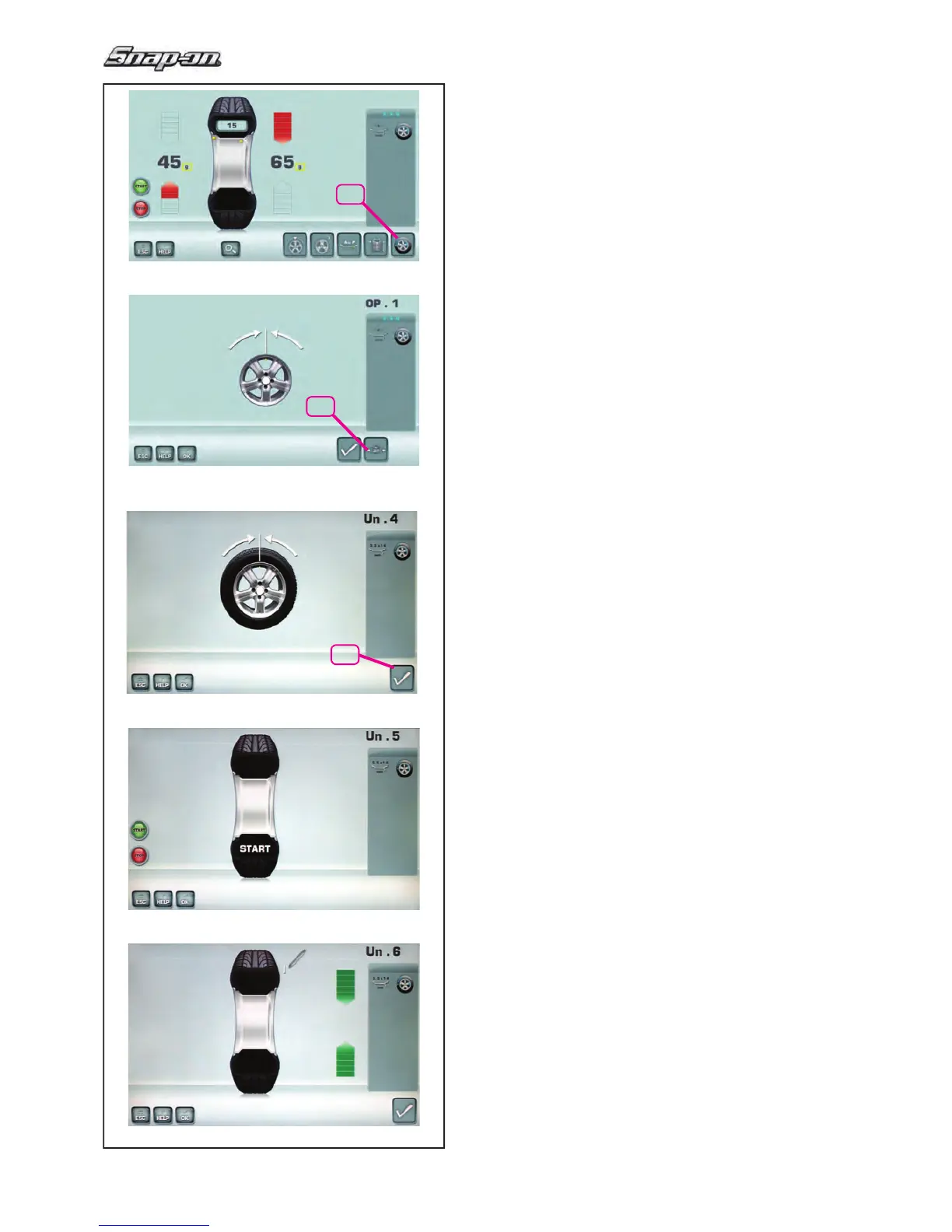
5-33
5-34
20
28
5-53
26
5-54
5-55
Operation
5.10.3.2 WEIGHT MINIMISATION
To directly perform compensation weights Minimisation,
proceed as follows:
—
From the BALANCING menu press key 20
Optimisation – Minimisation (Fig. 5-33).
The OPTIMISATION MENU “OP.1” screen (Fig. 5-34)
is displayed.
— Press the menu key 28 (Fig. 5-34).
The MINIMISATION “Un.4” screen is displayed (Fig.
5-53).
Fig. 5-53 MINIMISATION “Un.4”
— Readjust the wheel such that the valve is exactly
perpendicular to and above the main shaft.
— Enter the valve position by pressing menu key
26.
The
MINIMISATION “Un.5” screen (Fig. 5-54) is
displayed.
Fig. 5-54 MINIMISATION “Un.5”
START is signalled on the screen.
— Spinn the wheel.
The MINIMISATION “Un.6” screen (Fig. 5-55) is
displayed.
The H1 indication may appear
If H1 appears at this point, it means that the machine
recommends you do not continue with Minimisation.
Despite that, it is possible to continue, to obtain a
possible improvement in quiet running, even for values
below the threshold (critical vehicle).


 To Next Page