90
5-60
5-62
5-61
5-63
5-64
29
26
26
26
Operation
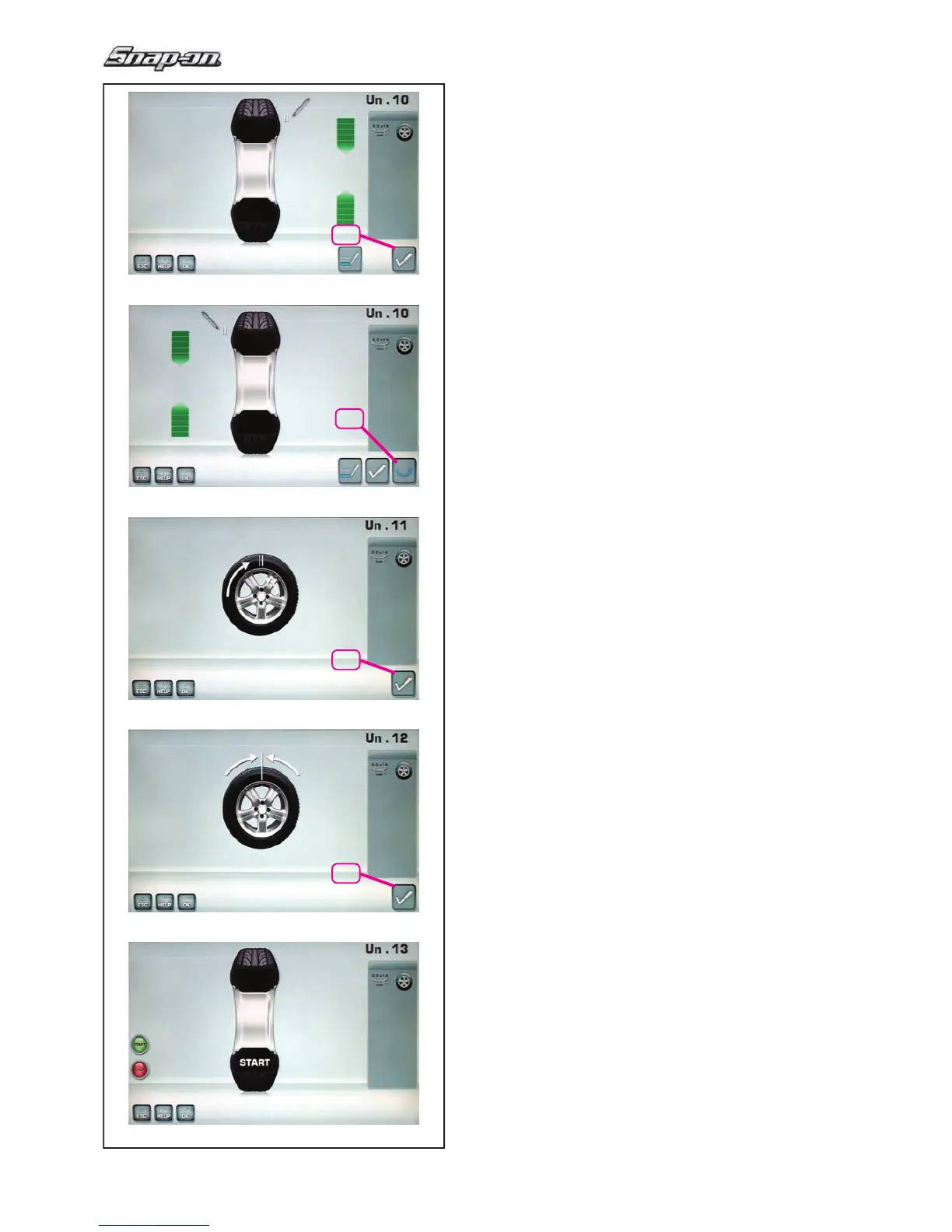
Fig. 5-60 MINIMISATION “Un.10”, outside
— Rotate the wheel into marking position following the
arrows.
— In this position provide a double mark on the tyre
outer side exactly perpendicular to and above the
main shaft.
— Con! rm by pressing menu key 26.
The MINIMISATION “Un.11” screen (Fig. 5-62) is
displayed.
Fig. 5-61 MINIMISATION “Un.10”, inside
If the tyre can
not be turned over on the rim (e.g.:
Asymmetrical and Directional),
— press menu key 29, then
— continue as shown on screen MINIMISATION
“Un.10” (Fig. 5-60).
If the wheel can be turned over on the rim;
— Rotate the wheel into marking position following the
arrows.
— In this position provide a double mark on the tyre,
on the inside of the wheel, exactly above the main
shaft.
— Turn over the tyre on the rim (tyre changer).
— Con! rm by pressing menu key 26.
The MINIMISATION “Un.11” screen (Fig. 5-62) is
displayed.
Fig. 5-62 MINIMISATION “Un.11”
— Readjust the tyre on the rim such that the double
mark coincides with the valve (use tyre changer).
— Con! rm by pressing menu key 26.
The MINIMISATION “Un.12” screen (Fig. 5-63) is
displayed.


 To Next Page