EasyManua.ls Logo

Snap-On Sun Koolkare Blizzard - User Manual

Snap-On Sun Koolkare Blizzard
6 pages
Print Icon
To Next Page IconTo Next Page
Loading...
CHECK OUT OUR VIDEO TUTORIAL AND VISIT:
DIAGNOSTICS.SNAPON.CO.UK/TRAINING
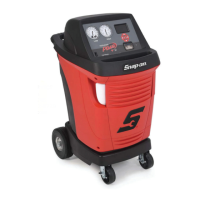
BLIZZARD AIR CONDITIONING UNIT
QUICK
START GUIDE
QUALITY AND SERVICE YOU EXPECT AT A PRICE YOU WOULDN’T
EAZ0042N00A
Machine LOCKED
Press OK to
unlock
R134a ACTIVATION
000000
11:21
01/06/17
AUTOMATIC MANUAL CUSTOM
SETUP MAINTENANCE DATA
R134a
ACTIVATION CODE
XXXX-XXXX-XXXX
Go to the website
www.ac-activation.com
Press OK to proceed
R134a ACTIVATION
STOP
1 2 3
4 5 6
7 8 9
0
ABC DEF
GHI JKL MNO
PQRS TUV WXYZ
MENU
BACK
ESC
STOP
1 2 3
4 5 6
7 8 9
0
ABC DEF
GHI JKL MNO
PQRS TUV WXYZ
MENU
BACK
ESC
STOP
1 2 3
4 5 6
7 8 9
0
ABC DEF
GHI JKL MNO
PQRS TUV WXYZ
BACK
ESC
MENU
HR
Press
Select CONTAINER
then press OK
STOP
1 2 3
4 5 6
7 8 9
0
ABC DEF
GHI JKL MNO
PQRS TUV WXYZ
BACK
ESC
MENU
TILTWATCH
®
PLUS TILTWATCH
®
PLUS
SHOCKWATCH
®
SHOCKWATCH
®
DO NOT TILT THIS CARTON
PAST__________ DEGREES
DAMAGE MAY OCCURR IF CARTON
IS TILTED PAST INDICATED DEGREES
CONSIGNEE:
IF TILTING HAS OCCURRED
DO NOT REFUSE SHIPMENT
NOTE ON BILL OF LOADING DEGREE OF TILT
80°
80°
70°
70°
60°
60°
50°
50°
40°
40°
180°
30°
30°
www.ac-activation.com
• New Activation
Activation code
Enter the activation code for your machine. Characters and numbers are allowed
Get unlock code
Enter unlock code
Press OK to confirm
Unlock bottle cell
Press OK to continue
Back to exit
STOP
1 2 3
4 5 6
7 8 9
0
ABC DEF
GHI JKL MNO
PQRS TUV WXYZ
BACK
ESC
MENU
Connect cartridge
or refill UV container
Press OK to continue
Back to exit
STOP
1 2 3
4 5 6
7 8 9
0
ABC DEF
GHI JKL MNO
PQRS TUV WXYZ
BACK
ESC
MENU
OK to continue
with a vacuum procedure
Back to exit
STOP
1 2 3
4 5 6
7 8 9
0
ABC DEF
GHI JKL MNO
PQRS TUV WXYZ
BACK
ESC
MENU
BOTTLE FILLING
Press OK to continue
Back to exit
STOP
1 2 3
4 5 6
7 8 9
0
ABC DEF
GHI JKL MNO
PQRS TUV WXYZ
BACK
ESC
MENU
Set amount:
g
BOTTLE FILLING
1 2 3
4 5 6
7 8 9
0
ABC DEF
GHI JKL MNO
PQRS TUV WXYZ
BACK
ESC
MENU
STOP
1 2 3
4 5 6
7 8 9
0
ABC DEF
GHI JKL MNO
PQRS TUV WXYZ
BACK
ESC
MENU
STOP
1 2 3
4 5 6
7 8 9
0
ABC DEF
GHI JKL MNO
PQRS TUV WXYZ
BACK
ESC
MENU
Verify vacuum pump
Oil level
Press OK to continue
Back to exit
STOP
1 2 3
4 5 6
7 8 9
0
ABC DEF
GHI JKL MNO
PQRS TUV WXYZ
BACK
ESC
MENU
Connect cartridge or
refill new oil container
Press OK to continue
Back to exit
STOP
1 2 3
4 5 6
7 8 9
0
ABC DEF
GHI JKL MNO
PQRS TUV WXYZ
BACK
ESC
MENU
Ok to continue
with a vacuum procedure
R134a ACTIVATION
AC Pressure
STOP
3
1
2
OR
1 2 3
4 5 6
7 8 9
0
ABC DEF
GHI JKL MNO
PQRS TUV WXYZ
BACK
ESC
MENU
STOP
OR
1 2 3
4 5 6
7 8 9
0
ABC DEF
GHI JKL MNO
PQRS TUV WXYZ
BACK
ESC
MENU
STOP
OR
Min 600g
Max 18126g
STOP
1 2 3
4 5 6
7 8 9
0
ABC DEF
GHI JKL MNO
PQRS TUV WXYZ
BACK
ESC
MENU
BOTTLE FILLING
Bottle pressure 3.3 bar(rel)
Ext. Bottle Pressure 1.6 bar(rel)
319g

Question and Answer IconNeed help?

Do you have a question about the Snap-On Sun Koolkare Blizzard and is the answer not in the manual?

Summary

Quick Start Guide

Packaging and Initial Handling

Instructions for checking delivery condition, removing protective covers, and unpacking the unit.

Product Activation

Steps for activating the unit online using a web browser and activation code.

Scale Unlocking Procedure

Guidance on entering unlock codes and physically releasing the scale security nut.

Vacuum Pump and Fluid Setup

Checking the vacuum pump oil level and adding tracer dye and oil to the unit.

Vacuum Test and Gas Filling

Performing a vacuum test and connecting/filling the unit with refrigerant gas.

Optional Koolklean Set-Up

Instructions for unpacking, filling, and connecting the optional Koolklean unit.

Summary

Quick Start Guide

Packaging and Initial Handling

Instructions for checking delivery condition, removing protective covers, and unpacking the unit.

Product Activation

Steps for activating the unit online using a web browser and activation code.

Scale Unlocking Procedure

Guidance on entering unlock codes and physically releasing the scale security nut.

Vacuum Pump and Fluid Setup

Checking the vacuum pump oil level and adding tracer dye and oil to the unit.

Vacuum Test and Gas Filling

Performing a vacuum test and connecting/filling the unit with refrigerant gas.

Optional Koolklean Set-Up

Instructions for unpacking, filling, and connecting the optional Koolklean unit.

Overview

The document provides a quick start guide for the Blizzard Air Conditioning Unit, a device designed for automotive air conditioning system maintenance. The unit is manufactured by Snap-on, a company known for quality tools and equipment.

Function Description:

The Blizzard Air Conditioning Unit is an advanced system for servicing vehicle air conditioning systems. Its primary functions include:

  • Refrigerant Recovery and Recycling: The unit can recover refrigerant from a vehicle's AC system, clean it, and prepare it for reuse.
  • Vacuum Testing: It performs a vacuum test to ensure the AC system is leak-free before recharging.
  • Oil and Dye Injection: The unit can inject new oil and UV tracer dye into the AC system, which is crucial for lubrication and leak detection.
  • Refrigerant Charging: It accurately charges the AC system with the correct amount of refrigerant (R134a, as indicated in the manual).
  • Scale Unlocking: The unit features an internal scale for precise measurement of refrigerant, which needs to be unlocked during initial setup.
  • Product Activation: The unit requires online activation to ensure proper functionality and possibly to register the device for warranty and support.
  • Optional Koolklean System Integration: For Blizzard Pro or Blizzard HFO models, an optional Koolklean unit can be integrated to perform additional cleaning or flushing procedures.

Important Technical Specifications (inferred from the manual):

  • Refrigerant Type: R134a (explicitly mentioned).
  • Refrigerant Capacity: The unit can handle a minimum of 600g and a maximum of 18126g of refrigerant for bottle filling, indicating a substantial internal storage or processing capacity for refrigerant.
  • Pressure Measurement: Displays bottle pressure and external bottle pressure in bar(rel).
  • Connectivity: Features power cable connection, data cable connection (for Koolklean unit), and LP/HP couplers for connecting to the vehicle's AC system.
  • User Interface: Equipped with a digital display and a keypad for input and navigation.
  • Safety Features: Requires personal protective equipment (PPE) when handling gas, and includes warnings against using unapproved oil tracer dye.

Usage Features:

  • Quick Start Guide: The manual is designed as a quick start guide, providing step-by-step instructions for initial setup and common operations.
  • Online Activation: The unit requires activation via a dedicated website (www.ac-activation.com, which redirects to www.ac-service24.com/attivazione), ensuring legitimate use and access to updates.
  • Video Tutorials: Users are encouraged to check out video tutorials and visit diagnostics.snapon.co.uk/training for additional support.
  • Intuitive Display Prompts: The unit's display guides the user through various procedures with clear instructions, such as "Press OK to continue" or "Back to exit."
  • Guided Procedures: Operations like vacuum pump setup, tracer dye and oil insertion, vacuum test, and gas bottle filling are all guided step-by-step on the unit's display.
  • Automated Processes: Many procedures, such as the vacuum test and bottle filling cycle, are largely automated once initiated.
  • Accessory Pack: The unit comes with an accessory pack, which likely includes necessary hoses, adaptors, and other components for operation.
  • Mobility: The unit is designed to be mobile, featuring wheels and a brake for easy positioning in a workshop.
  • Koolklean Integration: For specific models, the optional Koolklean unit seamlessly integrates by docking onto the AC unit and connecting via a data cable, expanding the service capabilities.

Maintenance Features (inferred from the manual):

  • Oil Level Check: The manual instructs users to check the oil level for the vacuum pump, indicating a need for regular monitoring and replenishment of pump oil.
  • Oil and Dye Refill: The unit allows for easy refilling of new oil and UV tracer dye containers/cartridges.
  • Error Prevention: Warnings are provided regarding the use of non-approved oil tracer dye, highlighting the importance of using specified consumables to prevent malfunction and warranty voidance.
  • Data and Setup Menus: The main menu includes options for "SETUP," "MAINTENANCE," and "DATA," suggesting that the unit provides access to settings, maintenance logs, and operational data.
  • Consumables: The manual mentions the need for Koolklean fluid, which can be purchased from www.snaponconsumables.co.uk, indicating that the unit relies on specific consumables for its extended functions.
  • Service and Support: Contact information for Snap-on service (tel: +44 (0) 1553 692422, email: ukservice@snapon.com, http://diagnostics.snapon.co.uk) is provided, ensuring users can access professional support and parts when needed.

Snap-On Sun Koolkare Blizzard Specifications

General IconGeneral
BrandSnap-On
ModelSun Koolkare Blizzard
CategoryAir Conditioner
LanguageEnglish

Related product manuals