10
Getting Started
9
Getting Started
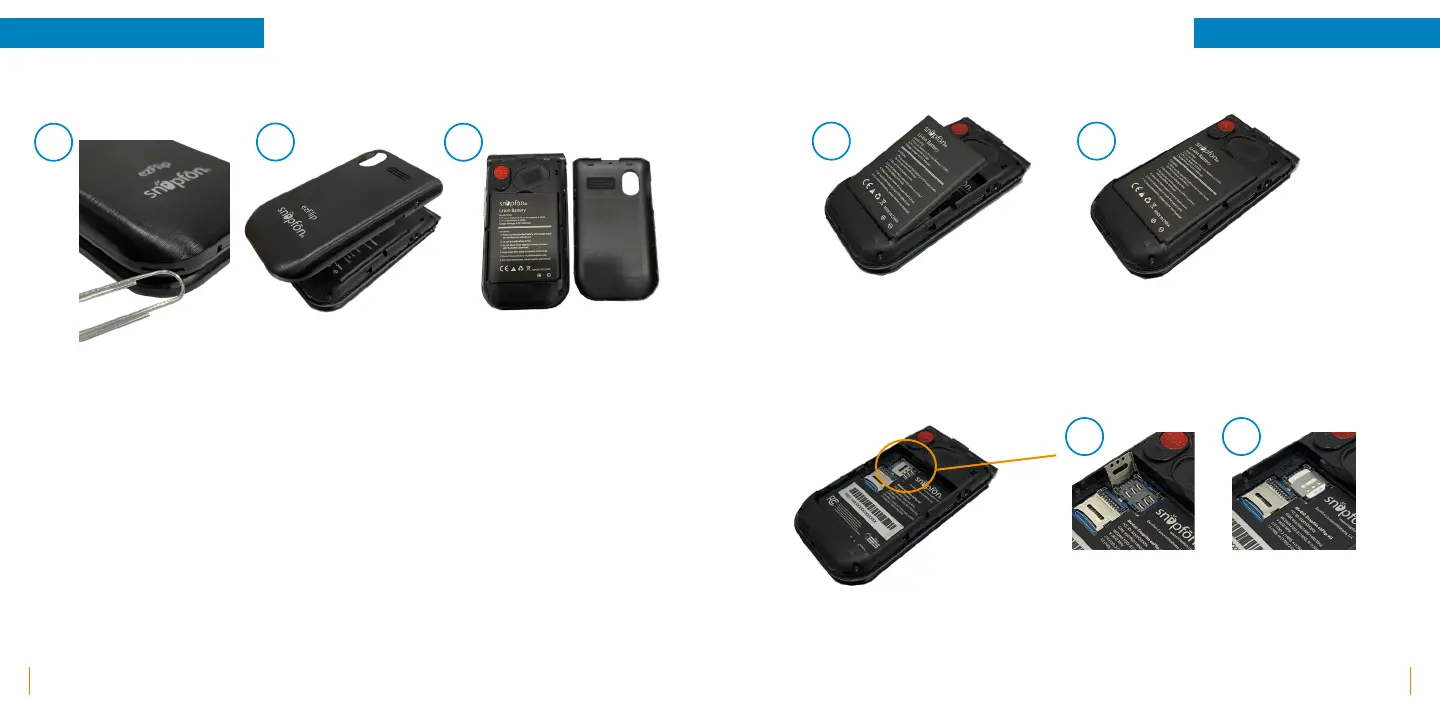
Removing Back Cover
SIM Card Installation
Battery Installation
1. Removing the back of the ezFlip can be done by locating the slit on the left side of your device.
You can use your nger or a tool, such as a paper clip, by inserting into the slit and turning clockwise.
2. The back will then pop up. You'll then need to work your ngers around the device to fully remove
the back cover.
3. Once the back is removed you'll be able to access the Battery, SIM Slot, and MICRO SD slot.
A.
B.
1. Insert battery with Logo side up and gold contacts facing down into the compartment at an angle.
2. Press top of battery down until at into the compartment.
1. Slide SIM Tray to the OPEN position following the arrows then lift.
2. Insert SIM Card LOGO side up then slide SIM Tray back to the locked position.
A.
B.
A.
B.
C.



 To Next Page