EasyManua.ls Logo

SNBC BTP-L42II - User Manual

SNBC BTP-L42II
46 pages
Print Icon
To Next Page IconTo Next Page
Loading...
U
U
S
S
E
E
R
R
S
S
M
M
A
A
N
N
U
U
A
A
L
L
Barcode Printer
Shandong New Beiyang Information Technology Co., Ltd.
M
M
o
o
d
d
e
e
l
l
:
:
B
B
T
T
P
P
-
-
L
L
4
4
2
2
I
I
I
I

Questions and Answers

Summary

Declaration

Copyright

Details copyright information for the document.

Trademark

States the registered trademark of the company.

Warning and Caution Symbols

Defines the meaning of warning and caution symbols used in the manual.

Certifications

ISO9001 Quality Control System Certification

Lists the ISO9001 Quality Control System Certification.

ISO14001 Environmental Management System Certification

Lists the ISO14001 Environmental Management System Certification.

OHSAS18001 Occupational Health and Safety Management System Certification

Lists the OHSAS18001 Occupational Health and Safety Management System Certification.

IECQ QC 080000 Hazardous Substance Process Management System Certification

Lists the IECQ QC 080000 Hazardous Substance Process Management System Certification.

Safety Instructions

Safety Warnings and Operational Notices

Covers print head warnings, ESD sensitivity, and general operational notices.

Product Description

Introduction

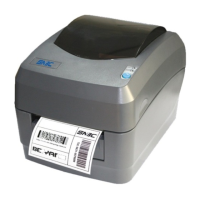
Introduces the BTP-L42II label printer and its features.

Unpacking and Checking

Guides on unpacking and checking printer components for completeness.

Appearance and Modules

Details the printer's external appearance and internal modules with labels.

Introduction of Main Modules

Explains the function of key printer modules.

Printer Installation

Installation Position

Specifies requirements for the printer's placement.

Paper Roll Installation

Provides initial steps for installing the paper roll into the printer.

Ribbon Installation

Guides on how to install the ribbon for thermal transfer printing.

Power Adapter Connection

Explains how to connect the power adapter to the printer.

Communication Cable Connection

Details how to connect communication cables for data transfer.

Starting the Printer

Power-on and Self-Test

Describes the power-on sequence and the printer's self-test process.

Mark Calibration

Explains the process for calibrating the printer for media marks.

Printing Self-Test Page

Describes how to print a self-test page to verify printer status.

Driver Setup

Driver Installation Steps

Guides on installing the printer driver software on a computer.

Printer Operations

LED Functions

Details the meaning of different LED states on the printer.

Button Functions

Describes the functions of the printer's buttons.

Buzzer Functions

Explains the printer's buzzer signals for status indications.

Printer Status and Operation

Printer Status

Describes the different operational statuses of the printer.

Daily Operations

Outlines routine operations and user interactions with the printer.

Operations under Abnormal Status

Explains how to handle and interpret abnormal printer status.

Sensor Position Adjustment

Adjusting Sensor Position

Guides on adjusting the sensor position for accurate media detection.

Print Position Adjustment

Adjust Vertical Print Position

Explains how to adjust the vertical print position of the output.

Adjust Horizontal Print Position

Explains how to adjust the horizontal print position of the output.

Adjust Tear-off Position

Guides on adjusting the tear-off position of the paper.

Routine Maintenance

Cleaning Print Head

Provides instructions for cleaning the printer's print head.

Cleaning the Sensor

Guides on cleaning the printer's mark sensor.

Cleaning Platen Roller

Provides instructions for cleaning the printer's platen roller.

Troubleshooting

Troubleshooting Methods

Lists error indications and troubleshooting methods for printer issues.

Print Quality Problems

Addresses common print quality issues and their solutions.

Appendix

Appendix 1 Technical Specifications

Provides general technical specifications for the printer.

Appendix 1.1 Main Technical Specifications

Lists the main technical specifications of the printer.

Appendix 1.2 Technical Specifications of Paper

Details specifications for different types of paper media.

Appendix 2 Self-Test Page

Displays printer configuration and self-test details.

Appendix 3 Print and Paper Out Position

Explains print and paper out positions.

Appendix 4 Communication Interfaces

Details serial, parallel, and USB communication interfaces.

SNBC BTP-L42II Specifications

General IconGeneral
BrandSNBC
ModelBTP-L42II
CategoryBarcode Reader
LanguageEnglish