The SNEED-JET Titan Series is a range of industrial coding and marking printers designed for simplicity and ease of use. The series includes models such as the Titan, Titan 21/22, and Titan 41/44, offering various capabilities for different applications.
Function Description:
The SNEED-JET Titan Series printers are used for printing text, time and date, batch numbers, serial numbers, logos, QR codes, and barcodes on a wide variety of materials. They are designed to make complex coding and marking processes easy, allowing users to focus on their core operations. The printers feature a user-friendly interface with a touch screen for message creation, editing, and system settings adjustments.
Important Technical Specifications:
- Printer Series: SNEED-JET Titan series
- Model: Titan (specific models include Titan, Titan 21/22, Titan 41/44)
- DPI: 600 max
- Screen Size: 7 inch
- Languages: English, Chinese, Arabic, Korean, Italian, Russian, Spanish, Portuguese, Turkish
- Shape Features: Aluminum alloy
- Printing Height: 25mm
- Printing Distance: 2-5mm
- Print Content: Text, time and date, batch number, serial number, logo, QR code, barcode
- Storage: More than 1000 messages
- Printing Length: 2000 characters for each message with no limitation to physical length
- Printing Speed: 70m/min
- Working Environment:
- Temperature: 0 - 45°C (best 20-30°C)
- Humidity: 40% - 60% Rh
- Printing Material: Paper, cardboard, wood, concrete, fabrics, fiberglass plastic (PET, HDPE, PVC, LDPE, other), glass, aluminum, stainless steel, carbon steel, and many others.
- Connectivity: Power adapter input, encoder input, product detector, print head port, USB, RS232 Input (x2).
Usage Features:
The SNEED-JET Titan Series offers a comprehensive set of features for flexible and precise printing:
- Main Menu: Provides access to "Edit" for message creation and customization, "Settings" for general printer configurations, "Print" to activate/deactivate print mode, and "Shut Down" for proper power-off procedure.
- Message Editor: Allows users to create and customize print messages. It supports programming text, date codes, sequential counters, logos, images, QR codes, and barcodes.
- Text Programming: Users can input text, adjust font, character size, interval (space between characters), and rotation (360 degrees).
- Date Codes: Offers pre-defined date formats and a "User-defined" option for rolling expiration dates. Users can customize the date format, dictate the order of fields, and offset expiration dates by days, months, or years.
- Sequential Counters: Allows insertion of counters into messages. Counter behaviors (current value, initial value, repeat count, step value) are adjustable in the settings menu.
- Logos and Images: Supports importing monochrome bitmap files (.bmp) from a USB drive. Images can be viewed, moved, and used in messages.
- QR Codes and Data Matrix Codes: Users can input information via a touchscreen keyboard. The "Scale" and "Length" settings allow adjustment of QR code size to ensure reliable scanning. Data Matrix codes are available in Standard and GS1 variants, programmed identically to QR codes.
- Barcodes: Offers 9 different barcode types. Users can program barcode information, scale the barcode on both axes, adjust height, and toggle the display of human-readable text.
- Settings Menu:
- Style Tab:
- Print Mode: Choose between external product sensor trigger or automatic mode (using printer delay/interval).
- Speed: Adjusts the speed at which the printer ejects ink to match conveyor speed. Smaller values mean faster ejection.
- Interval (Print Delay): Sets the delay between the print trigger and the actual print, allowing precise positioning of the message on the product. Also determines distance between prints in automatic mode.
- Direction: Reverses or mirrors the print along the X and Y axis.
- Print Width: Relevant when using an encoder wheel, equivalent to the speed setting.
- Gray: Greyscale value (do not increase past 3 without consulting technical services).
- Sync Encoder: Activates or disables the encoder wheel.
- Spray Settings Tab:
- Nozzle Line: Allows changing the nozzle line on the cartridge.
- DPI: Dots per inch (150, 200, 300, 600 options).
- Ink Type: Cartridge-specific settings. "Auto Selected" is recommended, where the printer reads the cartridge and sets parameters automatically.
- Print Head Choice: Assigns the total number of print heads in use.
- Splice: Select this option for stitching print heads (combining multiple print heads for a larger print).
- Advanced Tab:
- Offset: Interval value between printheads, relevant for multi-head print systems.
- Repeat Printing: Allows printing the same message multiple times with a single trigger.
- Repeat Count: Total number of times to repeat the print.
- Repeat Interval: Distance between each repeated print.
* UV Lamp Tab: Though the printer can operate a UV lamp, UV curable ink is not currently offered for the SNEED-JET Titan.
* System Settings Tab: Adjusts basic printer settings like language, time and date, and backlight brightness.
- Calibrate: For fine-tuning the touchscreen accuracy.
- Import Font: Loads new fonts for message creation.
- Reset: Factory reset function (requires technical support).
* **Counter Settings Tab:** Adjusts counter behaviors (current value, initial value, repeat count, step value).
- Print Stitching (for Titan 20 and 40 series): Combines multiple print heads to form a single, larger print. Requires print heads to be level on all axes and often necessitates an encoder wheel attachment. Adjusting "offset" values in the Advanced settings aligns the prints from multiple heads.
Maintenance Features:
- Cartridge Care: Always remove the ink cartridge when not in use and cap it with the provided plastic clip to ensure longevity.
- Cleaning: DO NOT use any liquids or chemicals to clean the printer or cartridge without consulting technical services first.
- Power Off Procedure: Always use the "SHUT DOWN" button and follow on-screen instructions to power off the printer correctly.
- Print Mode Deactivation: Ensure "Print mode" is deactivated before making any setting changes, message edits, or removing the ink cartridge.
- Cable Security: ENSURE that all cables are secure before operation.
- Technical Support: Sneed Coding Solutions provides support for troubleshooting and guidance on complex installations or settings.

 Need help?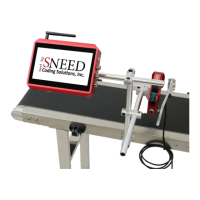

 To Next Page
 General