v2018005_e
2
A230 DECT USB-Stick
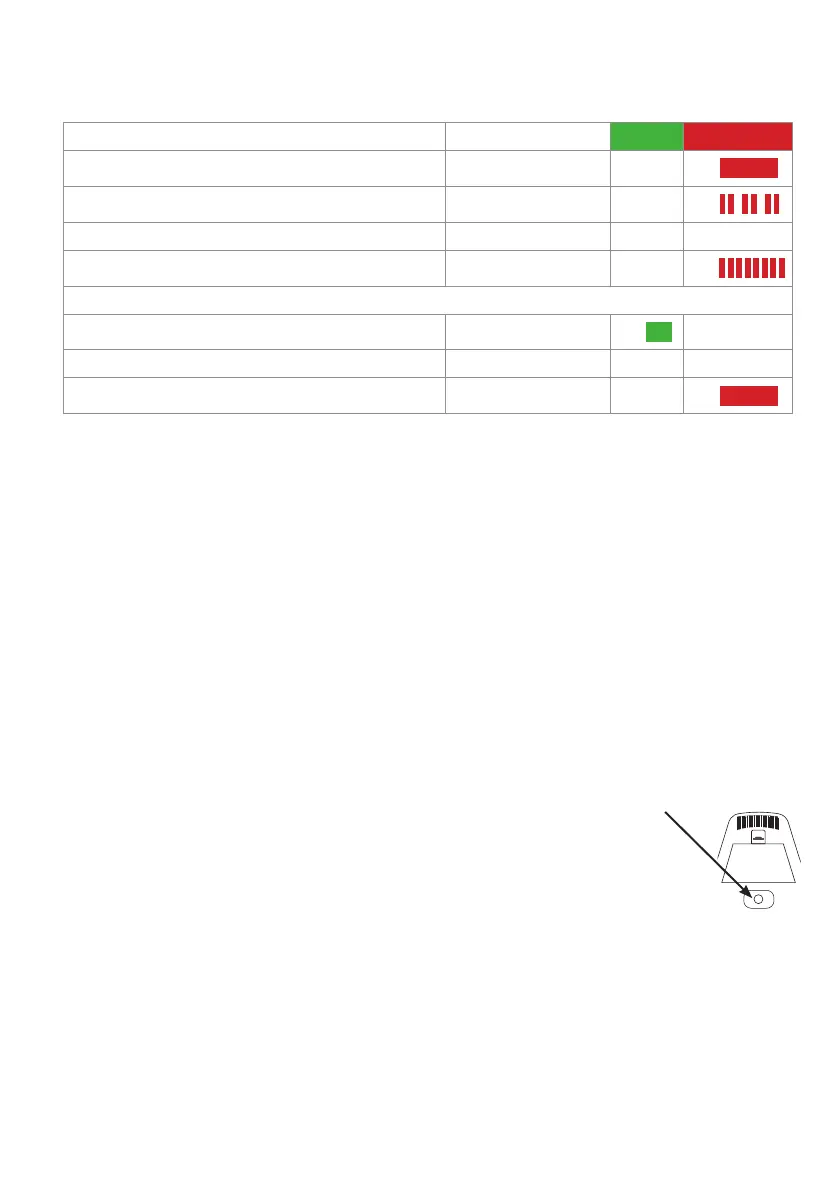
LED status indications
Description of state Pattern Green Red
Standby mode, no wireless device subscribed Steady -
ON
In registration mode (duration 10 seconds) Rapid double flashes -
ON
Standby, wireless device subscribed OFF - -
Ready to enter deregistration mode Rapid flashing
ON
After deregistration mode has been confirmed:
1. Duration: 3 seconds Steady
ON
2. Duration: 1 second OFF - -
3. Back in standby, no wireless device subscribed Steady -
ON
Compatible with
• Wireless headsets Snom A170, A150
• wireless speakerphone Snom C52-SP
Pairing with A170/A150 headsets
1. Deregister the headset from its base station or from another dongle it may have been paired with. Please
refer to the user instructions of the headset or the dongle on how to do it. When the headset has been
deregistered, its LED blinks red and green alternatingly.
2. Press the key on the A230 for 4 seconds, then place the headset in its charger. The A230‘s red LED dou-
ble-flashes rapidly and turns o when the registration has been successful, while the headmit beeps once
and its LED switches to steady light (green if fully charged, red if charging).
Pairing with C52SP speakerphone
NOTE: If the speakerphone was previously registered to another DECT dongle or a C520-WiMi conference
phone, it must be deregistered first.
◦ For the deregistration from another A230 DECT dongle, see reverse side.
◦ For the deregistration from the C520-WiMi, please refer to the C520-WiMi
user manual.
NOTE: The C52SP‘s battery must be fully charged, and the device must be connected
to a wall outlet via its power adapter. Keep distance between C52SP and A230
at < 30 cm until pairing was successful.
1. Press the white registration button underneath the battery compartment on the
bottom of the speakerphone for 5 seconds until the speakerphone‘s LEDs start flashing red and green
alternatingly.
2. Press the key on the A230 for 4 seconds. The red LED double-flashes rapidly and
turns o when the registration has been successful. The LEDs on the C52-SP briefly
turn green and then turn o while the red Power LED turns on.
Pairing with both: One C52 SP and one headset can be registered at the A230.


 To Next Page
 Loading...
