Return to contents
Overview MY Speed DVR
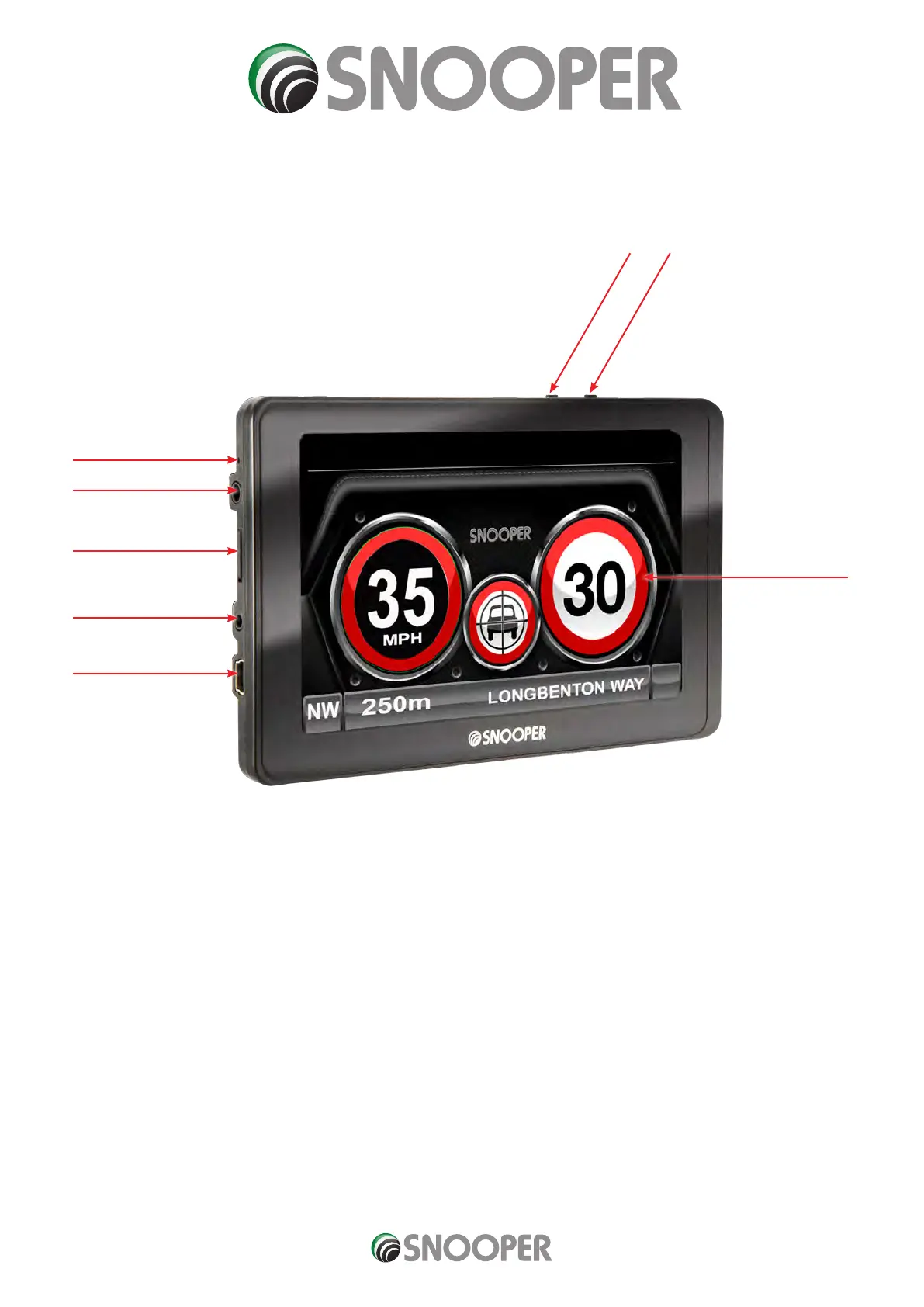
Front View
1. Power Button
Press and hold to switch on or o.
2. LED Power indicator
Status LED
On and Charging - Red LED
O and Charging - Red LED
On and using internal battery - Green LED
Fully charged - No LED
3 Touch screen LCD
4. Earphone jack (Earphones not included)
5. Micro-SD Card Slot
6. TMC/Video In socket ** TMC not used on MySpeed DVR
7. USB Socket
8. Emergency Record button
1
5
3
6
4
2
7
8
** Video In The video-in connection is for connecting a rear view or reversing camera (not supplied) to the unit. The socket on the
device is a 2.5mm jack.
The unit will automatically switch the screen image to show the image from the rear camera once the device receives a video signal
from the rear camera - please refer to the camera tting/wiring instructions for details on connecting the camera to the vehicle.
Rear view cameras are designed as a guide only and drivers should still be aware of their surroundings and take care when reversing.
MY Speed combined V3.0 02/21


 To Next Page