
 Need help?
Do you have a question about the Soaiy S-61 and is the answer not in the manual?
Details the capabilities and functions of the SOAIY S-61 Bluetooth hands-free car kit.
Instructions for connecting the S-61 to a car charger for powering the device while in the vehicle.
Guide on charging the S-61 using a USB cable connected to a computer's USB port.
Steps to power the SOAIY S-61 on and off using the designated button.
Detailed procedure for the initial Bluetooth pairing of the S-61 with a mobile phone.
Explains the device's automatic power-off feature due to inactivity or disconnection.
Describes how to wake the S-61 from standby mode back to active operation.
Instructions on streaming music or receiving GPS audio from a connected mobile device.
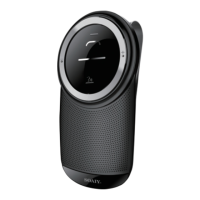
The SOAIY S-61 is a Bluetooth Hands-free Car Kit designed to enhance your driving experience by providing convenient and safe communication and entertainment options. This device allows you to manage calls, listen to music, and receive GPS directions without needing to handle your mobile phone directly.
The S-61 serves as a versatile in-car communication hub. Its primary function is to enable hands-free calling, allowing you to answer, end, or decline incoming calls with simple voice commands or button presses. The device is equipped with an HD voice microphone that ensures great sound and noise cancellation, making conversations clear even in a noisy car environment. It also supports last number redial for quick call-backs.
Beyond calls, the S-61 can connect with up to two mobile phones simultaneously, offering flexibility for users with multiple devices or for shared vehicle use. It provides voice notifications for incoming call numbers, ensuring you're aware of who's calling without looking at your phone. Voice guidance is a key feature, offering instructions for pairing and connection status updates, simplifying the setup process.
For entertainment and navigation, the S-61 allows you to play music and receive GPS directions directly from your connected mobile device, with audio automatically transferring to the S-61's speaker. This means you can enjoy your favorite tunes or follow navigation prompts through the car kit's speaker, enhancing the audio experience.
The device also integrates with mobile phone voice commands, such as Siri on iPhone or Android phone commands, allowing you to activate these features directly from the S-61. This expands its functionality, enabling a wider range of voice-controlled interactions with your smartphone.
The S-61 is designed for ease of use in a car environment. It can be easily positioned by inserting a metal clip into its back groove and then clipping it to the sun visor in your vehicle, placing it within easy reach and optimal microphone range.
Turning the device on or off is done via a simple ON/OFF slide button. For first-time use, voice guidance walks you through the pairing process with your mobile phone. Once paired, the S-61 will automatically connect to your phone whenever it's within range and Bluetooth is activated.
Pairing with another mobile phone is also straightforward. By simultaneously long-pressing the Volume + and Volume - buttons for 2.5 seconds, you can disconnect the current Bluetooth link and enter pairing mode for a second device. The device supports connecting up to 8 paired devices, with two active connections simultaneously.
Call management is intuitive: short-pressing the Answer/End button answers or ends a call, while a long press declines it. Voice commands like "YES" to answer or "NO" to decline an incoming call provide a truly hands-free experience. Double-pressing the Answer/End button redials the last number.
Volume control for the speaker is managed by long-pressing the Volume + or Volume - buttons. The Voice Command button activates your mobile phone's voice assistant.
The S-61 features automatic power ON/OFF functionality. If no mobile phone is connected in pairing state for 180 seconds, or if the Bluetooth connection is disabled and not re-established within 180 seconds, the device will automatically power off (soft off). This conserves battery life. Furthermore, the device can power on from standby mode (soft off) by detecting nearby movement, such as closing a car door, bringing it back to active mode without manual intervention.
Charging the S-61 is flexible, supporting both in-car and PC charging. For in-car charging, connect the S-61 to the included Car Charger via the USB cable, then plug the charger into your car's lighter socket. For PC charging, use the USB cable to connect the S-61 to any powered USB slot on your computer. A full charge takes approximately 3 hours.
The device provides a low battery alert, indicated by a red light flashing quickly three times every 3 seconds, prompting you to charge the unit. During charging, the red indicator glows solidly and turns off once fully charged.
To manage paired devices, you can empty the paired list of the S-61 by simultaneously long-pressing the Volume + and Volume - buttons for 5 seconds. This is useful for troubleshooting pairing issues or clearing old connections.
For long-term care, it's recommended to store the S-61 with the power off and in a protected manner. If the device is not used for an extended period, charge it at least once a month to prevent damage to the lithium battery from excessive consumption. Avoid storing the S-61 in extreme temperatures (above 45°C/113°F or below -10°C/14°F), as this can shorten battery life and degrade performance. The device should also not be exposed to rain or other liquids.
 General
| Microphone | HD Omni-directional microphone |
|---|---|
| Speaker | 3W |
| Frequency response | 150Hz~18KHz |
| Impedance | 4Ω |
| SNR | ≥70dB |
| Bluetooth version | 4.1 |
| Paired devices | Up to 8 paired devices. Two active Devices connected simultaneously |
| Pairing passkey or PIN | 0000 |
| Operating range | 10m |
| Talk time | Up to 18 hours |
| Standby time | Up to 1200 hours |
| Battery | Internal rechargeable 1000mAh Li-ion battery |
| Charging time | 3 hours |
| CLA power adapter | DC 12V input, 5V 500mAh output |
| Operating temperature | Charging 0° C to 40° C (32° F to 104° F) Discharging -10° C to 60° C (14° F to 140° F) |
 Weight and Dimensions
| Dimensions | W72xD26xH130mm |
|---|---|
| Weight | 120g including the metal clip |
| Charging plug dimensions | Micro-USB |

 To Next Page