Need help?
Do you have a question about the Sofabaton X1 and is the answer not in the manual?
Specifies the control range from the X1-Remote to the X1-Hub and from the X1-Hub to devices.
Clarifies that the infrared module is embedded in the X1-Hub, not the X1-Remote.
Confirms the X1-Remote requires the X1-Hub as it houses infrared, Bluetooth, and Wi-Fi modules.
Advises using the included blaster and extending the terminal when placing the HUB inside a cabinet.
Confirms the hub has a function to make the remote emit a beep sound for easy retrieval.
Explains the Off key is for Activity mode only to prevent TV state inconsistencies.
Troubleshooting tip: keep the X1-remote close to the hub during synchronization.
Steps to diagnose: check codebase, device power/source status, and edit program flow.
Explains real-time status recording in Activity mode vs. Device mode limitations.
Lists supported Wi-Fi devices: ROKU, SONOS, and PHILIPS HUE.
States X1 is mainly for audio/video control, not door locks or other smart home devices.
Confirms no built-in speaker, but voice control is possible via Alexa or Google Assistant.
Requires account registration for certain functions that use cloud data services.
Allows local use after initial internet-based registration and code base download.
States the X1-Hub is exclusive to the X1-remote and not compatible with Sofabaton U1.
Confirms that only one X1-Remote can be paired with a single X1-Hub.
Requires the phone app and the hub to be on the same Wi-Fi network for communication.
Steps to resolve: ensure same Wi-Fi network, then restart hub power.
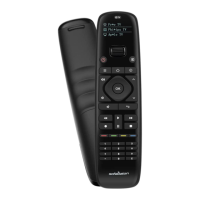
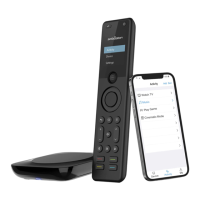
The Sofabaton X1 is a universal remote control system designed to simplify the management of various home entertainment devices. It consists of an X1-Remote and an X1-Hub, working in conjunction to provide comprehensive control over your audio and video equipment.
The primary function of the Sofabaton X1 is to consolidate the control of multiple devices into a single, intuitive remote. It achieves this by utilizing an X1-Hub, which houses infrared, Bluetooth, and Wi-Fi modules. The X1-Remote communicates with the X1-Hub, and the hub then transmits the appropriate commands to your devices, such as TVs, sound systems, and other entertainment components.
The system supports "Activity mode," which allows you to program a sequence of actions for a specific activity, such as "Watch TV" or "Listen to Music." In this mode, the system can record the real-time status of associated devices based on your settings. This means that when you initiate an activity, the X1 can automatically power on the necessary devices, switch to the correct inputs, and adjust settings as pre-configured.
For individual device control, the X1 also offers "Device mode." However, it's important to note that in Device mode, due to the one-way communication nature of infrared operations, the real-time power and source status of the device cannot be obtained by the X1. Therefore, to maintain consistency and avoid confusion within Activity settings, it is recommended to avoid switching device power or source positions in Device mode after an Activity has been created.
The Sofabaton X1 supports Wi-Fi devices, specifically ROKU, SONOS, and PHILIPS HUE, expanding its control capabilities beyond traditional infrared-controlled devices. While it does not support door locks, curtains, or other smart home devices, its focus remains on audio and video equipment.
For enhanced control, the X1 can be integrated with voice assistants like Alexa or Google Assistant, allowing for voice commands to manage your entertainment system. However, the X1 itself does not come with a built-in speaker for voice interaction.
The control range of the X1 system is approximately 30 feet from the X1-Remote to the X1-Hub, and another 30 feet from the X1-Hub to your controlled devices. This provides ample flexibility in placing your hub and using the remote within your living space.
The X1-Hub is designed to be versatile in its placement. You can even place the hub inside a cabinet, provided you use the included blaster and ensure its terminal is extended out of the cabinet for optimal signal transmission.
A convenient feature of the X1 is its remote retrieving function. If you misplace your X1-Remote, you can press a button on the hub, and the remote will emit a beep sound, helping you locate it.
To use the Sofabaton app, which is essential for setting up and managing your X1 system, you will need to register an account. This is because certain functions rely on cloud data services. While the app requires an internet connection for account registration and downloading device code bases, the X1 system can be used locally without an internet connection once the code base has been downloaded.
The X1-Hub is designed to work exclusively with the X1-Remote; it cannot be used with other Sofabaton remotes like the U1. Furthermore, each X1-Hub can only be paired with a single X1-Remote.
When connecting the Sofabaton app to the hub, it is crucial that your mobile phone is connected to the same Wi-Fi network as the hub. The app communicates with the hub via Wi-Fi to facilitate setup and configuration.
If you encounter issues with the X1-Remote not syncing, it's important to keep the remote close to the hub during synchronization to prevent interruptions in the configuration file transfer.
Should an Activity fail to start as expected, there are several troubleshooting steps you can take. First, verify the accuracy of the code base added for each device involved in the activity. Second, reconfirm that the power status and source information for each device are correctly configured. Finally, you can go into the Startup Settings within the app and edit the Program Flow to fine-tune the sequence of actions.
If the hub, which is already connected to Wi-Fi, cannot be found by the app, ensure your mobile phone is on the same Wi-Fi network as the hub. If the problem persists, try disconnecting and reconnecting the hub's power supply, and then attempt to connect again.
 General
| Battery | Rechargeable lithium-ion battery |
|---|---|
| Charging Port | USB-C |
| IR Learning | Yes |
| Connectivity | Bluetooth, IR |
| App Support | Yes (Sofabaton App) |
| Hub Required | Yes |
| Voice Control | Amazon Alexa, Google Assistant |
| Display | Touchscreen |
| Macro Commands | Yes |
| Compatibility | 6000+ Brands, Apple TV, Roku, Xbox, Kodi, Philips Hue, LIFX, Sonos, and more |

 To Next Page