EasyManua.ls Logo

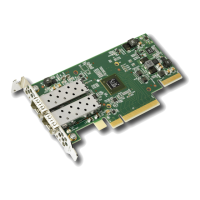
Solarflare SFN6122F - User Manual

Default Icon
375 pages
Print Icon
To Next Page IconTo Next Page
Loading...
Issue 11 © Solarflare Communications 2014 i
Solarflare Server Adapter
User Guide
Solarflare® Server Adapter User Guide
• Introduction...Page 1
• Installation...Page 18
• Solarflare Adapters on Linux...Page 39
• Solarflare Adapters on Windows...Page 109
• Solarflare Adapters on VMware...Page 236
• Solarflare Adapters on Solaris...Page 263
• SR-IOV Virtualization Using KVM...Page 307
• SR-IOV Virtualization for XenServer...Page 324
• Solarflare Adapters on Mac 0S X...Page 334
• Solarflare Boot ROM Agent...Page 344
Information in this document is subject to change without notice.
© 2008-2014 Solarflare Communications Inc. All rights reserved.
Trademarks used in this text are registered trademarks of Solarflare® Communications Inc; Adobe is
a trademark of Adobe Systems. Microsoft® and Windows® are registered trademarks of Microsoft
Corporation.
Linux® is the registered trademark of Linus Torvalds in the U.S. and other countries.
Other trademarks and trade names may be used in this document to refer to either the entities
claiming the marks and names or their products. Solarflare Communications Inc. disclaims any
proprietary interest in trademarks and trade names other than its own.
SF-103837-CD
Last revised: July 2014
Issue 11

Table of Contents

Question and Answer IconNeed help?

Do you have a question about the Solarflare SFN6122F and is the answer not in the manual?

Summary

Chapter 2: Installation

Chapter 3: Solarflare Adapters on Linux

Installing Solarflare Drivers and Utilities on Linux

Details the installation process for Solarflare drivers and utilities on Linux using DKMS or source RPMs.

Unattended Installation - Red Hat Enterprise Linux

Details preparing a Red Hat Enterprise Linux network installation using Kickstart for unattended setup.

Chapter 4: Solarflare Adapters on Windows

Installing the Solarflare Driver Package on Windows

Details the process of installing the Solarflare driver package on Windows, including command-line installation.

Managing Adapters with SAM

Introduces the Solarflare Adapter Manager (SAM) for managing adapters, teams, and VLANs.

Chapter 5: Solarflare Adapters on VMware

Installing Solarflare Drivers and Utilities on VMware

Details installing drivers and utilities on VMware ESX, ESXi, and vSphere platforms.

Chapter 6: Solarflare Adapters on Solaris

Installing Solarflare Drivers

Details the installation process for Solarflare drivers on Solaris using binary packages.

Chapter 7: SR-IOV Virtualization Using KVM

Chapter 8: SR-IOV Virtualization for XenServer

Installation

Details platform support, installation of XenTools and Solarflare SR-IOV drivers, and firmware updates.

Chapter 9: Solarflare Adapters on Mac OS X

Chapter 10: Solarflare Boot ROM Agent

Solarflare SFN6122F Specifications

General IconGeneral
Product TypeNetwork Adapter
Interface TypePCI Express 2.0 x8
Data Rate10 Gbps
Form FactorLow Profile
Data Link Protocol10 Gigabit Ethernet
Connectivity TechnologyWired
ComplianceRoHS
Operating Temperature0°C to 55°C
Storage Temperature-40°C to 70°C
Humidity10% to 90% non-condensing
Supported ProtocolsEthernet
FeaturesVLAN support, Low Latency
Compliant StandardsIEEE 802.3ae

Related product manuals