11 ©2014, SolidSignal.com Reproduction is permitted provided copyright information is intact.
The next step is installing the DECA Broadband. The DECA Broadband provides a
link between all your receivers and the internet. It should be located in a room where
there is an ethernet line, either directly into the home router or into a switch.
This procedure is for the wired DECA Broadband; the wireless Cinema Connection Kit
will be covered later. If you have a Genie DVR and wish to use it in place of a DECA
Broadband, that will also be covered later.
You will need the following:
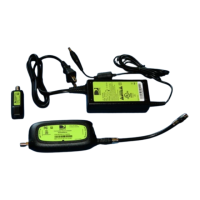
DIRECTV Cinema Connection Kit (DECABB1R0) from Solid Signal)
The easiest way to connect a DECA Broadband is to come from an open port on a
splitter into the coax connection on the DECA Broadband. Connect the ethernet cable
from the DECA Broadband to the router or switch, and plug the power supply into a
wall outlet.
If you have no open ports on your splitter, you can use the following parts as well:
Solid Signal Custom Cable Lengths RG6 with (two short cables if needed)
NAS STD-9501M Satellite / O Air Diplexer Power Passing (STD-9501)
Connect the DECA Broadband to the TV port of the STD-9501M. Connect the line from
your dish or multiswitch to the Cable/Sat port. Then connect the DECA Broadband to
your router or switch, and plug it in to a wall outlet. Connect the output line from the
STD-9501M to the input of the splitter.
The advantage of this method is that you may be able to avoid using a larger splitter
which would potentially cause signal loss. Remember, we always want to use the
smallest possible splitter.
The following diagram shows the proper installation options for a DECA Broadband.
INSTALLING THE DECA BROADBAND


 To Next Page
 Loading...