Project: Coax Networking
DOCUMENT DATE: January, 2014
©2014, SolidSignal.com Reproduction is permitted as long as copyright information is intact.
©2014, SolidSignal.com Reproduction is permitted as long as copyright information is intact.
Connecting your coax network to your internet connection
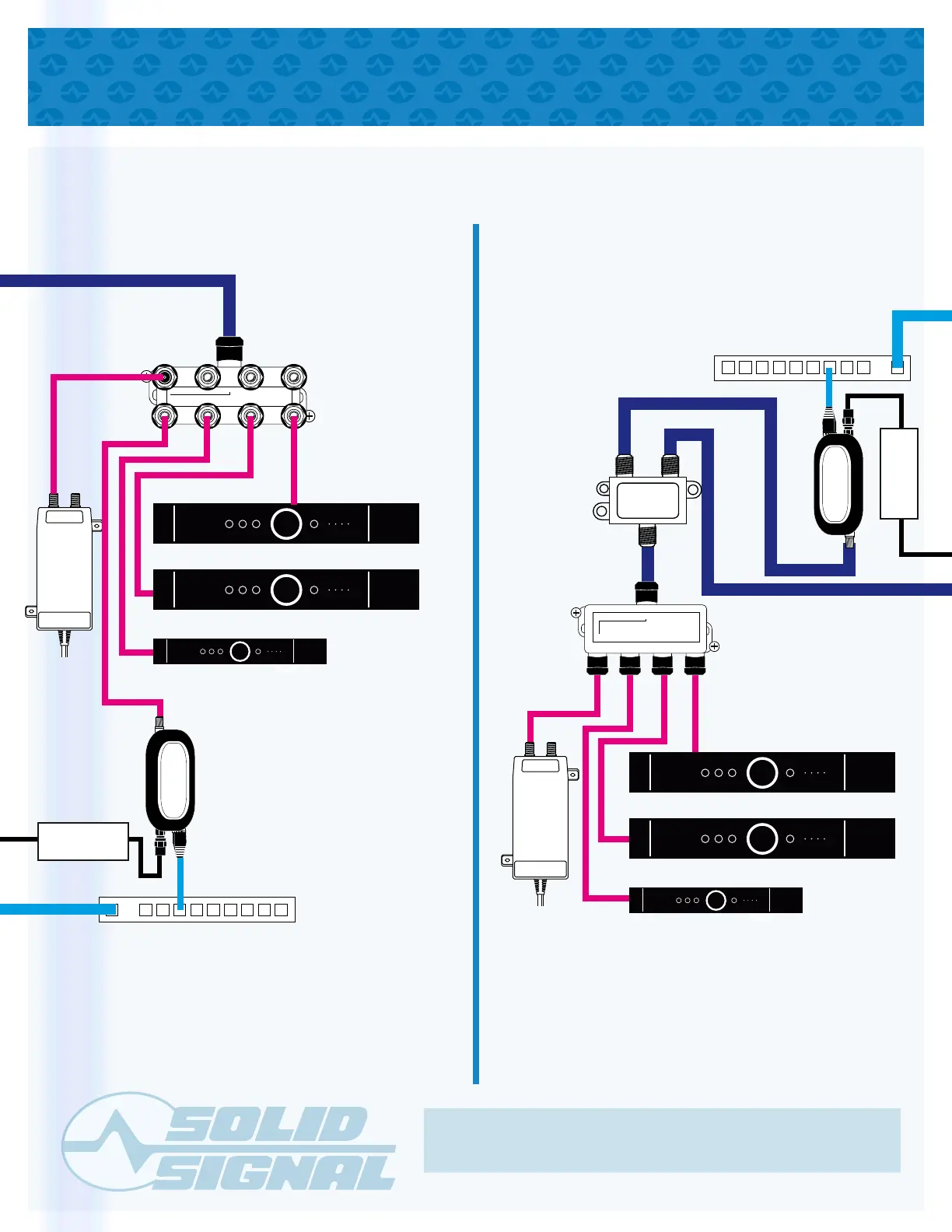
INSTALLING A DECA BROADBAND
OPTION 1: OPTION 2:
Power inserter
line must come
from red port
on splitter.
To
AC
power
To
AC
power
Power inserter
line must come
from red port
on splitter.
Connect DECA Broadband
to home internet
Connect DECA Broadband
to home internet
Line from Dish or multiswitch
Use the smallest splitter possible.
Terminate all unused connections.
Attach
DECA Broadband
to “TV” port
on diplexer
Some wiring and items have been omitted from this diagram in the interest of clarity. Consult other diagrams for satellite wiring.
NAS 9501-M
5-800 MHz
TV
850-2150 MHz
SAT -DC
IN
OUT OUT OUTOUT
OUT OUT OUTOUT
DIRECTV
DIRECTV
DIRECTV
DIRECTV
SIGNAL
TO IRD
POWER
TO SWM
Stand-Alone SWM Module Only
SWIM
DIRECTV
DIRECTV
DIRECTV
DIRECTV
DIRECTV
SIGNAL
TO IRD
POWER
TO SWM
Stand-Alone SWM Module Only
SWIM
DIRECTV
IN
OUT OUT OUT OUT
DC POWER PASS
DIRECTV
CONNECTED HOME
ADAPTER
EPS10
Power Adapter
DIRECTV
CONNECTED HOME
ADAPTER
EPS10
Power Adapter


 To Next Page
 Loading...