Detailed App Instructions
21
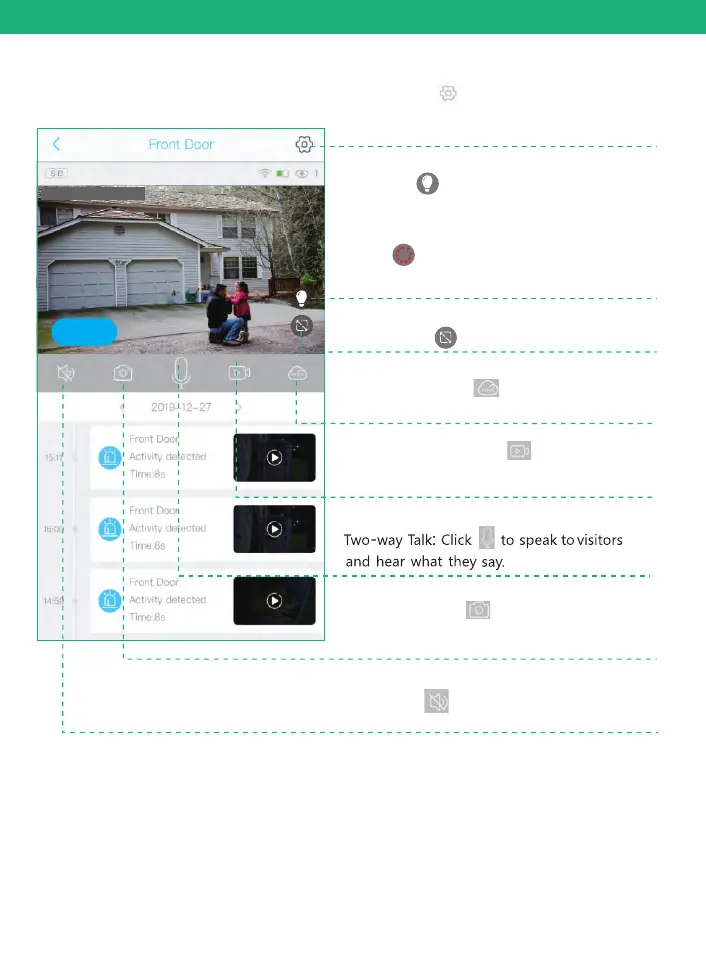
Screenshot: Click to screen capture
and pictures will be saved to your phone's
album.
Manual Recording: Click to manually
record and the videos will be saved to
your phone's Album
Voice: Click to mute the sounds from
the camera.
Cloud storage: Click to playback videos
saved in cloud storage.
Setting: Click to enter into device
settings. ( Check page 21 for more
details)
Click the icon to switch to full screen play
This icon “ ” is to turn on the spot light during
night. The spot light will turn on to record a starlight
color video clip when there's motion detected by
the camera. You can click it to switch to infrared
LEDS “ ” night vision mode to disable spot
light.Camera will record motion in black and white
video mode.
2019-12-27 15:00:36
Online


 To Next Page