
 Need help?
Do you have a question about the Solon HD Video Doorbell MKII and is the answer not in the manual?
Device requires a 2.4GHz WiFi connection and is not compatible with 5.0GHz networks.
It's recommended to set up the doorbell and chime with the app before physical installation.
Identifies key components and ports of the doorbell unit and its rear connections.
Details how to access the TF card slot and Micro USB port by removing the waterproof cover.
Instructions on downloading the Tuya Smart app and creating a user account.
Steps to add the doorbell, connect to WiFi, and complete pairing using the QR code.
Steps to plug in the chime, select volume, and pair it with the doorbell.
Warning about sealed batteries and instructions for charging via USB.
Information on approximate charging time and how the indicator light functions.
Overview of adhesive/screw mounting and warnings about metal surfaces.
Step-by-step instructions for mounting the doorbell using adhesive sticker or screws.
Guides for using the angled bracket and a warning about professional installation for hardwiring.
Overview of app sections, accessing live view, and control panel icons.
Managing notifications, viewing past footage, and sharing clips or device access.
Instructions for factory reset, noting potential data loss.
Steps to remove the doorbell from the app, clearing settings and app footage.
Adjusting PIR sensitivity, human body filtering, and offline notifications.
Setting low battery level alerts for charging reminders.
Information on optional services and advanced features like home automation.
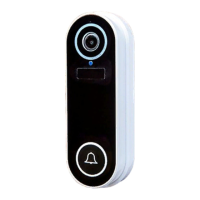
The HD Video Doorbell MKII is a smart home security device designed to enhance the safety and convenience of your home. It functions as a video doorbell, allowing you to see, hear, and speak to visitors from anywhere using your smartphone. The device comes with a quick start guide for easy installation, setup, and daily use, making it accessible for users of all technical levels.
The primary function of the HD Video Doorbell MKII is to provide real-time video and audio communication with visitors at your door. When the doorbell is pressed, or motion is detected, it sends notifications directly to your smartphone via the Tuya Smart app. This allows you to view a live feed of your doorstep, engage in two-way conversations with visitors, and even sound an alarm if necessary. The doorbell integrates with a plug-in chime for traditional household alerts, ensuring you don't miss a visitor even if your phone isn't immediately accessible.
The doorbell captures footage and stores it on an inserted 32GB SD card, which comes pre-installed. This local storage ensures that recordings are kept even without cloud services. The app provides a timeline view of captured footage, allowing you to easily navigate through different dates and times to review events. You can also take screenshots and record live footage directly from the app, saving them to your phone's library or the app's album for later sharing.
For advanced users, the Tuya Smart app offers sophisticated features like home automation, cloud storage, and integration with Alexa/Google. While these features are not essential for day-to-day doorbell operation, they provide opportunities for a more integrated smart home experience. The device is designed to work with 2.4Ghz Wi-Fi networks, ensuring compatibility with most home setups.
Setting up the HD Video Doorbell MKII involves downloading the Tuya Smart app, creating an account, and pairing the doorbell with the app. The pairing process is straightforward: after selecting 'Smart Doorbell' in the app, you press and hold the ON button on the doorbell until a blue light flashes, then slowly flashes red. The app then guides you to enter your Wi-Fi details and scan a QR code with the doorbell's camera. A tone indicates successful pairing, after which you can name your doorbell.
The plug-in chime offers five volume options, including a silent mode, and 52 different melodies. Pairing the chime with the doorbell is simple: plug in the chime, select your desired volume and melody, then press and hold the volume button until the light stays blue. Within five seconds, press the ring button on the doorbell to complete the pairing. For optimal performance, it's recommended to install the doorbell and chime within 20 feet of each other.
The doorbell can be mounted using either an adhesive sticker for smooth surfaces or screws for brick walls, wood, and concrete. An angled mounting bracket is also provided for angled walls. It's important to avoid installing the doorbell on metal surfaces, as this can interfere with the camera's wireless signal. After physical installation, a security screw is affixed to the base to secure the doorbell to its bracket.
The app's live view and control panel allow you to access various functions. The 'Screenshot' feature saves the current view to your app album, while 'Speak' enables two-way conversations. 'Record' captures the current view to your app album, and 'Playback' provides a timeline of captured footage. The 'Buzzer' function allows you to sound an alarm from the doorbell, and the 'Album' section stores saved footage that can be shared or saved to your phone library.
Notifications are a key feature, alerting you to doorbell presses or motion detection. Clicking on these notifications in the app's message centre provides a preview and allows you to access the live view to communicate with visitors in real-time. The app also allows you to share device access with others, enabling them to view footage without being able to edit settings.
The HD Video Doorbell MKII is powered by two long-life 18650 lithium-ion batteries, which, on a full charge, can provide up to six months of continuous usage, depending on activation and connection frequency. The batteries are sealed within the unit and controlled by an On/Off switch, and users are advised not to attempt to access them.
When charging is required, simply remove the doorbell from its bracket by removing the security screw. The device is charged using the provided micro USB cable connected to its side port and a suitable 5V/2A power supply. A full charge takes approximately four hours, and a blue light flashes during charging. The app displays the current battery percentage, allowing you to monitor its charge level at your convenience.
The doorbell can be reset by pressing and holding the reset button on the rear until a tone is heard. This will re-enter pairing mode. While SD card footage remains, any footage within the app will be lost, so it's advisable to back up or save important clips to your phone library beforehand. If you wish to completely remove the doorbell from the app, selecting 'Remove Device' in the settings will clear all footage and settings from the app, though SD card footage will still remain.
Recommended settings within the app help optimize performance and battery life. Adjusting the PIR (Passive Infrared) sensitivity level to low or medium can prevent false alerts. Enabling 'human body filtering' in Detection Alarm Settings ensures that only humans trigger alerts, reducing notifications from animals or vehicles and conserving battery. Setting a low battery level notification in Power Management Settings reminds you to charge the device, and turning on 'Offline Notification' alerts you if the doorbell loses signal for more than 30 minutes.
For those interested in hardwiring the doorbell to an existing mains wired doorbell, the necessary wires and screws are provided. However, this process should only be carried out by a professional electrician, as formal installation guidance is not provided in the manual. Further information can be found in the online FAQ.
 General
| Field of View | 160 degrees |
|---|---|
| Two-Way Audio | Yes |
| Operating Temperature | -20°C to 50°C |
| Power Source | Hardwired or Battery |
| Weather Resistance | IP65 |
| Video Resolution | 1080p |
| Connectivity | Wi-Fi 2.4GHz |
| Compatibility | iOS and Android |
| Night Vision | Infrared (IR) LEDs, up to 25 feet |

 To Next Page