16 17
Other Settings
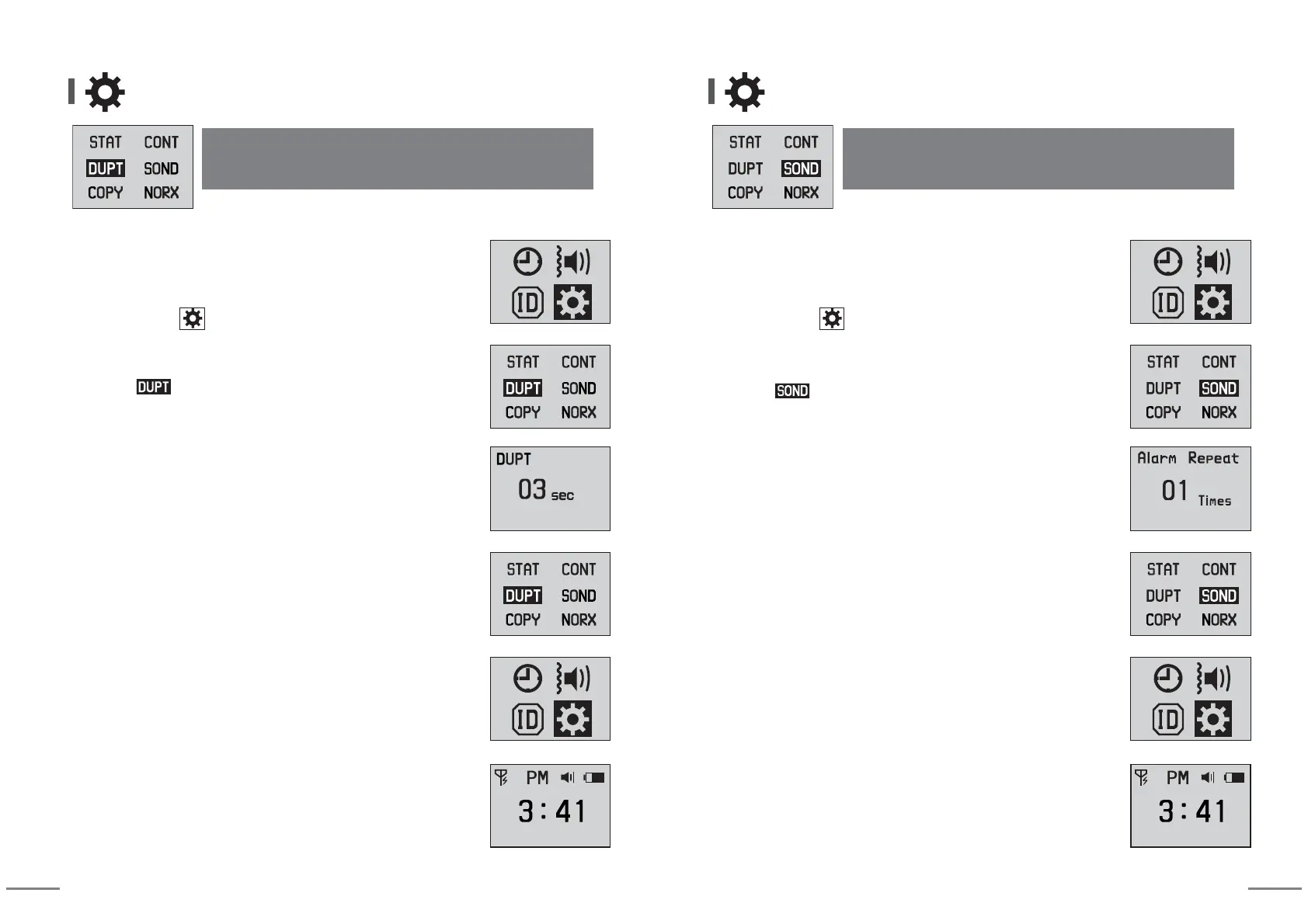
(When receiving same calling numbers, it allows only one
reception during set time period.)
⑶ Duplicated receiving prevention time
④
Set desired value using arrow keys.
Initial setting value is [03] and 3 seconds (setting range: 00~99).
(When receiving same calling numbers for 3 seconds, it is displayed
only once.)
⑤ When you press SET button for more than 2 seconds,
storing is completed and returns to previous stage.
⑦
When you press MODE button for more than 2 seconds,
idle screen is displayed.
⑥ When pressing SET button for more than 2 seconds,
it returns to previous stage.
③ Move to mode using arrow keys and enter into change
mode by pressing SET button.
② After moving to using arrow keys, enter into setting mode
by pressing SET button.
① You can enter into Setting Mode by pressing MODE button
for more than 2 seconds at idle screen.
Other Settings
(It is a function that sets repeated numbers of sound or
vibration for calls.)
⑷ Number of call alarm repetition
⑤ When you press SET button for more than 2 seconds,
storing is completed and returns to previous stage.
⑦
When you press MODE button for more than 2 seconds,
idle screen is displayed.
⑥ When pressing SET button for more than 2 seconds,
it returns to previous stage.
④
Set desired value using arrow keys.
ㆍInitial setting value is [01] and it means one time notification against a call.
(setting range: 00~99)
ㆍ
When setting as [00], receiving notification is repeated continuously,
and when pressing any button, receiving notification stops.
③ Move to mode using arrow keys and enter into change
mode by pressing SET button.
② After moving to using arrow keys, enter into setting mode
by pressing SET button.
① You can enter into Setting Mode by pressing MODE button
for more than 2 seconds at idle screen.


 To Next Page
 Loading...