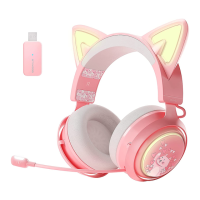
Power On/Off
In the off state, long press the power button for 2 seconds, the
headset will automatically turn on.
In the power-on state, press and hold the power button for 3
seconds, the headset will automatically turn off.
Audio Mode Switch
Short press the “mode” button once to switch the sound effect
mode.
Green light: Gaming Mode/ White light: Music Mode/ Blue light:
Live Mode
Music Pause/Play
Short press the power button once to pause/play the music.
Call Mode
When a call comes in, short press the power button once to
answer the call.
When a call comes in, short press the power button twice to reject
the call.
During a call, short press the power button once to hang up the
call.
Light On/Off
Three-click the lighting touch key to turn on/off the headset light.
Light Color Switch
Press the lighting touch key for 2 seconds to switch the light color.
Charge
1. When the headset is charging, the battery indicator shows a
solid orange light.
When the headset is fully charged, the battery indicator
shows a solid green.
2. When the power of the headset is less than 10%, the headset
will emit a "Please Charge" prompt, please charge it in time.


 To Next Page