EasyManua.ls Logo

Sonance VC60R - User Manual

Sonance VC60R
2 pages
Print Icon
To Next Page IconTo Next Page
Loading...
INTRODUCTION
Thank you for purchasing a Sonance
®
volume control.The VC60R/S
are both UL Listed and CE approved.Sonance also offers the largest
selection of high fidelity in-wall/in-ceiling speakers in the world.
Consult Sonance literature or your Authorized Sonance Dealer for
more information on the wide variety of speakers, amplifiers,
switchers, controls, cable, and other custom installation products
available from Sonance.
Please read these instructions carefully before connecting this
device to your system. If connections are made incorrectly you may
damage your amplifier/receiver.
IMPORTANT NOTE: TURN YOUR AMPLIFIER/RECEIVER OFF
BEFORE ATTEMPTING THE FOLLOWING HOOK-UP
PROCEDURES.
VC60R/S APPLICATIONS
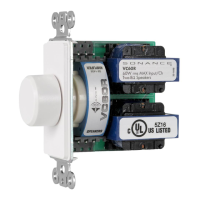
The VC60R is a rotary volume control. The volume can be
controlled by turning the knob clockwise to increase volume and
counterclockwise to decrease volume. This 12 position rotary knob
incorporates light touch and silent switching capabilities. The
slider volume control,VC60S,controls volume by sliding the switch
up to increase volume and down to decrease volume. The slider
also displays 12 volume positions with silent switch action. The
VC60S and VC60R both contain easy screw in quick disconnectors
and can safely handle 60 watts per channel of power.
WIRING AND PLACEMENT
DO NOT mount the volume control in the same
electrical box with AC house wiring,light switches,dimmers,or any
other high voltage device or control. The VC can share gang boxes
with other low voltage controls such as A/B speaker switches,
infrared receivers and emitters, and other volume controls if these
other devices are rated as Class 2 devices by the National Electrical
Code. With 14-18 gauge cable, wire the volume control between a
single pair of speakers and the amplifier powering those speakers.
Run four 14-18ga. wires for carrying speaker signals (L+, L-, R+,
and R-) from the amplifier, through the walls or ceiling, to the
volume control. We recommend high quality wire like Sonance
MediaLinQ
®
. If using free standing speakers, run the wire through
the wall or ceiling to a convenient location near the speaker and
terminate it with a Sonance FielDress
series system terminator or
other audio jack.
WARNING: TO PREVENT THE RISK OF FIRE OR
ELECTRIC SHOCK, DO NOT EXPOSE THIS APPLIANCE TO
RAIN OR MOISTURE
INSTALLATION FOR VC60R/S (SEE DIAGRAMS 1 AND 2)
1. Once the speaker wires have been run, install a standard light
switch plaster ring or J-box that is 3-1/2" in depth,available from an
electrical supply source.
2. TURN THE AMPLIFIER/RECEIVER POWER OFF.
Then connect the left or Channel-A speaker output, of the
amplifier/receiver, to the left screw-to-connect input terminals of
the volume control, observing proper polarity. For example
connect L+ of the amplifier to L+ of the VC, and L- to L-
(see diagrams 1 and 2).
3. Repeat step 2 for the right or Channel-B speaker output.
4. Connect the left speaker wires to the left or Channel-A
output terminals of the volume control. Check proper polarity of
wires for correct speaker phase. For example connect the +
terminal of the speaker to the + VC output, and - to - (see
diagrams 1 and 2).
5. Repeat step 4 for the right or Channel-B speaker connection.
MOUNTING THE CONTROLS:
Once the unit has been wired, attach it to a standard light switch
plaster ring or J-box. Use the included screws to attach the volume
control to the electrical box. Attach the wallplate
to the control using the screws provided. DO NOT OVER-
TIGHTEN THE PLATE SCREWS OR YOU MAY DAMAGE THE
PLATE. Finally, with the rotary VC attach the knob onto the
control shaft. With the slider VC, please note vertical
orientation of VC by noting marking of "TOP" on circuit board for
proper vertical orientation during installation. (See Diagram 3)
OPERATION
Determine the maximum volume you wish to feed to the rooms in
which you have volume controls and speakers. With your house
music source (amplifier/receiver) turned down, turn the volume
control(s) all the way up.Feed the amplifier/receiver a strong music
signal, then gradually increase the amplifier/ receiver volume until
the volume in the room(s) is as loud as you are likely to ever listen.
Take particular care that no audible distortion is heard through
your speakers or speaker damage will occur. If you are using an
amplifier with input level controls, such as the Sonance Sonamp
®
series amplifiers, adjust the level controls appropriately. Then
return to the rooms with volume controls and lower the volume
settings to normal listening levels.Setting the maximum volume in
this way will ensure safe operation for speakers and amplifiers. If
you think there should be sound coming from your speakers but do
not hear anything when the VC is turned all the way up, DO NOT
leave it in the full ON position when checking your sources or
source material. Otherwise there may be a startling increase in
volume when the problem is remedied, and speaker damage
may occur.
SPECIFICATIONS
Power Rating: 60 Watts RMS MAX INPUT/CH
Switch Type: VC60S 12 Position light touch slide switch with silent
slide action
VC60R 12 Position light touch silent rotary switch
Terminal Type: Screw quick disconnect 20-14 AWG wire capacity
Frequency Response: 20-20KhZ ±1dB
Speaker Impedance: 8
Dimensions (WxHxD) VC60S: 1-5/8" x 4" x 3"
(41mm x 102mm x 76mm)
VC60R: 1-1/2" x 4" x 3"
(38mm x 102mm x 76mm)
INSTALLATION INSTRUCTIONS
VC60R/S ROTARY/SLIDER IN-WALL
STEREO VOLUME CONTROL
PN.33-1518 12.98
1

Question and Answer IconNeed help?

Do you have a question about the Sonance VC60R and is the answer not in the manual?

Summary

Introduction and Product Overview

Product Applications

Details on the VC60R rotary and VC60S slider volume controls and their capabilities.

Wiring and Placement Guidelines

Safety Warning: Electrical Hazards

Critical warning to prevent fire or electric shock by avoiding moisture exposure.

Installation and Operation

Installation Steps

Procedure for installing the volume control, connecting speaker wires, and observing polarity.

Mounting Controls

Instructions for attaching the control to the electrical box and wallplate, including knob installation.

Proper Operation

Guidance on setting maximum volume levels safely to prevent distortion or equipment damage.

Product Specifications

Technical Assistance and Service

Obtaining Service

Procedure for requesting product repair or service, including necessary information.

Warranty and Compliance

Warranty Coverage Details

Information on warranty terms, exclusions, limitations, and legal rights in the USA.

Declaration of Conformity

Statement of compliance with technical standards for the product.

Summary

Introduction and Product Overview

Product Applications

Details on the VC60R rotary and VC60S slider volume controls and their capabilities.

Wiring and Placement Guidelines

Safety Warning: Electrical Hazards

Critical warning to prevent fire or electric shock by avoiding moisture exposure.

Installation and Operation

Installation Steps

Procedure for installing the volume control, connecting speaker wires, and observing polarity.

Mounting Controls

Instructions for attaching the control to the electrical box and wallplate, including knob installation.

Proper Operation

Guidance on setting maximum volume levels safely to prevent distortion or equipment damage.

Product Specifications

Technical Assistance and Service

Obtaining Service

Procedure for requesting product repair or service, including necessary information.

Warranty and Compliance

Warranty Coverage Details

Information on warranty terms, exclusions, limitations, and legal rights in the USA.

Declaration of Conformity

Statement of compliance with technical standards for the product.

Overview

The Sonance VC60R/S is a series of in-wall stereo volume controls designed for managing audio output to speakers in various rooms. Both models, the VC60R (rotary) and VC60S (slider), are UL Listed and CE approved, ensuring compliance with safety and quality standards. These controls are part of Sonance's broader range of custom installation products, which also includes speakers, amplifiers, switchers, and cables.

Function Description

The primary function of the VC60R/S is to provide localized volume adjustment for a pair of speakers connected to an amplifier or receiver. This allows users to control the sound level in a specific room independently of the main audio source. The controls are designed to be integrated into standard light switch plaster rings or J-boxes, blending seamlessly with typical wall installations. They are specifically designed for low-voltage applications and should not be installed in the same electrical box as AC house wiring, light switches, dimmers, or other high-voltage devices. However, they can share gang boxes with other Class 2 low-voltage controls like A/B speaker switches or infrared receivers/emitters.

Important Technical Specifications

  • Power Rating: 60 Watts RMS MAX INPUT/CH. This indicates the maximum power per channel the device can safely handle, making it suitable for a wide range of home audio systems.
  • Switch Type:
    • VC60S: 12 Position light touch slide switch with silent slide action.
    • VC60R: 12 Position light touch silent rotary switch.
  • Terminal Type: Screw quick disconnect 20-14 AWG wire capacity. This feature simplifies wiring and ensures secure connections for various cable gauges.
  • Frequency Response: 20-20KhZ ±1dB. This wide frequency response ensures that the volume control does not significantly alter the audio signal quality across the audible spectrum.
  • Speaker Impedance: 8Ω. This is a standard impedance for most home audio speakers, ensuring compatibility with a broad range of speaker types.
  • Dimensions (WxHxD):
    • VC60S: 1-5/8" x 4" x 3" (41mm x 102mm x 76mm).
    • VC60R: 1-1/2" x 4" x 3" (38mm x 102mm x 76mm). These compact dimensions allow for easy installation in standard wall boxes.

Usage Features

  • Volume Control:
    • VC60R (Rotary): Volume is controlled by turning a knob clockwise to increase and counterclockwise to decrease. It features 12 distinct positions with light touch and silent switching.
    • VC60S (Slider): Volume is controlled by sliding a switch up to increase and down to decrease. It also displays 12 volume positions and offers silent switch action.
  • Easy Installation: The controls feature easy screw-in quick disconnectors for speaker wire connections. Installation involves running speaker wires from the amplifier/receiver to the volume control, and then from the volume control to the speakers. Proper polarity must be observed during wiring to ensure correct speaker phase.
  • Mounting: The unit attaches to a standard light switch plaster ring or J-box using included screws. A wallplate (also attached with screws) covers the control. Users are cautioned not to overtighten plate screws to avoid damage. For the VC60S, vertical orientation is important, indicated by a "TOP" marking on the circuit board.
  • Operation Guidelines: To ensure safe operation and prevent speaker damage, users should first determine the maximum desired volume. With the main amplifier/receiver volume turned down, the volume control(s) should be turned all the way up. Then, a strong music signal should be fed to the amplifier/receiver, and its volume gradually increased until the room(s) reach the loudest desired level without audible distortion. If using an amplifier with input level controls (e.g., Sonance Sonamp series), these should be adjusted appropriately. After setting the maximum volume, the room volume controls can be lowered to normal listening levels. This procedure ensures that speakers and amplifiers operate within safe limits. Users are also advised not to leave the VC in the full ON position when troubleshooting a lack of sound, as a sudden increase in volume could cause damage once the problem is resolved.

Maintenance Features

  • Durability: The VC60R/S units are designed for long-term reliability, backed by a five-year warranty in the USA covering defects in workmanship or material.
  • Warranty Coverage (USA Only): Sonance offers a five-year warranty from the date of purchase, covering repair or replacement of defective components at no charge. This warranty is valid only if the unit was purchased from an "Authorized Sonance Dealer" and is for original purchasers for non-industrial or commercial use. It does not cover damage from accident, abuse, misuse, unauthorized modification/repair, or failure to follow operating instructions.
  • Technical Assistance: Sonance provides technical assistance via phone for questions regarding operation or installation.
  • Obtaining Service: If a unit requires repair, users are instructed to contact Sonance's Technical Assistance Department to obtain a Return Authorization Number before shipping the unit. Units should be packed in their original shipping carton (replacements available if needed) and shipped prepaid (not collect). The Return Authorization Number must be written on the outside of the carton, and a copy of the original bill of sale included for warranty work.

The Sonance VC60R/S series offers a robust and user-friendly solution for multi-room audio control, emphasizing ease of installation, reliable performance, and safety for connected audio equipment.

Sonance VC60R Specifications

General IconGeneral
BrandSonance
ModelVC60R
CategoryController
LanguageEnglish