8
Cambridge
Audio
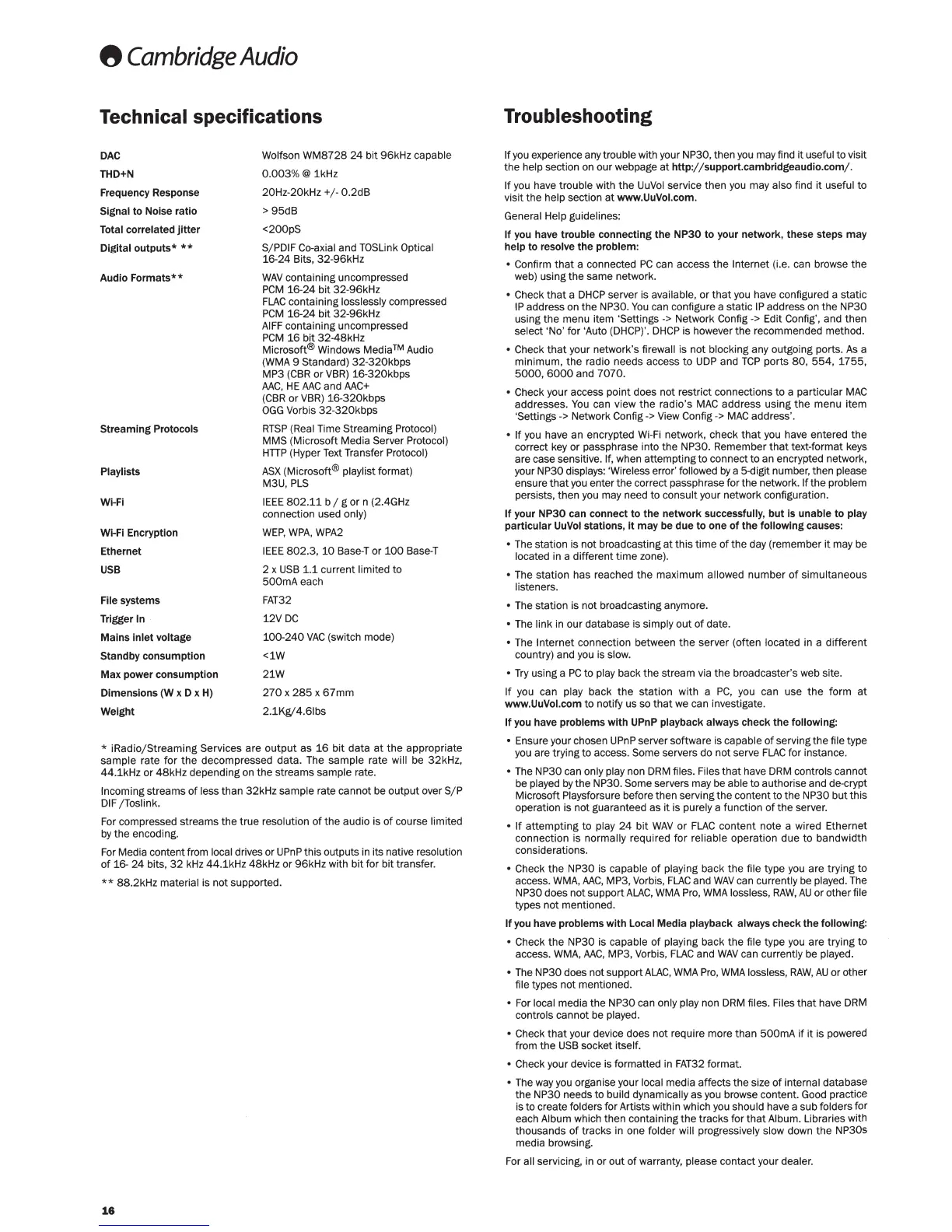
Technical specifications
DAC
THD+N
Frequency Response
Signal
to
Noise
ratio
Total correlated
jitter
Digital
outputs*
**
Audio
Formats**
Streaming
Protocols
Play lists
WI-FI
Wi-Fi Encryption
Ethernet
USB
File systems
Trigger
In
Mains
inlet
voltage
Standby
consumption
Max
power
consumption
Dimensions
(W x D x H)
Weight
Wolfson
WM8728
24
bit
96kHz capable
0.
003%@
1kHz
20Hz-20kHz+/-
0.2dB
>95dB
<200pS
S/ PDIF Co-axial
and
TOSLink Optical
16-24
Bits,
32-96kHz
WAV
containing uncompressed
PCM
16-24
bit
32-96kHz
FLAC
containing losslessly compressed
PCM
16-24
bit
32
-
96kHz
AIFF
containing uncompressed
PCM
16
bit
32-48kHz
Microsoft®
Windows
Media™
Audio
(WMA 9 Standard)
32-320kbps
MP3
(CBR
or
VBR)
16-320kbps
AAC
,
HE
AAC
and
AAC+
(CBR
or VBR)
16-320kbps
OGG
Vorbis
32-320kbps
RTSP
(Real Time Streaming Protocol)
MMS (Microsoft Media Server Protocol)
HTTP
(Hyper Text Transfer Protocol)
ASX
(Microsoft® playlist format)
M3U,
PLS
IEEE
802.11
b / g
or
n (2.4GHz
connection used
only)
WEP
,
WPA,
WPA2
IEEE
802
.3,
10
Base-l
or
100
Base-l
2 x
USB
1.1 current limited
to
500mAeach
FAT32
12VDC
100-240
VAC
(switch mode)
<1W
21W
270
x
285
x
67mm
2.1Kg/4.61bs
*
iRadio/Streaming
Services are
output
as
16
bit
data
at
the
appropriate
sample
rate
for
the
decompressed
data
. The
sample
rate will be
32kHz
,
44
.1kHz
or
48kHz
depending on
the
streams
sample rate.
Incoming streams
of
less
than
32kHz
sample rate
cannot
be
output
over
S/P
DIF
/Toslink
.
For compressed streams
the
true
resolution
of
the
audio
is
of
course limited
by
the
encoding.
For Media content from
local drives or UPnP this outputs in its native resolution
of
16-
24
bits,
32
kHz
44
.1kHz
48kHz
or
96kHz
with
bit
for
bit
transfer.
**
88
.2kHz material is
not
supported.
16
Troubleshooting
If
you experience any trouble with your NP30, then you may find
it
useful to visit
the
help section on
our
webpage
at
http
:/
;support.cambridgeaudio
.
com/
.
If
you have trouble with
the
UuVol service
then
you may also find
it
useful
to
visit
the
help section
at
www.UuVol.
com
.
General Help guidelines:
If
you have
trouble
connecting
the
NP30
to
your
network
, these steps
may
help
to
resolve
the
problem
:
• Confirm
that
a connected
PC
can access
the
Internet (i.e. can browse
the
web) using
the
same network.
• Check
that
a
DHCP
server is available,
or
that
you have configured a static
IP
address on
the
NP30.
You
can configure a
static
IP address on
the
NP30
using
the
menu item 'Settings
->
Network Config -> Edit Con fig', and
then
select
'No' for 'Auto (DHCP)'.
DHCP
is however
the
recommended method.
• Check
that
your network's firewall is
not
blocking any outgoing
ports
.
As
a
minimum,
the
radio needs access
to
UDP
and
TCP
ports
80,
554,
1755,
5000
,
6000
and
7070.
• Check your access
point
does
not
restrict connections
to
a
particular
MAC
addresses.
You
can view
the
radio's
MAC
address
using
the
menu
item
'
Settings->
Network Config
->View
Config
->
MAC
address'.
•
If
you have
an
encrypted Wi-Fi network,
check
that
you have entered
the
correct key or passphrase into
the
NP30
. Remember
that
text-format keys
are case sensitive.
If, when
attempting
to
connect
to
an encrypted network,
your NP30 displays: 'Wireless error' followed
by
a 5-digit number, then please
ensure
that
you enter
the
correct pass phrase for the network.
If
the
problem
persists,
then
you may need
to
consult
your network configuration.
If
your
NP30
can
connect
to
the
network
successfully,
but
is
unable
to
play
particular
UuVol stations,
it
may
be
due
to
one
of
the
following
causes:
• The station is
not
broadcasting
at
this
time
of
the
day (remember
it
may be
located in a different
time
zone).
• The
station
has reached
the
maximum
allowed
number
of
simultaneous
listeners.
•
The station is
not
broadcasting anymore.
• The
link
in
our
database is simply
out
of
date
.
• The
Internet
connection between
the
server (often located in a
different
country) and you is slow.
•
Try
using a
PC
to
play back
the
stream via
the
broadcaster's web site.
If
you can play
back
the
station
with a
PC
, you can use
the
form
at
www
.UuVol.com
to
notify us so
that
we can investigate.
If
you have
problems
with
UPnP playback always
check
the
following:
• Ensure your chosen UPnP server software is capable
of
serving
the
file type
you are trying
to
access. Some servers
do
not
serve
FLAC
for instance.
• The
NP30
can only play non DRM files. Files
that
have DRM controls cannot
be played
by
the
NP30. Some servers may be able
to
authorise and de-crypt
Microsoft Playsforsure before
then
serving
the
content
to
the
NP30
but
this
operation is
not
guaranteed
as
it
is purely a
function
of
the
server.
•
If
attempting
to
play
24
bit
WAV
or
FLAC
content
note a wired
Ethernet
connection
is normally required
for
reliable
operation
due
to
bandwidth
considerations.
• Check
the
NP30 is capable
of
playing back
the
file type you are
trying
to
access. WMA,
AAC,
MP3, Vorbis,
FLAC
and
WAV
can currently be played. The
NP30
does
not
support
ALAC
,
WMA
Pro, WMA lossless,
RAW
,
AU
or
other
file
types
not
mentioned.
If
you have
problems
with
Local
Media
playback
always
check
the
following
:
• Check
the
NP30 is capable
of
playing back
the
file type you are
trying
to
access. WMA,
AAC,
MP3, Vorbis,
FLAC
and
WAV
can currently be played.
• The NP30 does
not
support
ALAC,
WMA
Pro,
WMA
lossless,
RAW,
AU
or other
file types
not
mentioned.
• For local
media
the
NP30
can only play non DRM files. Files
that
have DRM
controls cannot be played.
• Check
that
your device does
not
require
more
than
500mA
if
it
is powered
from
the
USB socket
itself
.
• Check your device is formatted in
FAT32
format
.
• The way you organise your local media
affects
the
size
of
internal database
the
NP30
needs
to
build dynamically
as
you browse content. Good practice
is to create folders
for
Artists within which you should have a sub folders
for
each Album which
then
containing
the
tracks
for
that
Album. Libraries with
thousands
of
tracks in one folder will progressively slow down
the
NP30s
media browsing.
For all servicing, in or
out
of
warranty, please contact your dealer.



 To Next Page
 Loading...