8
Cambridge
Audio
Rear
panel
connections
@
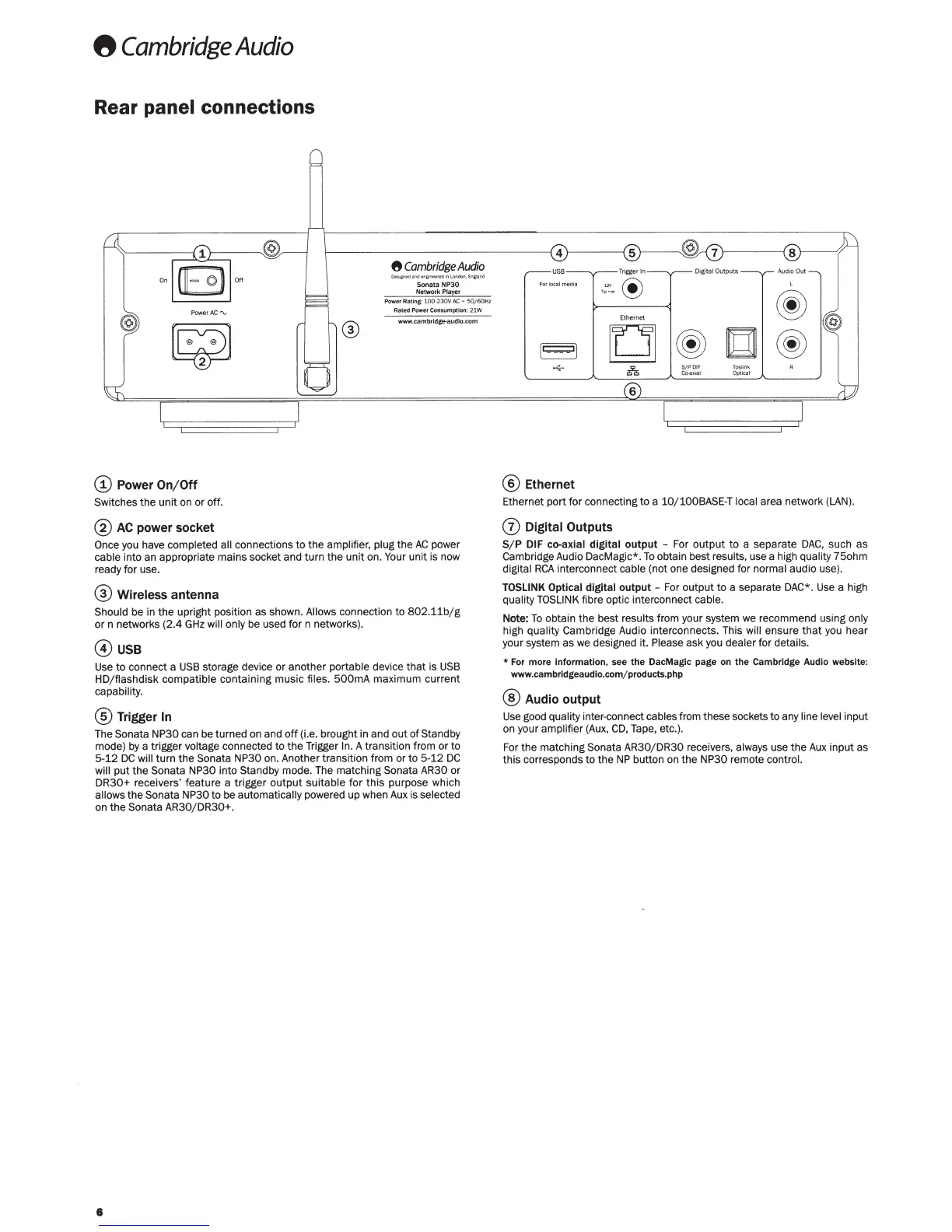
Power
On/Off
Switches
the
unit on
or
off.
®
AC
power socket
8
Cambridge
Audio
De$1Cf*l~
l'ltl
enc;
n
-edl
nlOI'Idcn
,
Enlllancl
Sonata
NP30
Network
Player
Power Rating:
100
-230V
AC
- 5
0/60Hz
Rated Power Consumption:
21W
-.cambridge-audlo.com
Once you have
completed all
connections
to
the
amplifier, plug
the
AC
power
cable
into an appropriate mains socket and
turn
the
unit
on.
Your
unit is now
ready for use.
®
Wireless
antenna
Should
be in
the
upright position as shown. Allows connection
to
802.11b/g
or
n networks
(2.4
GHz
will only be used
for
n networks).
@use
Us
e
to
connect a
USB
storage device
or
another
portable
device
tha
t is
USB
HD/flashdisk compatible
containing music
files.
500mA
maximum current
capability.
®Trigger
In
The
Sonata NP30
can be turned on
and
off
(i.e. brought in and
out
of
Standby
mode) by a trigger
voltage
connected
to
the
Trigger
ln.
A transition from or to
5-
12
DC
will
turn
th
e
Sonata NP30
on. Anoth
er
transition from or
to
5-
12
DC
will
put
the
Sonata NP30 into
Standby
mode. The matching
Sonata AR30
or
DR30+
receivers' feature a trigger
output
suitable
for
this purpose which
allows
the
Sonata NP30
to
be
automatically
powered up when
Aux
is
selected
on
the
Sonata AR30/DR30+.
8
®Ethernet
Ethernet port
for
connecting
to
a
10
/ 100BASE-T local
area network
(LAN).
(j)
Digital
Outputs
S/ P DIF co-axial
digital
output
-
For
output
to
a separate
DAC
,
such
as
Cambridge Audio DacMagic*.
To
obtain best
results,
use a high
quality
75ohm
digital
RCA
interconnect
cable
(not one designed for
normal
audio use).
TOSLINK Optical digital
output
-
For output
to
a separate DAC*.
Use
a high
quality
TOSLINK
fibre optic interconnect
ca
ble.
Note:
To
obtain
the
best
results
from your system
we recommend using only
high
quality
Cambridge Audio interconnects. This will
ensure
that
you h
ear
your system as we designed it.
Please
a
sk
you
deal
er
for
details.
*
For more information, see
the
DacMagic page on the Cambridge Audio website:
www.cambridgeaudio.comj products.php
®
Audio output
Use good
quality
inter-connect cables
from these sockets
to
any line level
input
on your
amplifier
(Aux.
CD,
Tape,
etc
.).
For the matching
Sonata AR30/ DR30
receivers,
always
use
the
Aux
input as
this
corresponds
to
the
NP
button on the
NP30
remote
control.



 To Next Page
 Loading...