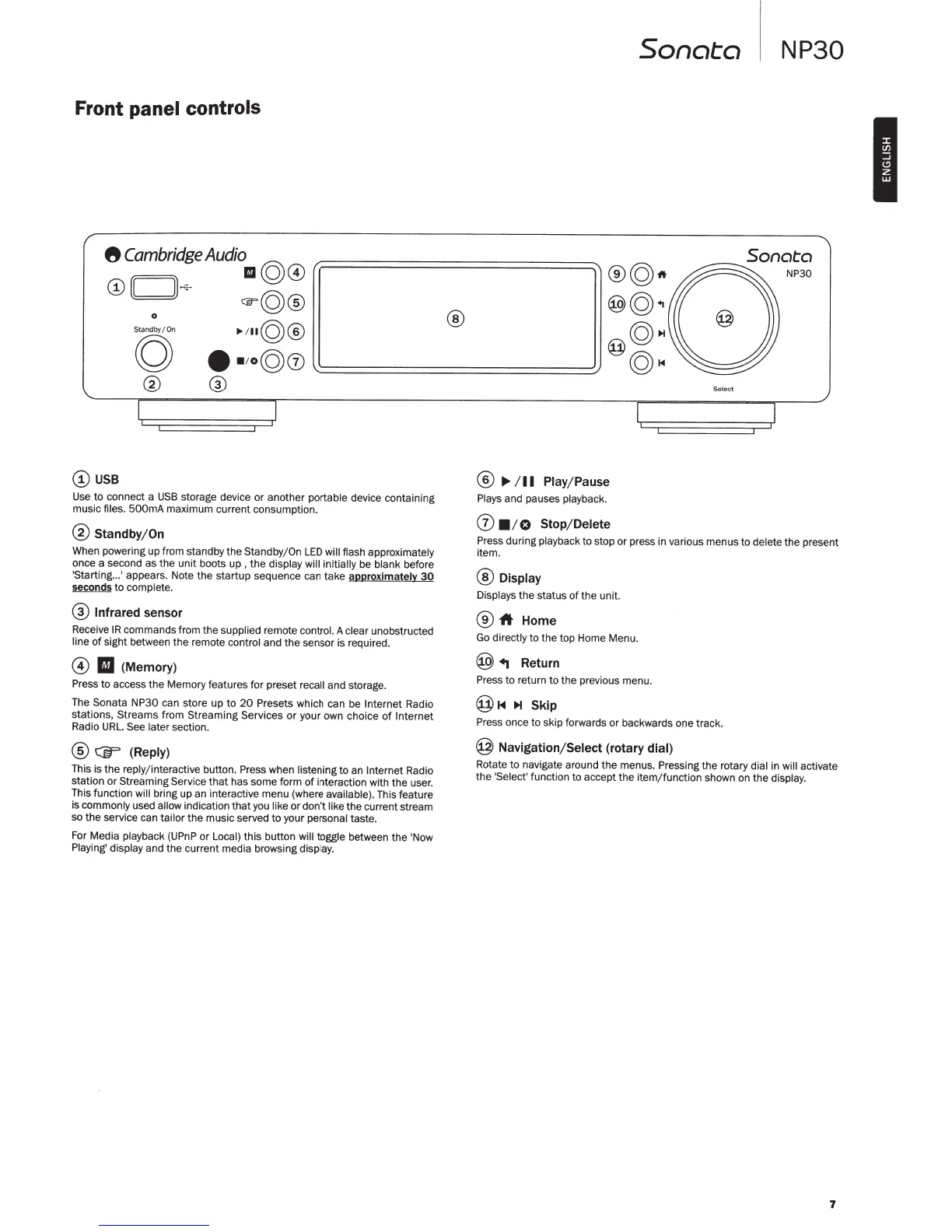
Front
panel controls
8
Cambridge
Audio
©
110@
@(CJ}~
©
CEFQ@
0
Standby/On
~~~~©®
g
••
;
o@0
® ®
@USB
Use
to
connect a
USB
storage device
or
another
portable
device containing
music
files.
500mA
maximum current consumption.
@
Standby/
On
When powering up from standby
the
Standby/On
LED
will flash approximately
once a second
as
the
unit
boots
up
,
the
display will initially
be
blank
before
'Starting ... ' appears. Note
the
startup sequence can take
approximatelY
30
seconds
to
complete.
®
Infrared
sensor
Receive
IR
commands from
the
supplied
remote
control.
A
clear
unobstructed
line
of
sight between
the
remote control
and
the
sensor is required.
@
II
(Memory)
Press to access
th
e Memory features for preset
recall
and storage.
The
Sonata
NP30 can store up
to
20
Presets which can be
Internet
Radio
stations,
Streams
from Streaming
Services
or
your own choice
of
Internet
Radio
URL.
See later
section.
@
Cfr
(Reply)
This is
the
reply/
int
eractive
button. Press when
listening
to
an
Internet Radio
station or Streaming
Service
that
has some form
of
interaction with
the
user.
This function will
bring
up
an intera
ct
ive menu (where
available).
This feature
is
commonly used
allow
indication
that
you
like
or
don't
like
th
e current
st
ream
so
the
service can
tailor
the
music served
to
your
personal
taste.
For Media
playback
(UPnP or
Local)
this
button will toggle between
the
'Now
Pl
aying' display and
the
current media browsing
display.
®
Sonata
®©1t
®©.,
©H
@©~
®
~
/
II
Play/ Pause
Plays
and pauses
playback.
(j)
• 10
Stop/Delete
Select
NP30
Sonata
NP30
Press during
playback
to
stop
or
press in various menus
to
delete
the
present
it
em.
®Display
Displays
the
status
of
the
unit.
®
-ft
Home
Go
directly
to
the top Home Menu.
@
+j
Return
Press
to
return to
th
e previous menu.
@~<~
~
Skip
Press once to skip forwards
or
backwards one track.
@
Navigation/ Select (rotary
dial)
Rotate
to
navigate around
the
menus. Pressing
the
rotary
dial
in will
activate
the
'Select'
function to accept
the
item
/function
shown on
the
display.
7
I



 To Next Page
 Loading...