Need help?
Do you have a question about the SONICAKE MATRIBOX II and is the answer not in the manual?
Safety guidelines for handling the device to prevent damage or injury.
Instructions for connecting and disconnecting power and audio cables safely.
Guidance on proper cleaning methods and restrictions on unit modification.
Requirements for using the correct AC adapter to prevent malfunction or hazards.
Steps to take if the unit malfunctions, including contacting support.
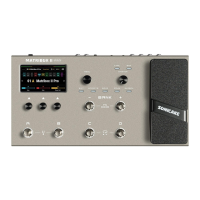
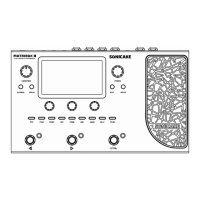
Description of the MASTER knob, display screen, and menu navigation controls.
Details on connecting expression pedals, audio inputs/outputs, MIDI, and USB ports.
Detailed explanation of the Preset Mode display, including its elements and functions.
Detailed explanation of the Stomp Mode display and its footswitch functions.
How to access and edit the sequence and status of effects in the chain.
Guide to editing individual effect modules, their types, and positions.
Instructions for configuring preset-specific parameters like volume and BPM.
Procedure for saving edited presets, including naming and location selection.
Steps for saving current settings as a preset and assigning a name.
How to use the looper for recording, playback, and overdubbing.
Explanation of Looper modes (Pre/Post) and synchronization with the drum machine.
Configuration options for the built-in drum machine, including rhythm, tempo, and volume.
Settings for input impedance, input level, and cab simulation modes.
Configuration for USB audio interface, recording levels, and modes.
Scenarios for using the Matribox II as a DAW audio interface for re-amping and loopback.
Choosing between Preset Mode and Stomp Mode for footswitch operation.
Customizing tap/hold functions for footswitches in different modes.
Selecting between 'effect chain' or 'Footswitch function' display.
Resetting footswitch functions to factory defaults.
Comprehensive list of available footswitch functions.
Procedure for calibrating the expression pedal for accurate control.
Configuring single or dual footswitches connected to the EXP/FS jack.
Settings for MIDI input source, channels, and clock source.
Adjusting screen brightness, display time, and system language.
Enabling automatic matching of CAB module to AMP module settings.
Configuration of the global equalizer, including level, low/high cut, and frequency bands.
Displaying the current firmware version of the device.
Steps to perform a factory reset, clearing all user data and settings.
Details on Compressor, Boost, Filter, Wah, Overdrive, Fuzz, Distortion effects, and common parameters.
List of amp models based on classic amplifiers, including clean, drive, and hi-gain types.
Details on Noise Reduction (NR) modules, including Gate 1 and Gate 2 for noise suppression.
List of cabinet simulations, covering various speaker configurations, brands, and acoustic models.
Description of Guitar EQ, Bass EQ, and Calif EQ modules, along with common parameters.
Details on Chorus, Flanger, Tremolo, Phaser, Vibe effects, and their parameters.
Descriptions of various delay effects like Warm, Pure, Mag, Tube, BBD, and Lo-Fi repeats.
Descriptions of reverb effects simulating studio spaces, plates, springs, and modulated sounds.
Details on FX LOOP send/return nodes and pure volume control functionality.
List of MIDI Control Change numbers, value ranges, and their corresponding functions.
MIDI CC# for controlling FX modules, Tuner, and Looper on/off states.
MIDI CC# for looper functions (record, play, delete) and drum machine control.
MIDI CC# for drum play/stop, rhythm, and volume control.
Troubleshooting steps for when the device fails to turn on.
Guidance for resolving issues related to no sound, low volume, or incorrect levels.
Steps to identify and reduce unwanted noise from the instrument or unit.
Troubleshooting tips for distorted or abnormal sound quality.
Steps for resolving problems with the expression pedal's functionality.
Detailed technical specifications including audio converters, sampling rate, and memory.
Information on input/output jacks, USB port, and MIDI connectors.
Physical dimensions, unit weight, and power requirements.
 Technical Specifications
| A/D/A converter | 24-bit high performance audio |
|---|---|
| sampling frequency | 44.1 kHz |
| SNR | 110dB |
| maximum simultaneous effects | 10 |
| preset memory | 198 Presets Slots |
| looper | Maximum 90 seconds of record time |
| drum machine | 100 Patterns |
| MIDI (IN/OUT) | 1/8” TRS MIDI jacks |
Analog Input Connections| guitar input impedance (A.GT) | 4.7M Ohms |
|---|---|
| guitar input impedance (E.GT) | 1M Ohms |
| guitar input impedance (Line) | 10k Ohms |
| return input | 1/4” Unbalanced (TS), 100k Ohms |
| aux input | 1/8” Stereo (TRS), 10k Ohms |
Analog Output Connections| L/R outputs | 1/4” TRS, 1k Ohms |
|---|---|
| send output | 1/4” Unbalanced (TS), 1k Ohms |
| headphone output | 1/8” Stereo (TRS), 22 Ohms |
Digital Connections| USB port | USB 2.0 Type-C Port |
|---|
USB Recording Specification| sample rate | 44.1 kHz |
|---|---|
| bit depth | Supports 16-bit or 24-bit |
 Power
Power| power requirements | DC 9V center negative, 1000mA |
|---|
Size and Weight| dimensions | 276mm (W) x 164mm (D) x 55.8mm (H) |
|---|---|
| unit weight | 1.54kg |

 To Next Page