• SelecttheradiobuttonfortheWirelessGuide
wizard.
• ClickNextandfollowthepromptsintheWireless
Guidewizard.Formoreinformationandcomplete
procedures,refertothelatestSonicOS
AdministrationGuide.
Forinternational(nonUSAorJapan)TZWireless
appliances,youareaskedtoselectacountrycode
when
usingtheWirelessGuideorwhenyouinitiallynavigateto
theWireless>Settingspage.Besuretoselectthecountry
codeforthecountryinwhichtheappliance willbe
deployed,evenifyouarenotcurrentlyinthatcountry.
IMPORTANT:IfyouselectthecountrycodeforCanada,it
cannotbechangedexceptbycontactingSonicWall
Support.
6 Registerproduct
• PointyourbrowsertotheapplianceLANIPaddress
(default
https://192.168.168.168)andlogin
usingtheadministratorcredentials.
• ClickRegisterontheSystem>Statuspageunderthe
SecurityServicessection.
• LoginusingyourMySonicWallaccountnameand
password.IfyoudonothaveaMySonicWallaccount,
TIP:RegisteringtheappliancefromSonicOSrequiresthat
DNSServersettingsareconfiguredontheWAN(X1)
interface.
clicktheCr eateMySonicWallaccountlinktocreate
anaccount.
• MySonicWalldirectlyobtainsthenecessary
informationfromtheTZappliance.Whenfinished,
youwillsee amessagethatregistrationhasbeen
completed.ClickContinue.
NOTE:Yourappliancemustberegisteredtodownload
thelatestfirmware.
7 Getthelatestfirmware
• InaWebbrowser,navigateto
http://ww w.mysonicwall.com
• ClickDownloadsandselectTZ300orTZ300W
FirmwarefromtheSoftwareTypedrop‐downmenu.
• Clickthelinkforthefirmwareyouwantandsavethe
filetoalocationonyourcomputer.
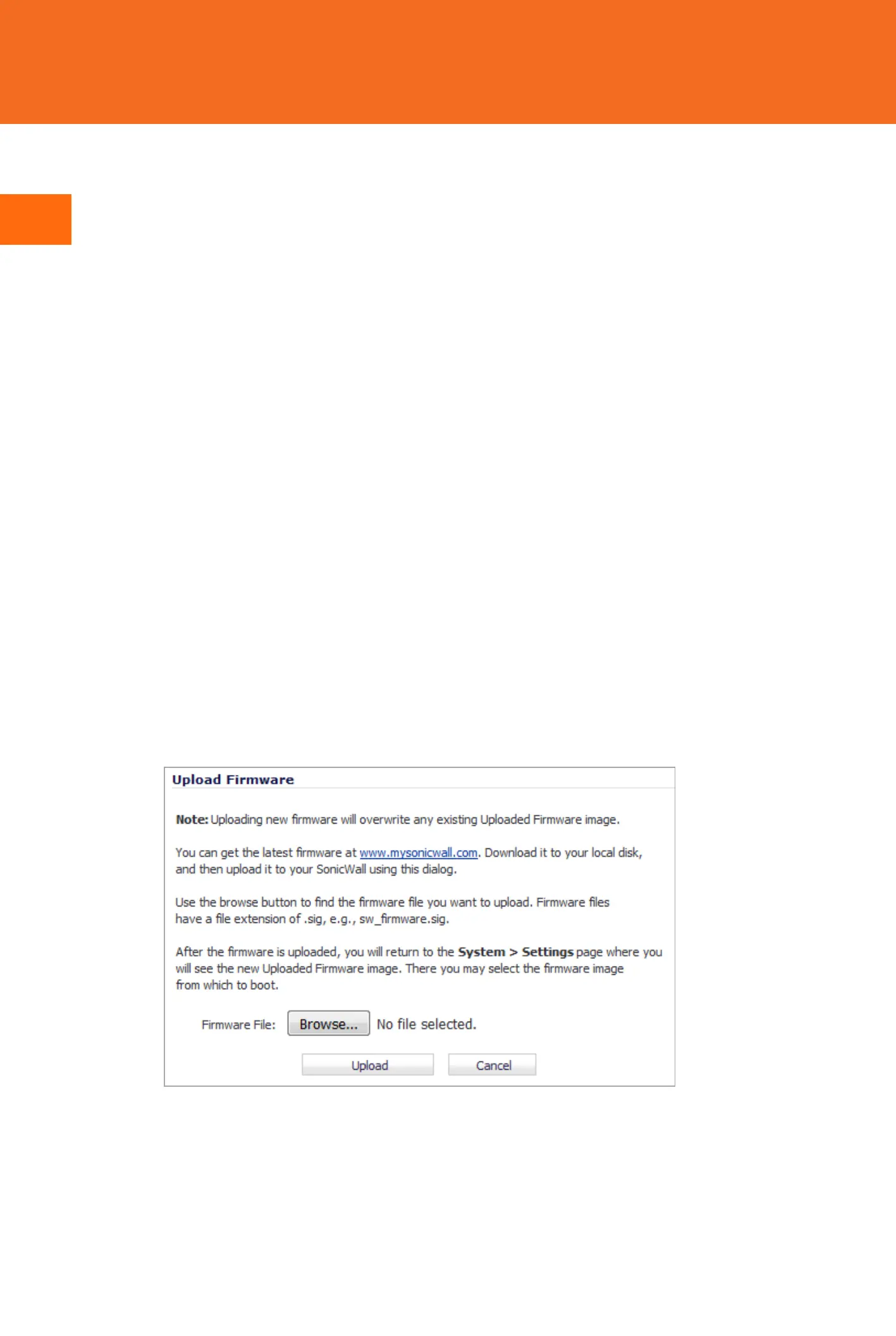
• OntheTZappliance,navigatetotheSystem
>
Settingspage.ClicktheUploadNewFirmware
button.
• ClicktheBrowsebuttontoselectthefirmwareyou
justdownloaded.
• ClickUploadandwaitfortheuploadtocomplete.
• IntheFirmwareManagementTable,clicktheBoot
iconforyournewfirmware.
8 MountingtheTZappliance
Foroptionalwallmounting ,youneed:
• Screwdriver
• Drillwithappropriatesizebit
• Formountingondrywall:
• Two#6pan‐headscrews,1inchlong(7mm
diameterhead,25mmlong)
• Twowallanchors
• Formountingonsolidwoodormetal:
• Two#6pan‐headwoodormachinescrews,1
inch
long(7mmdiameterhead,25mmlong)
Tomounttheapplianceonthewall:
1Drilltwoholes4.5inches(11.5cm)apartinthewall
where youwanttomounttheappliance.
2Ifusingwallanchors,insertawallanchorintoeach
hole.
3Insertascrewintoeachwallanchor(intoeachhole
if
notusingwallanchors),leav ing3/16inches(0.45cm)of
thescrewsexposed(includingscrewhead).
4 Positiontheappliancemountingslotsoverthescre ws
andpressinanddownuntiltheapplianceissecurely
mounted.
WARNING:Donotmounttheapplianceonthecei ling,it
isnotdesignedforsecureceilingmounting.
9 Safetyandregulatoryinformation
Installingtheappliance
Installinalocationawayfromdirectsunlightandsourcesofhea t.Amaximumambient
temperatureof104ºF(40ºC)isrecommended.
Routecablesawayfrompowerlines,fluorescentlightingfixtures,andsourcesofnoisesuch
asradios,transmitters,andbroadbandamplifiers.
Theincludedpowercord(s)areapprovedforuseonly
inspecificcountriesorregions.Before
usingapowercord,verifythatitisratedandapprovedforuseinyourlocation.
Ensurethatnowaterorexcessivemoisturecanentertheunit.
Allowunrestrictedairflowaroundtheunitandthroughtheventsonthesideoftheunit.A
minimum
of1inch(25.44mm)clearanceisrecommended.
Considerationmustbegiventotheconnectionoftheequipmenttothesupplycircuit.
Appropriateconsiderationofequipmentnameplateratingsmustbeusedwhenaddressing
thisconcern.Donotoverloadthecircuit.
Thisequipmentisnotintendedforuseatworkplaceswithvisualdisplay
units,inaccordance
with§2oftheGermanordinanceforworkplaceswithvisualdisplayunits.Toavoid
incommodingreflectionsatvisualdisplayworkplacesthisdevicemustnotbeplacedinthe
directfieldofview.
Lithiumbatterywarning
TheLithiumBatteryusedintheSonicWall securityappliancemaynotbereplacedbythe
user.ReturntheSonicWallsecurityappliancetoaSonicWall‐authorizedser vicecenterfor
replacementwiththesameorequivalenttyperecommendedbythemanufacturer.If,for
anyreason,thebatteryorSonicWallsecurityappliancemustbedisposedof,dosofollowing
thebatterymanufacturer'sinstructions.
Cableconnections
AllEthernetandRS232(Console)cablesaredesignedforintra‐buildingconnectiontoother
equipment.Donotconnecttheseportsdirectlytocommunicationwiringorotherwiring
thatexitsthebuildingwheretheSonicWallapplianceislocated.
Powersupplyinformation
IfthepowersupplyismissingfromyourSonicWallproductpackage,pleasecontact
SonicWallTechnicalSupportathttps://support.sonicwall.com/contact‐supportfora
replacement.Thisproductshouldonlybeuse dwithaULlistedpowersupplymarked“I.T.E.
LPS”withanoutputrated12VDC,minimum2.0A,Tma:minimum40degreeC.
WARNING:Foryoursafety,followallinstructionslisted
inthissection.
EUandEFTA
ThisdeviceisapprovedforuseinEUmemberstatesandEFTAcountriesasshownonthe
appliancelabel.
Declarationofconformity
A“DeclarationofConformity”inaccordancewiththedirectivesandstandardshasbeen
madeandisonfileatSonicWallInt ernationalLimited,CityGatePark,Mahon,Cork,Ireland.
CEdeclarationscanbefoundonlineathttps://support.sonicwall.com.
台灣 RoHS
限用物質含有情況標示資訊請參考下列網址 :https:// support.sonicwall.com.
操作說明 :
VerwarnungWeiterehinweisezur
montage
WählenSiefürdieMontageeinenOrt,derkeinemdirektenSonnenlichtausgesetztistund
sichnichtinderNähevonWärmequellenbefindet.DieUmgebungstemperaturdarfnicht
mehrals40°Cbetragen.
FührenSiedieKabelnichtentlangvonStromleitungen,LeuchtstoffröhrenundStörquellen
wieFunksendernoderBreitbandverstärk ern.
DasimLieferumfa ngenthaltenebzw.die
imLief erumfangenthaltenenNetzkabelsindnur
TZ300W(RM:APL28‐0B5)RFTransmitterBandsandPower
FrequencyBand MaximumRadio‐FrequencyPowerTransmitted
MHz dBmEIRP
2412‐2472 19.06
5180‐5240 22.19
5260‐5320 22.07
5500‐5700 26.29
NOTE:Additionalregulatorynotificationsandinf ormationforthisproductcanbefound
onlineathttps://support.sonicwall.com.
輸入產品型號並搜尋
選擇 TechnicalDocumentation
選擇 SafetyandRegulatoryReferenceGuide
Downloadthisdocument 下載此文件
fürdieVerwendunginbestimmtenLändernundRegionenzugelassen.ÜberprüfenSiebitte
vorderVerwendungeins Netzkabels,obesfürdieVerwendunginIhremLandoderIhrer
RegionzugelassenistunddengefordertenNormenentspricht.
StellenSiesicher,dassdasGerät
vorWasserundhoherLuftfeuchtigkeitgeschütztist.
StellenSiesicher,dassdieLuftumdasGer ätherumzirkulierenkannunddieLüftungsschlitze
anderSeitedesGehäusesfreisind.HieristeinBelüftungsabstandvonmindestens26mm
einzuhalten.
PrüfenSiedenAnschlussdesGerätsandieStromversorgung,damitderÜberstromschutz
sowie
dieelektrischeLeitungnichtvoneinereventuellenÜberlastungderStromversorgung
beeinflusstwerden.PrüfenSiedabeisorgfältigdieAngabenaufdemAufkleberdesGeräts.
ÜberlastenSienichtdenStromkreis.
DiesesGerätistnichtzurVerwendunganArbeitsplätzenmitvisuellenAnzeigegeräten
gemäߧ2derdeutschen VerordnungfürArbeitsplätzemitvisuellenAnzeigegeräten
vorgesehen.
UmstörendeReflexionenamBildshirmarbeitsplatzzuvermeiden,darfdieses
ProduktnichtimunmittelbarenGesichtsfeldplatziertverden.
Verwarnunghinweiszurlithiumbatterie
DieinderInternetSecurityAppliancevonSonicWallverwendeteLithiumbatteriedarfnicht
vomBenutzerausgetauscht werden.ZumAustauschenderBatteriemussdieSonicWallin
einvonSonicWallautorisiertesService‐Centergebrachtwerden.DortwirddieBatterie
durchdenselbenoderentsprechenden,vomHers tellerempfohlenenBatterietypersetzt.
BeachtenSiebeieinerEn tsorgungderBatterieoderderSonicWallInternetSecurity
AppliancediediesbezüglichenAnweisungendesHerstellers.
Verwarnungkabelverbindungen
AlleEthernet‐undRS232‐C‐KabeleignensichfürdieVerbindungvonGerätenin
Innenräumen.SchließenSieandieAnschlüssederSonicWallkeineKabelan,dieausdem
Gebäudeherausgeführtwerden,indemsichdasGerätbefindet.
Informationenzurstromversorgung
WenndieStromversorgungvonderSonicWall‐Produktpaketfehlt,wendenSonicWallden
TechnischenSupportunterhttps://support.sonicwall.com/conta ct‐support.
DiesesProduktsolltenurmiteinemfürdenEuropäischenMarktgenehmigtenNetzteilmit
demLogo"I.T.E.LPS"undeinerAusgangsleistungvon12VDC,mind.2.0 A,Tma:mind.40
GradC,betriebenwerden.


 To Next Page
 Loading...