Welcome
Congratulations and thank you for purchasing your new Sonik® SKS Bivvy Lamp. We are sure that it will provide
you with many years of faithful service in your angling. Please take a few moments to read this manual. The
advice it contains will enable you to get the very best performance from your SKS Bivvy Lamp.
Controls & Features
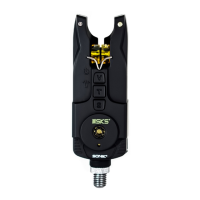
On/off button • LED on/off button • Sync Button • Delay time button • Brightness button
Getting Started
Battery Fitting/Replacement
Remove the magnetic and hook lamp back casing by twisting it anti-clockwise. Unhinge the battery compartment
cover clip. Insert carefully 3 x AA 1.5V batteries noting the polarity shown in the battery compartment. Replace
the battery compartment cover and back case ensuring that it closes positively into place.
Switching On / Off
4OTURNTHELAMPONPRESSANDHOLDTHEONOFFBUTTONFORSECONDSTHE,%$INDICATORWILLmASHREDGREENBLUE
ANDTHEWHITE,%$SWILLmASHTHREETIMES4HELAMPISNOWINSTANDBYMODE
4OTURNTHELAMPOFFINSTANDBYMODEPRESSANDHOLDTHEONOFFBUTTONFORSECONDSTHEWHITE,%$SWILLmASHONCE
LED Illumination
The bivvy lamp can also be used as a standard lamp. To turn on/off press the LED on/off button.
Brightness control
In standby mode, press brightness button to cycle through the brightness settings. There are 6 brightness levels
ANDTHECENTRE,%$WILLmASHTOINDICATECHOSENLEVEL
Syncing Lamp to Alarms
1. In standby mode press the S-button to cycle through the 6 colour channels, red / green / blue / yellow / purple
/ white. (Bright LED = channel free, Low LED = channel in use) In order to pair an alarm the channel must be
free (see step 2 below otherwise move to step 3)
2. To erase a paired channel use the S-button to select the channel. Next press and hold the S-button until the
LED changes from low to high brightness. To quickly erase all channels Press and hold the S-button for a
LONGERTIMEUNTILTHECENTRE,%$mASHESMULTIPLECOLOURS
New Bivvy Lamp Manual.indd 3 27/01/2017 14:38:17


 To Next Page
 Loading...