- 17 -- 16 -
FIELD CALIBRATION
This unit was calibrated under the circumstance
of 760 mmHg atmosphere and 50% relative
humidity, if the unit is not used under such environ-
mental conditions, it may produce an error. The
built in users calibration mode is designed for the
user working under other than standard conditions
such as high altitudes. After the unit is calibrated
all environmental errors are compensated and the
accuracy is improved.
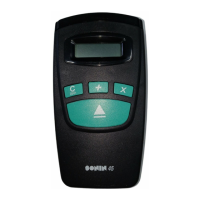
To Field Calibrate unit -
1) Turn the On/Off switch to the ON position.
2) Place unit 10 feet (or 3 meter) from the bottom
of the unit to a flat vertical surface.
3) Press and hold both and keys then
press key, the unit will turn on and process
calibration immediately.
4) When calibration is completed 10.00 ft.ft
(or 3.00 m) will displayed on the LCD.
5) Then turn off the unit and turn on again, the
new calibrated data will now used in all
measures.
NOTE - BEFORE CALIBRATING UNIT:
1) It is imperative that the unit be exactly 10 feet
(imperial) or 3 meter (metric) from the bottom
of the unit to a flat vertical surface.
2) Verify the temperature of the unit is within
± 1°C of the ambient temperature.
TO RESET BACK TO FACTORY DEFAULT
SETTING:
1) Turn OFF unit and turn in ON again.
2) Press and hold
key then press . The
LCD will display (RESET). the
factory default setting now restored to the unit.
3) Then turn OFF unit and turn ON again to
resume measuring.
FCC NOTE:
This device has been tested and found to
comply with the limits for a Class B device,
pursuant to part 15 of the FCC Rules. These
limits are designed to provide reasonable
protection against harmful interference in a
residential installation. This device generates,
uses and can radiate radio frequency energy
and, if not used in accordance with the
instructions, may cause harmful interference to
radio communications. However, there is no
guarantee that interference will not occur in a
particular installation. If this equipment does
cause harmful interference to radio or television
reception, which can be determined by turning
the device off and on, the user is encouraged
to try to correct the interference by one or more
of the following measures:
- Reorient or relocate the receiving antenna
- Increase separation between the device
and receiver
This Class B Digital Apparatus meets all
requirements of the Canadian Interference-
Causing Equipment Regulations.
TECHNICAL ASSISTANCE
If you have any questions or need technical
assistance, e-mail to:
technicalsupport@sonin.com
CUSTOMER SERVICE
SONIN takes pride in offering unmatched
customer service to owners of SONIN
products. If you have any questions or would
like additional information, please call:
1 - 800 - 223 - 7511 (USA)
or e-mail to:
customerservice@sonin.com



 To Previous Page
 Loading...