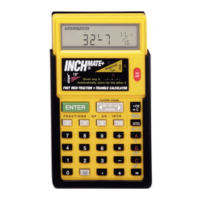
To activate battery, carefully remove plastic tab from battery
compartment.
Your calculator utilizes chaining logic allowing you to carry
our successive intermediate operations using the [=] key to
finalize operations. See page 34 for Chaining
1 5
2 5
3 5
4 5
8.
28.
4.
8.
53
9 5
74
7 92
Working with Dimensions and Units
When entering dimensional values, you must always enter
the largest dimension first. When entering fractions, enter
the numerator followed by the dedicated denominator key
( [/2] [/64] ). If an operation is performed with mixed units,
your calculator will automatically convert the result to the
units of first entry.
Addition:
Enter
1
5
Feet Inch
/ 16
7
9
5
6 1Feet Inch
12 Ft - 4 1/16 INCH
Enter
1
5
Feet75
6
·
· 6 Feet
12.3 Ft
- 12 -
GETTING STARTED
- 13 -
GETTING STARTED
Subtract:
Enter
6 Ft - 6 3/4 INCH
Feet Inch
/ 4
9
4
1
3
1
Feet Inch 1
5
2
Enter
2
5
13 Ft - 3 INCH
Feet
7 56
2 0
· Feet
Multiply:
Enter
21.6 SQ Ft
Feet81
2·1 Feet
3
5
Enter
54 INCH
Inch81 3
3 5
Divide:
Enter
12 INCH
Inch63 3
4 5
Enter
7 Ft - 0 3/64 INCH
Feet / 3241 23
4 5
Enter
2.5
Inch5 2 Inch
4 5
- 14 -
GETTING STARTED
DEFAULT SETTINGS
Reduced Fraction Mode
Your calculator is set to Reduced Fraction mode which give
the most accurate result (to the /64th). To change your results
to a Fixed Fraction you must press [2ND] [2] and desired
denominator. The FIX icon will blink. To confirm your selection
press [2ND] again.
Example: To change to /8th fixed fraction:
Press
/ 822ND 2ND
. Your calcula-
tions will now result to the nearest /8th.
To Restore back to Reduced Fraction Mode press [2ND] [2]
Weight/Volume
The density default values are 1.5 Tons/Cu Yd, 3000 lb/Cu
Yd, and 1779.829 kg/Cu M. The density is used in calculating
weight. When using English units, the density is entered as
tons per cubic yard or pounds per cubic yard; when using
metric units, the density is entered as kilograms per cubic
meter.
You can recall the density by entering [2ND] [5]. Continuing
to press 5 causes the calculator to cycle through the various
units: Tons/Cu Yd, LB/Cu Yd and kg/Cu M. You can set a
new density by entering the weight followed by [2ND] [5].
Example: To change and work in a density of
4000 LB/CuYd.
Enter:
4
5
0
2ND
0 0
5
Display : 4000 LB/Cu Yd



 To Next Page