- 1 - - 2 -
TABLE OF CONTENTS DESCRIPTION OF PRODUCT
DESCRIPTION OF KEY FUNCTIONS DESCRIPTION OF KEY FUNCTIONS
DESCRIPTION OF LCD DISPLAY
- 3 - - 4 - - 5 -
Introduction .................................................................... 1
Description of Product ..................................................... 2
Description of Key Functions ....................................... 3-4
Description of Display ................................................. 5-6
Getting Started ............................................................ 7-8
Helpful Measuring Hints ................................................. 9
Computation Functions ............................................. 10-11
Memories ................................................................. 12-13
Troubleshooting ........................................................ 14-16
Specifications ................................................................ 17
Environmental Conditions ........................................... 18-19
FCC Note ....................................................................... 20
Customer Service ......................................................... 21
Warranty Information ...................................................... 22
Warranty Registration Card ............................................. 23
INTRODUCTION
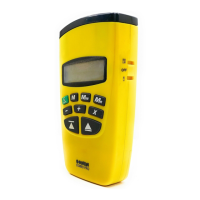
Thank you for choosing a SONIN Laser Targeting Range Finder
LTRF. Your LTRF is recommended for INDOOR use only. To
ensure proper use of this product and to obtain optimum
performance, be sure to read this manual carefully before use.
CAUTION
This product contains Class II laser radiation, to avoid injury
to eyes DO NOT stare into the laser beam or project the laser
beam to other persons or animals.
Second Function Key
Activates the second function or stores a measurement
into user memories M1, M2 and M3.
Clear Display / Clear Memories /
Unit OFF
Press button once to clear current display and go back
to measure mode.
Press and hold 5 seconds to clear all memories, including
user's memories M1, M2, M3 and the last 5 measurements.
After recalling M1, M2 or M3, press and hold this button 3
seconds to clear that memory.
Quickly press twice to turn OFF power when the current display
is cleared. Note: unit will automatically turn off in one minute
when idle.
Change or Convert Display Units
Press [2ND] then press [CLR/UNITS] button
to change display units.
Turns ON Power and Takes
Measurements
Press and hold 1 second to turn ON power
when the power is OFF.
Press and release to take measurement.
Changes the Measuring Position
Your LTRF is factory preset to measure from
the bottom of unit, if you want to change the
measuring position from top of unit, press
[2ND] than press the [READ] button. Note: The
setting will show in the left corner of LCD
Recalls the Last 5 Measurements
Your LTRF automatically stores up to 5 previous
measurements. Press this button to recall those
measurements one by one on the LCD screen, the RCL icon
and upper digits will indicate the measurements sequence.
Sets the Laser Pointer
Your LTRF is preset to measure with the laser
pointer on, you can also turn it off or reset the
laser pointer by pressing [2ND] then [RCL] button, the
icon will appear on the LCD only if the laser is on.
Adds Linear Distance, Areas and
Volume Measurements
Press this button to add linear distance or add
Areas and/or Volume measurements. The
icon will appear
on the upper corner of LCD screen.
Subtracts Linear Distance, Areas
and Volume Measurements
Press [2ND] button then press [+] button to
subtract linear distance or Areas and/or Volume. The
icon
will appear on the upper corner of LCD screen.
Multiplies Measurements for Area
and Volume
Press to compute Area or Volume measure-
ments. The icon will appear on the upper
corner of LCD screen.
Recalls Measurement from Users
Memories
Press [M1], [M2] or [M3] to recall stored
data from that memory. The memory icon
will blink to indicate the reading was recalled
from memory.
Stores Displayed Measurement in
to Users Memories
Press [2ND] then press [M#] button to store
displayed measurement into that memory. The
memory icon will appear on LCD indicating
the measurement is stored into that memory.
RCL
M1 M3M2
STORE
2ND
CLR
UNITS
READ
Laser Beam
Aperture
LCD
Display
Clear Display &
Change Display
Modes
Power ON &
Measure Key
Recall &
Laser ON/OFF Key
Store Memories &
Second Function Key
Multiplication Key
Add & Subtract Key
Users memories M1
M2 & M3
Ultrasonic
Aperture
#10275
Instruction Manual
Electronic Distance Measuring Tool
With Laser Targeting
Targeting
RANGE FINDER II
Laser
SONIN INC.
© 2006 SONIN Inc. All Rights Reserved
Printed in China
P/N: 275-1400-0070 REV.3
www.sonin.com
English
DESCRIPTION OF KEY FUNCTIONS
123456789
11 12
10
13
14


 To Next Page
 Need help?
 General