PRO.
PRO.
VOL.
VOL.
MENU
Introduction
4
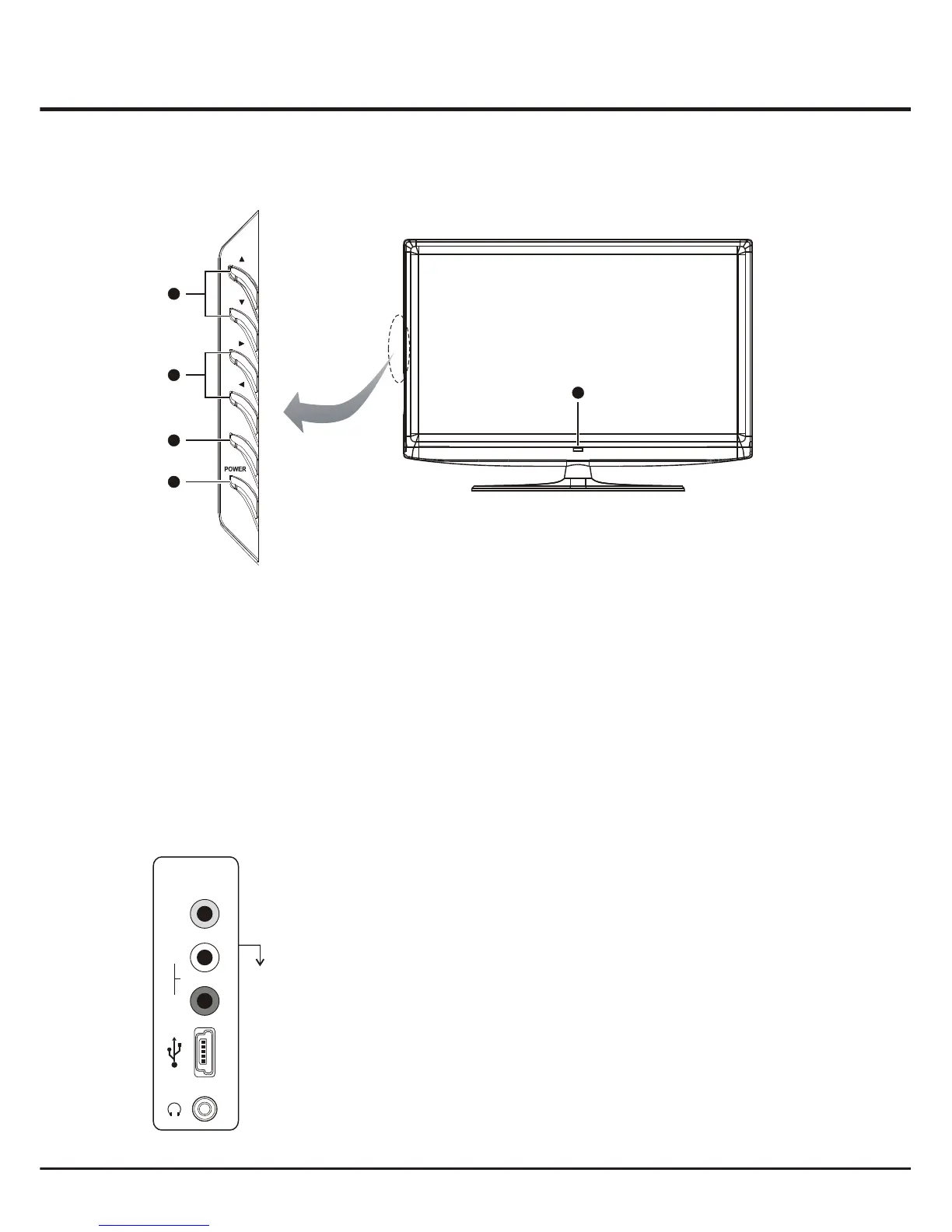
Side Panel Buttons
5
1. POWER button
Turns the TV on or to standby mode.
2. MENU button
Brings up the menu system.
3
. PROGRAM UP/DOWN button
Scans up/down through the channel list. In the menu system, and adjust menu
controls.
. STANDBY INDICATOR
When the TV is in standby mode, this standby indicator lights up; when the TV is turned on, the indicator turns off.
. VOLUME UP/DOWN button
Increases/decreases the volume. In the menu system, they act like the right/left direction buttons on the remote and adjust menu controls.
4
they act like the up/down direction buttons on the remote
5
Headphone socket (output) at the side
This socket can be used to connect headphones or stereo earphones.
AV2 RCA audio + video sockets (input) at the side
These sockets can be used to connect a range of equipment, including video
recorders, camcorders, decoders, satellite receivers, DVD players, or games
consoles. The VIDEO IN2 socket p
rovides composite video connection.
USB socket (input) at the side
This socket used for software upgrading only. is
Sockets
VIDEO
AV2 IN
R
L
AUDIO
Note: The location of
the s at the side
of the television might
differ depending on
the model.
ockets
Note: The location and names of the function buttons and standby indicator on the TV may vary according to TV model.
2
1
3
4


 To Next Page