Caution!
Please connect your interconnects first before connecting the mains power cable!
Power requirements:
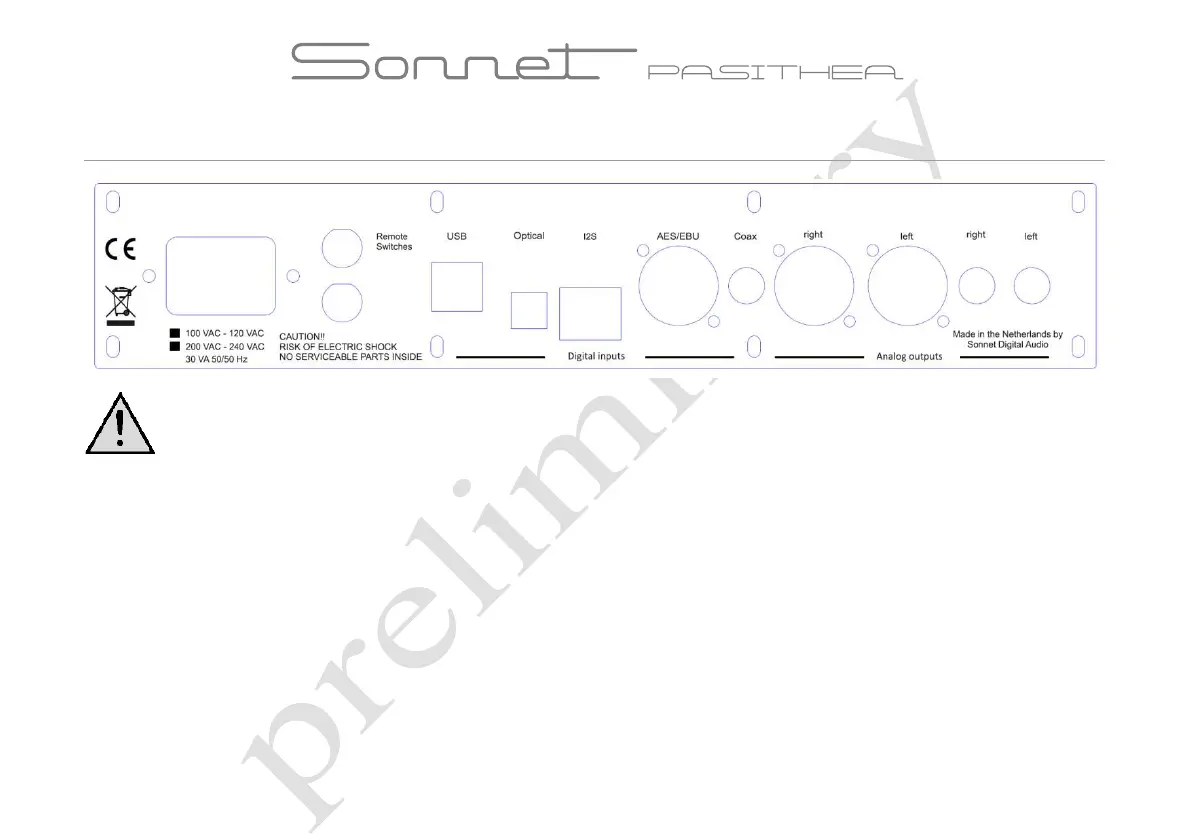
Check if the product is made conform the power requirements of your area. On the back side the product is marked for
the specific mains voltage.
Optical input: Use an optical (Toslink) cable to use the optical input. The optical input can
be used for sampling rates up to 96 kHz.
Coaxial input:
A 75 Ohm coaxial cable should be used to connect the dac to other digital equipment. To avoid ground loops
isolation and can handle a maximum sample rate of 192 kHz
Connecting
Please connect your interconnects first before connecting the mains power cable!
Check if the product is made conform the power requirements of your area. On the back side the product is marked for
be used for sampling rates up to 96 kHz.
A 75 Ohm coaxial cable should be used to connect the dac to other digital equipment. To avoid ground loops
it has a galvanic



 To Next Page