Need help?
Do you have a question about the Sonnet Echo Express and is the answer not in the manual?
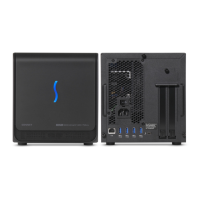
This indicator lights when the Echo Express is powered and connected.
Secures the top cover; thumbscrews allow its removal for access.
Connects to the computer's Thunderbolt port for data transfer.
Connects the included AC power cable to the chassis.
Allows access for PCIe cards or I/O plates, removable as needed.
Accommodates x16 mechanical, half-length PCIe 2.0 cards.
Cover for installing double-width cards or second PCIe cards.
Accommodates full-length, double-width PCIe 2.0 cards.
Accommodates full-length, single-width PCIe 2.0 cards.
Supports and secures full-length cards during installation.
Includes removing the chassis, locking plate, and top cover.
Removing screws for cards and port access covers.
Properly handling, lining up, and inserting the PCIe card into the slot.
Securing installed cards/plates and replacing the top cover.
Steps to confirm the Echo Express is recognized by the computer's system.
Checks if installed PCIe cards are recognized and have compatible drivers.
Advice on keeping cards cool, hot plugging, and LED operation.
Connecting devices, driver requirements, and card fit limitations.
Information on performance limitations, OS update compatibility, and hot-plugging warnings.
Details on connectors, slots, supported cards, power, dimensions, and weight.
Essential safety guidance for preventing injury and device damage.
Information on FCC rules, customer service contact, and website resources.
 General
| Interface | Thunderbolt 3 |
|---|---|
| Form Factor | Desktop |
| Category | Expansion Chassis |
| External Connectors | Thunderbolt 3 (USB-C) |
| Type | Expansion chassis |
| Compatibility | macOS, Windows |

 To Next Page