EasyManua.ls Logo

Sonnet R-1428 - User Manual

Sonnet R-1428
3 pages
Print Icon
To Next Page IconTo Next Page
Loading...
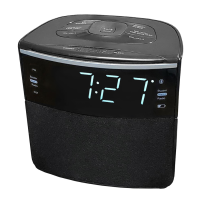
SONNET AUTO SET ALARM CLOCK RADIO
WITH BLUETOOTH AND USB CHARGING
MODEL NO. R-1428
Power Source
DC Power To power the unit, plug the DC power adaptor into a standard wall outlet.
Battery Back Up Requires 1 x CR2032 Button Cell Battery (included). The battery backup is intended for short power outages only. The units
primary functions cannot run on the battery backup alone. This unit uses a button cell battery that will last up to 1 year and maintains the time.
Replace the battery if the low battery indicator lights up.
Clock and Sleep
Setting the Clock
Auto Set When the clock radio is connected to an AC power outlet for the first time, the correct time for Eastern Standard Time zone will be
shown. You can change to the other time zones by following the instructions in Time Zone selection below.
Manual Time Set Up
1. With the power off, press and hold the MEMORY / CLOCK BUTTON to set up the clock.
2. Press the SKIP / TUNE BUTTON to adjust the hour.
3. Press the MEMORY / CLOCK BUTTON again to confirm the hour and minutes on the display will begin flashing.
4. Press the SKIP / TUNE BUTTON to adjust the minutes.
5. Press the MEMORY / CLOCK BUTTON to finish setting the minutes and day of the week (d1 to d7) on the display will begin flashing.
NOTE: d1 is Monday; d2 is Tuesday and so on to d7 which is Sunday.
6. Press the SKIP / TUNE BUTTON to adjust the day of the week.
7. Press the MEMORY / CLOCK BUTTON to finish all settings.
FUNCTION KEYS
1. Power / Source Button
2. Skip / Tune Backward / DST (Daylight Saving) Button
3. Play / Pause / Bluetooth Pair / Scan Radio Button
4. Volume Down / Alarm One Button
5. Dimmer / Snooze / Sleep Button
6. Memory / Clock Button
7. Skip / Tune Forward / Time Zone Button
8. Volume Up / Alarm Two Button
9. PM Indicator
10. Alarm One Indicator (Buzzer / Radio)
11. DST (Daylight Saving Time) Indicator
12. Bluetooth Mode Indicator
13. Alarm Two Indicator (Buzzer / Radio)
14. Low Back Up Battery Indicator
15. FM Antenna
16. Aux In Jack
17. Back Up Battery Compartment
18. USB Charging Port
19. DC Jack
Question and Answer IconNeed help?

Do you have a question about the Sonnet R-1428 and is the answer not in the manual?

Summary

Location of Controls

Function Keys Overview

Identifies and describes each numbered control button and indicator on the device.

Power Source Details

DC Power Connection

Details connecting the unit to a standard wall outlet via the DC power adapter.

Battery Backup Function

Explains the CR2032 battery backup for short power outages and time maintenance.

Time and Sleep Settings

Setting the Clock

Instructions for setting the device's current time, including auto and manual methods.

Time Zone and DST Adjustment

Setting the Time Zone

Guides on selecting the correct time zone from 1-7 for accurate local time display.

Daylight Saving Time

Instructions on how to adjust the clock for daylight saving time changes.

Alarm and Snooze Functions

Setting Alarms

Detailed steps for setting Alarm One and Alarm Two, including schedules and wake-up options.

Snooze Functionality

Explains how to temporarily stop the alarm for a 9-minute snooze duration.

Radio Operation

Radio Reception and Tuning

Information on improving FM reception and methods for auto or manual radio tuning.

Saving Preset Radio Stations

Steps to save and recall up to 20 FM radio stations into preset memory.

Bluetooth and Audio Input

Pairing a Bluetooth Device

Step-by-step guide for first-time pairing of Bluetooth devices with the unit.

Playing Audio via Bluetooth

Instructions on selecting and playing audio tracks from a connected Bluetooth device.

Using Audio Input (Aux)

How to connect and play audio from external devices using the 3.5mm Aux In jack.

USB Charging and Reset

USB Charging Functionality

Details on using the USB port for charging devices, including capacity notes.

Resetting the Unit

Procedure to reset the unit to factory defaults in case of malfunction.

Sonnet R-1428 Specifications

General IconGeneral
Display TypeLED
Snooze FunctionYes
Alarm SettingsDual Alarm
Power SourceAC Power
Battery BackupYes