EasyManua.ls Logo

Sonnettech Echo 5 - User Manual

Sonnettech Echo 5
2 pages
Print Icon
To Next Page IconTo Next Page
Loading...
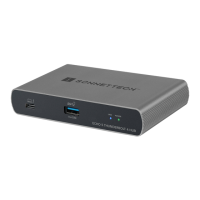
Echo 5 Thunderbolt 4 Hub Description
1 – Computer/Charging Port
Connect your computer to this port using the included
Thunderbolt 4 (40Gb/s) cable. If your laptop/notebook computer
supports charging through a Thunderbolt port, this port delivers
up to 85W of power.
2 – USB 3.2 Gen 2 (10Gbps) Charging Port
Connect a USB device to this port. Note that this port is USB
Battery Charging 1.2compliant; you may charge iOS
®
devices
(and other devices that charge via USB) connected to this port.
3 – Thunderbolt Link Indicator
With the hub switched on, this lights blue when the computer
to which the hub is connected is on; the LED turns off when the
computer is off or sleeping. Note that if the hub is connected to
another Thunderbolt device instead of directly to a computer,
other Thunderbolt devices connected between the computer and
hub must also be powered on before this indicator will light.
4 – Power Indicator
This lights green when the Echo Hub is switched on, and stays
off when the hub is switched off.
You Should Have
The following items should be included in your product package:
• Sonnet Echo 5 Thunderbolt 4 Hub
• Power adapter
• Power cord
• Thunderbolt 4 (40Gb/s) cable
Quick Start Guide
Mac
®
Compatibility
• macOS
®
11.2+
• M1 Mac with Thunderbolt/USB4 ports
• Intel
®
Mac with Thunderbolt 3 ports
Windows
®
Compatibility
• Windows computer with a Thunderbolt 4 port
Not compatible with Thunderbolt 3 Windows computers
• Windows 10 (64-bit Edition Version 20H2 or greater)
Quick Start Guide
for Echo
5
Thunderbolt
4
Hub
5 – 20VDC Socket
Connect the included DC power adapter between this socket and
the included power cord.
6 – Power Switch
This switches the hub on and off. When switched off, power
is removed from all ports and the hub will not charge a connected
computer or phone.
7 – Thunderbolt Peripheral Ports
Connect Thunderbolt or USB peripheral devices (including
monitors) to these ports using appropriate cables or adapters.
Support Note: This document was up to date at the time of
printing. However, changes to the hardware or software may
have occurred since then. Please check the Sonnet Web site for the
latest documentation.
1. Go to https://www.sonnettech.com/support/kb/kb.php
2. Navigate to and click the Echo 5 Thunderbolt 4 Hub link.
3. Click the Manual link.
4. Click the Echo 5 Thunderbolt 4 Hub Quick Start Guide [English] link,
and then check the Document Version information. If the version
listed is later than this document (revision C), click the Download
Now button for the latest version.
Question and Answer IconNeed help?

Do you have a question about the Sonnettech Echo 5 and is the answer not in the manual?

Summary

Echo 5 Thunderbolt 4 Hub Description

Computer;Charging Port

Connects computer via Thunderbolt 4, providing up to 85W of power for charging.

USB 3.2 Gen 2 Charging Port

USB-C port compliant with USB Battery Charging 1.2 for charging iOS devices.

Thunderbolt Link Indicator

Blue light shows computer connection status; off when computer is off or sleeping.

Power Indicator

Green light indicates the Echo Hub is switched on.

20 VDC Socket

Connects the included DC power adapter and power cord to the hub.

Power Switch

Switches the hub on/off, removing power from all ports when off.

Thunderbolt Peripheral Ports

Connect Thunderbolt or USB peripheral devices, including monitors.

Prepare Hub for Mac and Windows

Mac Compatibility

Supports macOS 11.2+, M1 Macs with Thunderbolt/USB4, and Intel Macs with Thunderbolt 3.

Windows Compatibility

Requires Thunderbolt 4 port, Windows 10 (64-bit, 20H2+). Not compatible with TB3 Windows.

Prepare for Windows Connection

Requires latest BIOS/Thunderbolt drivers; approve device in pop-up window.

Using the Echo 5 Hub

Charging Laptops

Supports up to 85W charging for compatible MacBook and PC laptops via Thunderbolt port.

Display Support

Supports up to two displays; resolutions depend on computer, GPU, and OS.

Thunderbolt Device Connection

Hub has four Thunderbolt ports; front for computer, three for peripherals/daisy-chaining.

Hot Plugging

Connect/disconnect hub while computer is on; eject devices before unplugging.

Computer Performance Considerations

Thunderbolt performance varies; some older models may have reduced PCIe bandwidth.

Cable Compatibility

Compatible with Thunderbolt 3 (40Gbps) or Thunderbolt 4 cables.

Customer Support and Service

Contacting Customer Service

Check website for updates; provide product name, OS, and system report for assistance.

Sonnettech Echo 5 Specifications

General IconGeneral
BrandSonnettech
ModelEcho 5
CategorySwitch
LanguageEnglish