Need help?
Do you have a question about the Sonoro Maestro SO-1010 and is the answer not in the manual?
Provides contact details for sonoro audio GmbH and support information.
Specifies the personal use and intended functions of the MAESTRO device.
Lists all accessories included with the MAESTRO unit.
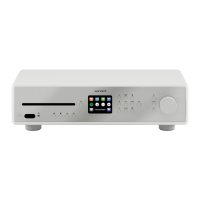
Details the front view of the MAESTRO, identifying all buttons and connectors.
Details the rear view of the MAESTRO, identifying all rear connectors and ports.
Details the bottom view of the MAESTRO, highlighting ventilation holes.
Identifies all buttons and features of the MAESTRO remote control.
Provides detailed specifications for the MAESTRO device, including dimensions and power.
Lists trademarks and certifications for the MAESTRO.
Instructions for unboxing MAESTRO and checking for damage.
Guide on how to prepare the remote control for use, including removing insulation.
Step-by-step instructions for replacing the battery in the remote control.
Instructions on connecting and positioning FM/DAB and WLAN antennas for optimal reception.
Details how to connect active subwoofers via PRE-OUT jacks and configure crossover.
Instructions for connecting turntables with MM cartridges directly to MAESTRO.
Guide on how to connect the power cord, emphasizing correct phase connection.
Common operations like turning on/off, volume control, CD playback, and mode selection.
Step-by-step guide for pairing and operating Bluetooth headphones with MAESTRO.
Details on connecting already paired devices and how to disconnect them.
How to access, select options, confirm, and go back within the device menus.
Instructions for tuning, storing, recalling, and browsing FM radio stations.
Options within the FM Radio setup menu, such as auto search and reception settings.
Instructions for tuning, storing, recalling, and browsing DAB radio stations.
Options within the DAB Radio setup menu, including station list and scan.
Instructions for tuning, storing, recalling, and browsing Internet radio stations.
Options within the Internet Radio setup menu, such as last listened and station list.
Options for browsing and tuning Internet radio stations by local, search, or popular.
Instructions for tuning, storing, recalling, and browsing podcasts.
Options within the Podcast setup menu, such as last listened and podcast list.
Options for browsing and tuning podcasts by local, search, or popular.
Instructions on how to pair MAESTRO with Bluetooth-enabled devices.
How to access, play, pause, skip, and control volume in Bluetooth mode.
Options within the Bluetooth setup menu, including disconnect and view details.
How to access and operate the AUX In 1 mode for external audio sources.
How to access and operate the AUX In 2 mode for external audio sources.
How to access and operate the Optical mode for external audio sources.
How to access and operate the Coaxial mode for external audio sources.
How to play CDs, including pause, stop, skip, and playback modes.
Options within the CD mode setup menu, including resume setting.
How to access and operate the Phono mode for turntables.
How to select and use streaming services, including logging in and preset items.
Options within the streaming services setup menu for configuration.
How to navigate to and access the main system settings menu for customization.
Options for adjusting sound settings like loudness, bass, treble, balance, and speaker size.
Settings for establishing and managing network connections, crucial for internet features.
Settings for time/date, language, inactive standby, and factory reset.
Instructions for checking and performing software updates and viewing device information.
Lists common malfunctions and their possible causes and solutions for MAESTRO.
Specific troubleshooting for WLAN signal strength and network connectivity issues.
 General
| Type | Receiver |
|---|---|
| Connectivity | Bluetooth, Wi-Fi, Ethernet |
| DAB+ | Yes |
| FM | Yes |
| Internet radio | Yes |
| Frequency Response | 20 Hz - 20 kHz |
| Input Sensitivity | 200 mV |
| Tuner | FM, DAB+ |
| Audio formats | MP3, WMA, AAC, FLAC, WAV |
| Streaming services | Spotify Connect, Tidal, Deezer, Amazon Music |
| Inputs | RCA, Optical, USB |
| Outputs | Speaker terminals, Subwoofer |
| Input Impedance | 47 kOhm |
| Speaker Impedance | 4-8Ω |
| Bluetooth version | Bluetooth 5.0 aptX |

 To Next Page